UltraCart Webhooks supercede the XML Postback. They are superior in every way.
Please see the Webhooks guide for help using webhooks.
XML Postback
Introduction
UltraCart’s XML Postback feature allows merchants to automatically receive an XML copy of an order shortly after it is placed. This process enables merchants to perform custom server-side operations such as validation, logging, or integration with external systems.
Although still available, UltraCart recommends using Webhooks instead, as they provide more robust functionality and greater flexibility.
Key Benefits
-
Automatically receive orders in XML format after they are placed.
-
Perform server-side validation or custom business logic.
-
Optionally receive updated order status changes.
-
Receive updates for Auto Orders when they change.
Prerequisites
Prerequisite: This feature is intended for advanced merchants or developers with programming experience.
To use XML Postback, you must:
-
Have a web server that supports HTTPS.
-
Create a script capable of:
-
Receiving one order per postback (in XML format).
-
Performing your desired functions.
-
Returning an HTTP 200 OK response to UltraCart.
-
XML Postback Script
UltraCart will post an XML message to your configured URL. This message is equivalent to manually exporting one order in the W3C Schema XML format from Order Management → Export Orders.
Popular languages for handling XML Postbacks include PHP, Python, Perl, Java, Ruby, and C#.
-
Example script: xmlPostBackExample.php
-
XML Schema reference: ultracart.xsd
Tip: Your script should immediately acknowledge receipt of the XML (return
200 OK) and offload heavy processing to a queue (database, Redis, SQS, etc.). This prevents timeouts and allows UltraCart to deliver high-volume postbacks efficiently.
Programmers need to be aware that the XML is within the HTTP body, not in parameters.
Configuring XML Postback
-
Log in to your UltraCart account.
-
Navigate to:
Main Menu → Configuration → Development → XML Post Back -
Choose one or more configuration options:
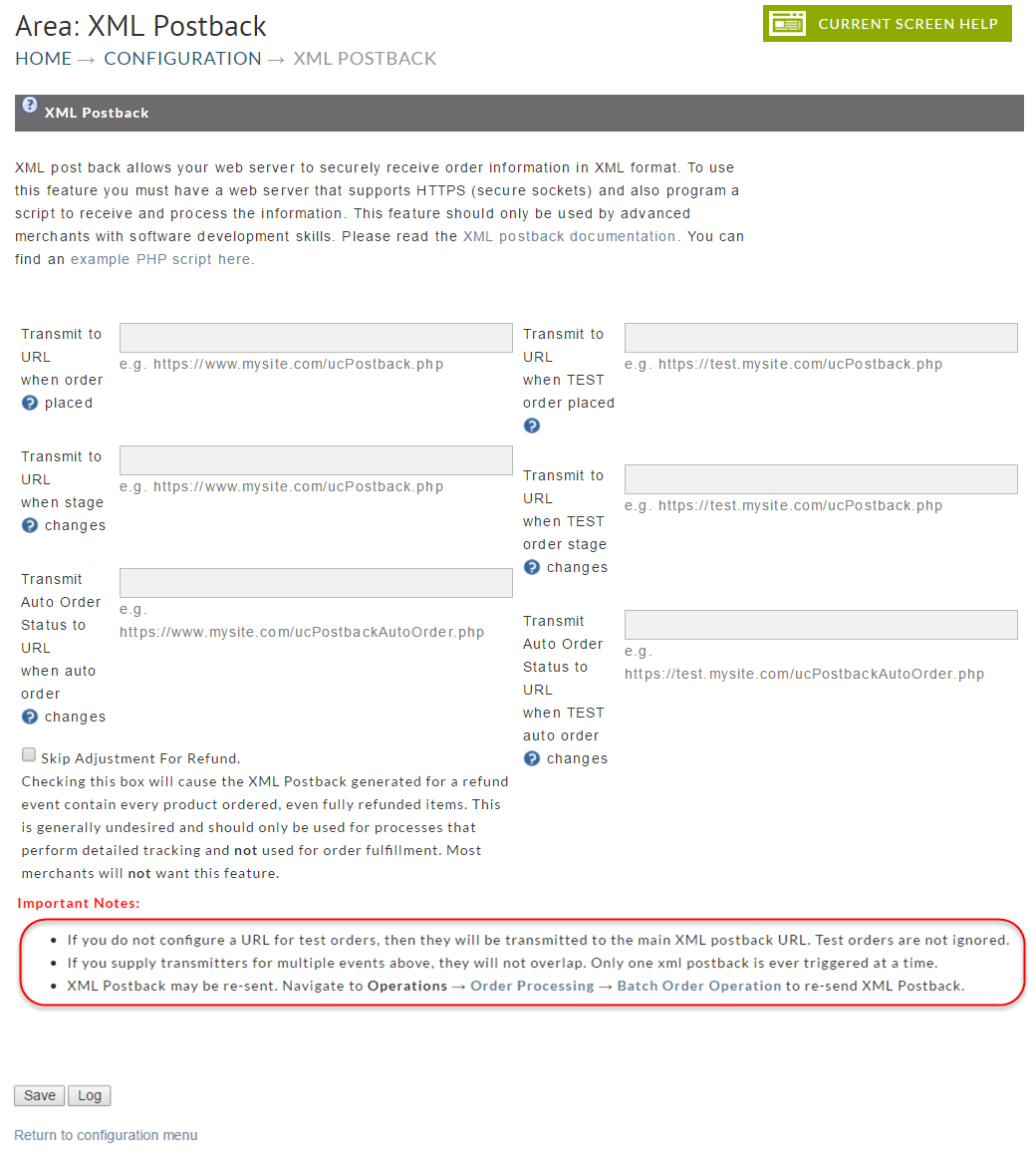
Option 1: Transmit to URL when order placed
-
UltraCart posts the order once it is created.
-
Postbacks repeat until your server responds with 200 OK.
Option 2: Transmit to URL when stage changes
-
UltraCart posts whenever the current_stage field changes.
-
Stages include:
-
IN(Inserting) -
AR(Accounts Receivable) -
PC(Pending Clearance) ← Checks orders and Amazon Payments -
SD(Shipping Department) -
CO(Completed Order) -
PO(Preorder) -
QR(Quote Request) -
QS(Quote Sent) -
REJ(Rejected) -
…and more
-
Option 3: Transmit Auto Order Status to URL
-
UltraCart posts updates when an auto order changes.
-
Example fields:
-
auto_order_code -
original_order_id -
status(active, cancelled, declined, terminated) -
next_attempt,failure_reason
-
Refund Postbacks
If you use the second option "Transmit to URL when stage changes" then UltraCart will also send you an XML postback when a refund occurs. When refunds occur the order can be in multiple stages (SD or CO typically) so you will want to look for the following elements in the XML:
-
subtotal_discount_refunded -
subtotal_refunded -
other_refunded -
tax_refunded -
shipping_handling_refunded -
buysafe_refunded -
total_refunded -
refund_dts
If a refund has occurred, the elements "total_refunded" and "refund_dts" will always exist. The other elements mentioned above will exist if that component of the order was refunded.
UltraCart will not send duplicate notifications. If you configure the second option (stage changes), you will not receive any notifications via the first option. Instead, when an order is placed, you'll receive a postback with the appropriate stage change (depends on the status/success of the order).
Save Changes
Once you've entered the URL into the appropriate field, click on the "Save" button at the bottom of the screen. Your configuration is complete.
Auto Order Update XML details
auto_order
  original_order_id
  auto_order_code
  firstname
  lastname
  email
  address
  address2
  city
  state
  zip
  company
  country
  home_phone
  cell_phone
  office_phone
  custom_field_1
  custom_field_2
  custom_field_3
  custom_field_4
  custom_field_5
  custom_field_6
  custom_field_7
  status = active, card declined, cancelled upgrade, cancelled downgrade, cancelled, terminated
  next_attempt
  attempt
  failure_reason
  status
  cancelled_by
  cancelled_dts
  original_items
    item
      item_id
      description
      unit_cost
      quantity
  auto_order_items
    auto_order_item
      original_item_id
      quantity
      frequency_override
      next_shipment
      next_item_id
      no_orders_after
      override_unit_cost
      override_unit_cost_next_x_orders
      percentage_discount
      next_preshipment_notice
Advanced Configuration
Multiple URLs
-
Enter multiple URLs separated by a space.
-
UltraCart retries all configured URLs until each returns 200 OK.
-
Warning: We recommend no more than 2–3 URLs. All must succeed, or the postback is retried.
Logs
-
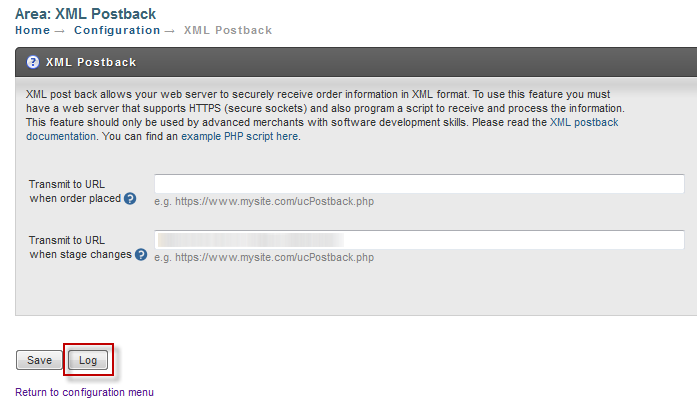
Use the Log button in the XML Postback configuration screen to review:
-
Order ID
-
Timestamp
-
Server response
-
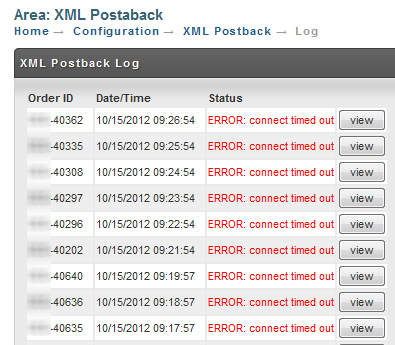
When you click on the log it will show you the order id, timestamp, and result for each transmission. Notice that we can quickly see that UltraCart
is having trouble connecting to this server.
For each transmission you can see what is sent to your server and what is returned as shown below.
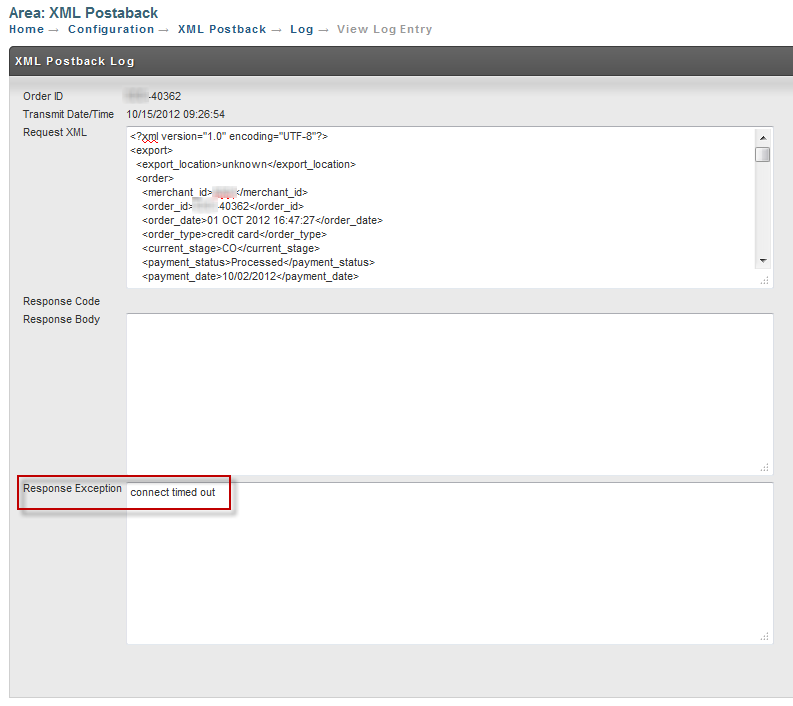
Notice that UltraCart is logging the response back from your server.
It only cares about the 200 result code to determine success,
but logging the response from your server allows you to output information that you can review in the logs for debugging purposes.
Error Handling
-
UltraCart disables postbacks after 50 consecutive errors.
-
Queued postbacks resume once you re-save the XML Postback configuration.
Common HTTP errors:
| Code | Meaning |
|---|---|
| 200 | OK |
| 301 | Moved Permanently |
| 302 | Redirect |
| 400 | Bad Request |
| 401 | Unauthorized |
| 403 | Forbidden |
| 404 | Script not found |
| 405 | Method Not Allowed |
| 500 | Internal Server Error |
The complete list can be found at http://www.w3.org/Protocols/rfc2616/rfc2616-sec10.html
Handling Read Timeouts
-
UltraCart allows up to 60 seconds for your server to respond.
-
Always queue the XML immediately; never run long processes in the postback handler.
Do not try and perform complex processing of the XML postback document on your receiver. Simply queue up the XML document in a persistent storage (database, Redis, SQS, etc.) and then perform your more complex processing in a decoupled fashion. This will allow you to receive a greater velocity of XML postbacks from UltraCart and fan out the processing of those postbacks appropriately.
Restarting Postbacks After Errors Have Halted Postback Processing
If UltraCart encounters 50 consecutive errors from your server, it will disable the XML postback and email you. The transmissions will queue up until you edit your XML Postback configuration.
After reviewing the logs to determine the cause of the errors. To restart the processing of the queued orders, re-save the XML PostBack settings (Click the save button on the XML Postback configuration page.)
How do I resend historical data to my server via XML postback?
Identify the first and last order id for the range of data that you want to resend to your new XML postback URL. Use the batch order operation utility to populate the XML postback queue.
Refunds
Orders with partial refunds will report the item Id's of the refunded items, whereas complete refunds will not include the item Id's by default.
Please Note
If you need the complete refunds to report the item ID's in the order, contact UltraCart by emailing support@ultracart.com stating your UltraCart MerchantID requesting that we enable the merchant property "XML Postback - Skip Adjustment for Refund".
With this property is enabled, it will prevent refunded items from being removed from the XML postback, so you will see these items in your refund transaction XML packet.
Pay close attention to these optional elements that will indicate the refunding of the item:
-
quantity_refunded
-
**total_refunded **
Frequently Asked Questions (FAQ)
Q: "I notice that there's an xml element, and that there could be more than one. Is it often that post backs come in with multiple orders in them?"
A:_ _The XML Postback transmissions are always a single order only.
Q: Are the merchant notes, special instructions, gift message, and comments transmitted in the XML document?
A: Yes, if they are present on the order then they are populated in the XML. We don't populate empty elements for these fields though. The element names are:
-
special_instructions
-
comments
-
gift_message
-
merchant_notes
Please consult the XML Schema for a full description of the XML document structure.
Q: My server is returning a 500 error code. What does that mean?
A: When your server returns a 500 error it means that the code on the other side (your side) has experience an unhandled error condition. Typically that is a null pointer exception, database error, etc. Please check your server logs for further details.
Q: When an order is successfully charged to the customer's credit card and goes to my Fulfillment Queue, what is its XML stage state while in the queue?
A: XML postback does not recognize that it's held in the fulfillment transmission queue. The state of the order will be the shipping department so the current_stage element in the XML will read "SD".
(NOTE: The XML will not register a new stage change until the order is either marked as shipped (which would trigger the XML stage "CO" or if the order were to be marked as "Rejected" then the XML would read "REJ")
Q: When an order goes to the A/R queue either because of a fraud issue or a shopping cart timed out, besides an "AR" state, did it ever have an "IN" status?
A: IN = Inserting, so it's just an initial stage while the order record is being processed. If you actually seeing these in XML postbacks to your system, email Support with the orderID for review (it's something that really should not appear in most cases.
Q: When that A/R order is successfully processed (credit card) and goes to the Fulfillment Held Queue?
A: In this situation, the stage changes from "AR" to "SD" and an XML postback will occur if you have it configured to send one when stages change.
Q: I'm trying to find if there's: (1) a flag indicating it's an auto-order AND (2) a way to tie it back to the original order?
A: If the order is an auto order there will be these elements in the XML:
-
auto_order_code
-
auto_order_original_order_id
Q: Is there a postback when an Auto order is cancelled? (updated 9/1/2014)
A: Yes. The auto order configuration now has a separate configuration field "Transmit Auto Order Status to URL when auto order changes" for auto orders.
If configured, auto order cancellations will trigger a XML Postback transmission when status changes.
Q: Our XML transmission appear to have stopped yesterday, why is that?
A: UltraCart will disable the XML postback after 50 consecutive non HTTP 200 responses. UltraCart will continue to queue up the requests and will send them only once the merchant goes back into the XMP Postback configuration page and saves the configuration, which reset the hold and releases the queued orders from immediate transmission. (So for example if you were doing some database maintenance for an hour that interrupted the transmissions, you would need to resave the settings to get things processing again.)
Q: Why does the postback not happen instantaneously after the order is processed?
A: XML postback requests are added to a queue when the order is placed. The queue is processed asynchronously by a background job once a minute. The number of postbacks that can be handled each cycle depends upon the throughput speed of the remote servers. Performing the postbacks in the background makes sure a merchant's slow or unresponsive server does not destabilize the front end of the platform. If there is a large spike in orders to the platform, the number of cycles to clear out the postback queue will vary.
Q: What information is in the order XML postback?
A: The complete XSD schema file for the order XML postback is located here: http://secure.ultracart.com/xml/ultracart.xsd
Q: In the XML postback, each item has a field called item_reference_oid. Can you describe this data?
A: The item_reference_oid in the XML postback is a read-only field that references UltraCart's internal object identifier (merchant_item_oid) for an item. This field is not intended for use as a unique identifier by merchants. Use merchant_item_id instead of item_reference_oid.
-
Uniqueness: The item_reference_oid is tied to the merchant_item_oid, which is unique to each item in your UltraCart catalog across all orders. It does not vary per order; it remains consistent for the same item across different orders.
-
Recommended Practice: Merchants should use the merchant_item_id field as the unique identifier for items. The merchant_item_id is designed for merchant-facing identification and is more suitable for tracking and managing items in your workflows.
-
Limited Use: The item_reference_oid is primarily used internally by UltraCart, such as in specific API calls like ItemApi.updateItem(). For most purposes, you should rely on merchant_item_id instead.
Schema: http://secure.ultracart.com/xml/ultracart.xsd
Q: Can I configure more than one URL within one of the three configuration fields?
A: Yes. To configure more than one URL into one of the URL configuration fields, simply separate each URL with a SPACE.
**PLEASE NOTE: Both endpoints must be able to deal with duplicates. If any endpoint fails, the postback is marked as a failure and when retried, each endpoint gets the postback again. **
When the postback occurs does it always pass the full set of customer data including custom fields?
There is quite a bit of order information in the XML postback, including customer data and the custom fields 1-7.
Is there a way it identifies it self as an auto-order vs an initial order?
On an order XML postback there is an element for the auto_order information. Inside that element there is a field for auto_order_original_order_id. If that is the same as the order_id in the XML document then this is the original order in the auto order sequence. If it's different then it's a rebill.
Just to clarify for each successful auto-order charge it will go through the main postback URL right? (not the auto-order status change URL)
Orders go through one URL and auto order status information through another. They can be the same URL if you want to configure it that way and just teach the one script to parse the XML document and then look at the content differently.
For the auto-order status change postback, do you have an XML schema for that? or is it the same as the normal postback? is their a particular field that we should check for?
There is not a schema file for this yet, but the easiest thing to do is configure a dummy URL, let the auto order XML postback fire, and then check the log under the XML postback configuration to see a copy of the document it tried to send.
We moved our XML Postback script to a new server via Cloudflare, and since then then our XML Postback is not longer working and is now disabled.
At this point in time you cant configure an XML postback to a URL that is fronted by Cloudflare. (XML postback requires a non-SNI hosted environment.)
Conclusion
The XML Postback feature enables merchants to build custom integrations by receiving orders and updates directly to their server. However, UltraCart strongly recommends migrating to Webhooks, which provide a more modern and flexible solution.
Next Steps
-
Learn more about UltraCart Webhooks
-
Review the XML Schema
-
Contact UltraCart Support for advanced configurations