eBay - Importing Orders for Items not Listed by UltraCart
This page will help you understand how to handle importing orders into UltraCart from eBay where the listing wasn't posted by UltraCart. First let's review the eBay configuration options associated with order processing located under:
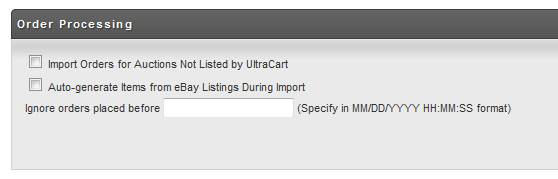
| Setting Name | Description |
|---|
| Field | From eBay Listing |
|---|---|
| Item Id | Auction Number |
| Description | Title |
| Extended Description | Description |
| Cost | Listing Price |
| Weight | Calculated Shipping Weight. Flat shipping listings will be configured as 1 LB |
| Length | Calculated Shipping Length. Flat shipping listings will not have dimensions configured. |
| Width | Calculated Shipping Width. Flat shipping listings will not have dimensions configured. |
| Height | Calculated Shipping Depth. Flat shipping listings will not have dimensions configured. |
If you are using flat shipping on Ebay and auto generated items then you may need to edit the item after it is created and the first order before you will have accurate shipping from UltraCart
Monitoring for Missing Items
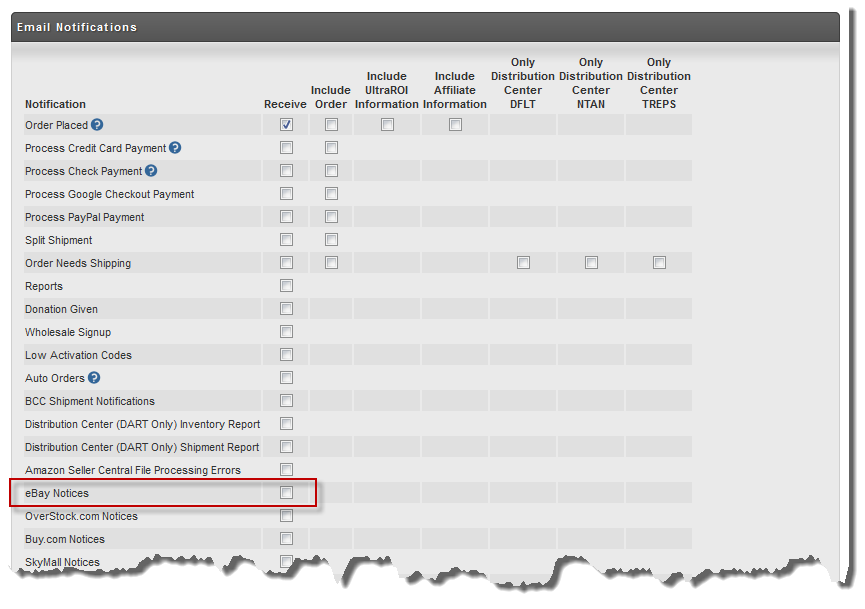
If you choose to import orders that UltraCart hasn't managed the listings for, but do not have the auto-generate option turned on then you can create a log jam. It is import to make sure one of your UltraCart users has the eBay notification turned on. Whenever a missing item is detected UltraCart will send these users an email letting them know an item is missing. The user can then go create the new item or map the auction number to an existing item and the order will import the next hour. To enable this notification go to:
Now in the notification section of the user select the eBay Notices as shown below and save.