Monitoring the Integration Service
UltraCart has developed a powerful, yet easy to use, dashboard that shows you the status of your Salesforce.com integration. This dashboard gives you the information necessary to troubleshoot any integration issues, as well as keep a pulse on the activity occurring between Salesforce.com and UltraCart.
To access the dashboard
Home → Configuration (External Integrations) → Salesforce.com → [Status tab].
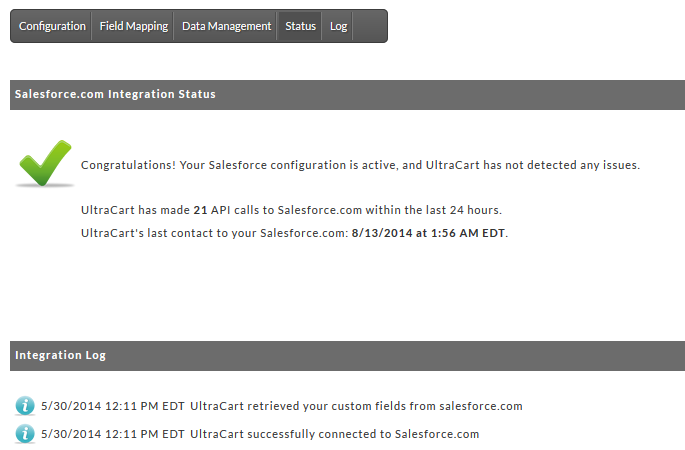
The dashboard contains a number of helpful items. First, the top section shows the overall health of your Salesforce.com integration. This section also shows how many API calls UltraCart has made to Salesforce.com, as well as the last time UltraCart contacted Salesforce.com.
Below the health check section is the Integration Log. This log shows you the last 10 actions that UltraCart performed relating to the Salesforce.com integration. Items with the  icon are informational in nature. If an item has an
  icon, this means that the message shows that something unexpected occurred, but does not prevent the successful communication between Salesforce.com and UltraCart. These messages typically are displayed when UltraCart is unable to create or update an object in Salesforce.com. In each case, the message will include the feedback provided to UltraCart by Salesforce.com when the operation was attempted.
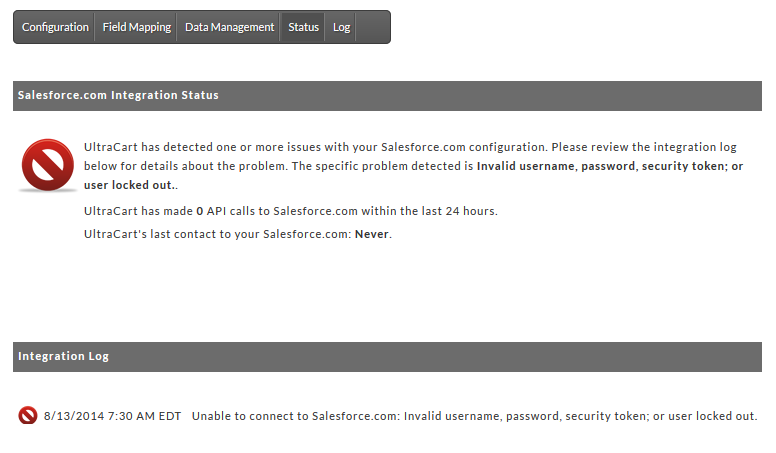
Messages with the  icon indicate an issue that is preventing the successful communication between Salesforce.com and UltraCart. In the example above, the user name or password was changed in Salesforce.com, but the change was not made in UltraCart. When an error occurs with the icon present, UltraCart will discontinue communication with Salesforce.com until the issue is resolved. If UltraCart is in this state, the health check section will reflect this fact, as demonstrated in the picture below.
If you are unable to determine the reason that the health check is failing, or are unable to make the necessary corrections to resolve the issue, please contact our professional services team for assistance.