Twilio
Last Updated: June 3, 2026
Overview
UltraCart sends SMS messages, such as order and shipment notifications, through Twilio. You connect your own Twilio account so messages go out from your own phone number and are billed directly by Twilio.
This guide shows you where to find your Twilio Account SID, Authentication Token, and phone number in the Twilio Console, and how to enter them in UltraCart.
SMS sent through this connection is billed directly by Twilio at Twilio's rates. UltraCart does not add a markup on messages.
Prerequisites
-
An active Twilio account. You can create one at twilio.com.
-
At least one Twilio phone number with SMS capability.
-
StoreFront administrator access in UltraCart.
Step 1: Locate Your Twilio Credentials
Log in to the Twilio Console at console.twilio.com.
Account SID and Authentication Token
On the Console dashboard, the home page you land on after logging in, find the Account Info panel. It contains the two values UltraCart needs:
-
Account SID: a string that begins with
AC. -
Auth Token: hidden by default. Select the show icon to reveal it, and the hide icon to conceal it again.
Your Auth Token is a secret. Anyone who has both your Account SID and Auth Token can send messages and run up charges on your Twilio account. Only enter it into systems you trust, and never share it.
Phone Number
In the Console left menu, go to Phone Numbers > Manage > Active numbers. This lists every number on your account. Copy the number you want UltraCart to send from.
If you do not have a number yet, go to Phone Numbers > Buy a number and purchase one with SMS capability first.
Step 2: Enter Your Credentials in UltraCart
-
In UltraCart, open your StoreFront.
-
In the left menu, select Communication > Settings.
-
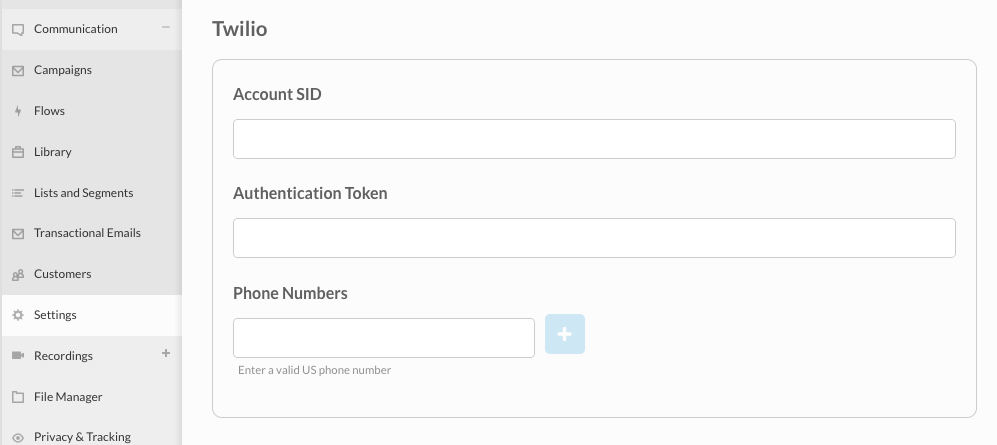
Scroll to the Twilio section.
-
Enter the values you copied from Twilio:
-
Account SID: paste your
ACAccount SID. -
Authentication Token: paste your Auth Token.
-
Phone Numbers: enter your Twilio phone number, then select the + button to add it. You can add more than one number.
-
-
Save your settings.
Once saved, UltraCart can send SMS through your Twilio number.
Phone Number Format
Enter a valid US phone number that you own in Twilio. Twilio displays numbers in E.164 format, which is a plus sign and the country code followed by the number, for example +15551234567. Enter the number exactly as it appears on your account.
Troubleshooting
Messages are not sending
Symptoms: SMS messages do not arrive.
Check:
-
The Account SID and Auth Token match the values in your Twilio Console exactly, with no leading or trailing spaces.
-
The phone number is active in your Twilio account and has SMS capability.
-
Your Twilio account has enough balance to send messages.
Credential or authentication errors
Cause: The Account SID or Auth Token is incorrect, or the Auth Token was changed in Twilio.
Solution: Re-copy both values from the Account Info panel in the Twilio Console and re-enter them in UltraCart. If you recently rotated your Auth Token in Twilio, update it here as well.
The phone number is rejected
Cause: The number is not entered in a valid format, or it is not owned by your Twilio account.
Solution: Confirm the number appears under Phone Numbers > Manage > Active numbers in Twilio, and enter it as a valid US number.