About
Integration of Google Shopping is vital to success of your online business. The Google Shopping platform is used to list your products across all of Google's Services.
In order to manage your products on Google, you’ll need a Google Merchant Center account.
Getting Started with Google Merchant Center
The Google Merchant Center lets you manage how your in-store and online product inventory appears on Google.
Below is a list of Google Integration points within UltraCart:
-
Google Adwords - reporting CLID back to Google Adwords
-
Google Product Search - lists products on Google Shopping
-
Google Trusted Stores - reviews and ratings by Google Shopping customers
-
Google Orders - transfers orders placed on Google Shopping into the UltraCart system for processing
-
Google Maps API - shows your physical store locations on a map on your StoreFront's Store Locator page
-
Google Auto Complete - used to provide a better checkout experience for your customers
-
Google reCAPTCHA - used to secure your feedback forms
Frequently Asked Questions
Question: How do I test out the google integrations?
Answer: You should use the Tag Assistant tool to troubleshoot the Google integrations.
PLEASE NOTE: Google now requires you to be logged into your google account to launch and run the debug tool:
https://tagassistant.google.com/ . https://support.google.com/tagassistant/answer/10039345#zippy=%2Cin-this-article
UltraCart is unable to diagnose issues with the Google integrations.
Question: I am attempting to verify my Google Merchant Center Account, but I am getting an error that the google analytics and tag manager scripts are rendering outside of the head. How can I resolve this issue to get verified?
Answer: UltraCart renders the Google scripts lower in the page so they do not hold up the first paint. The scripts work correctly where they render, but Merchant Center cannot verify you through them. Use the ‘Add an HTML tag or file’ verification option instead:
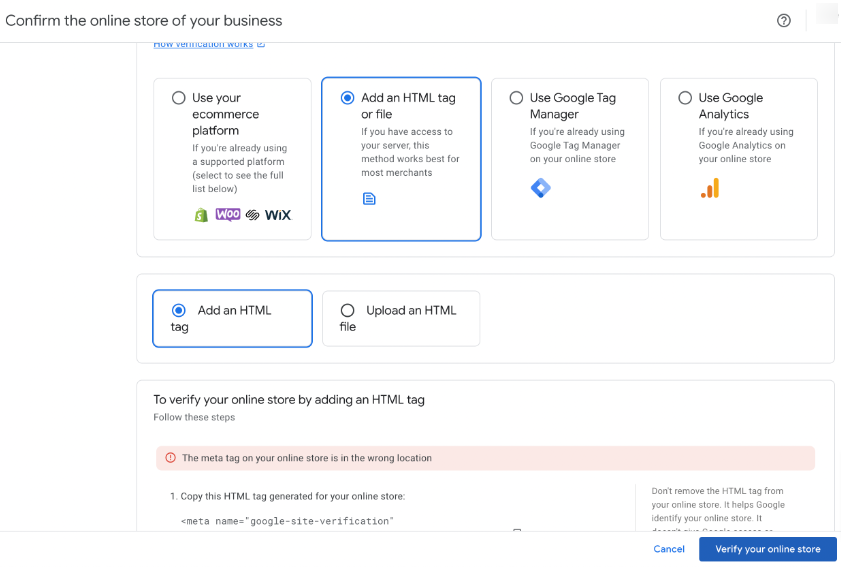
Add verification HTML tag to storefront for Google Merchant verification.
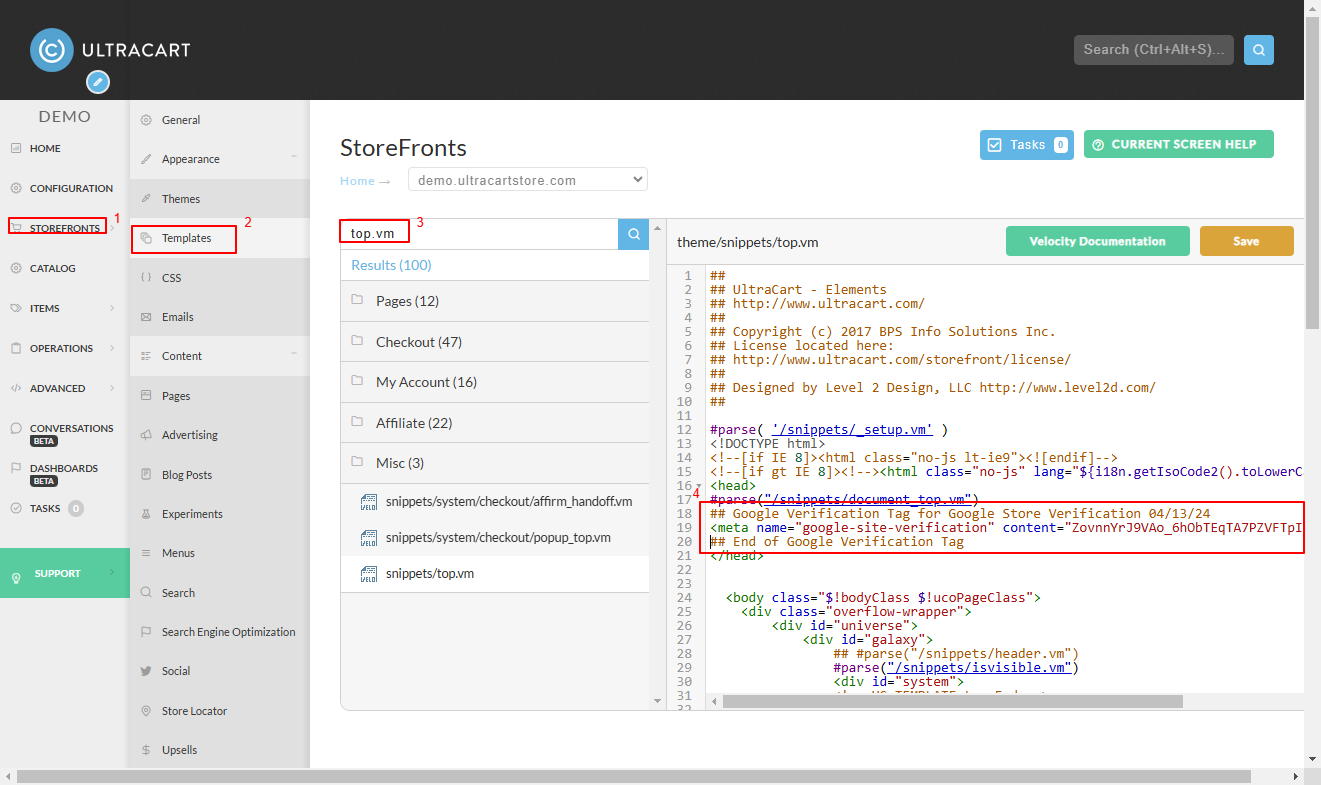
Google runs one verification service across Search Console and Merchant Center, so a token you add for either one satisfies both. Google Search Console verification covers the two routes that work on a StoreFront: a DNS TXT record, or a verification file placed in the File Manager. Either verifies your Merchant Center account.
Once the record or the file is in place, return to your Google account and click the ‘Verify your online store’ button.
Related Documentation:
https://ultracart.atlassian.net/wiki/spaces/ucdoc/pages/3888316425/Attribution+Analysis?search_id=dd5b62c8-d438-4147-83f5-0e5207a67cde&additional_analytics=queryHash---75738ae31c760e2b1985a0605d8ad8e88d14eec0a745661a9613f9fe36de8207
Understanding UTM Collection
Using UltraCart Analytics