Catalog Groups - UltraTrains
Here's the groups defined for UltraTrains.
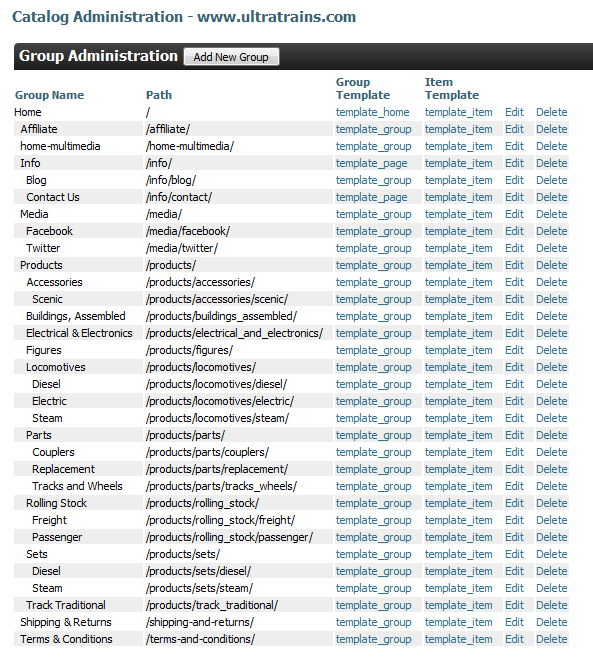
A catalog group has many settings, separated on different tabs within the merchant portal.

For the UltraTrains demo, there were no selectors or permissions used.
The following two tables list the attributes and multimedia used for each group (if any).
The value <empty> is used to denote any attribute that has no value.
tip
Why have an attribute with no value? It creates a placeholder. Attributes can be configured to be edtiable when a merchant logs into their site.
They may then do in-place edits to attributes. This can be useful for frequently changing data.
| catalog group | type | name | value |
|---|---|---|---|
| / | attribute | footer_links | ``` |
| | | | |
| / | attribute | header_info_menu | |
| / | attribute | main_content | |
| / | multimedia | logo |  |
| /home-multimedia/ | multimedia | image2 |  |
| /home-multimedia/ | multimedia | Image1 |  |
| /info/contact/ | attribute | main_content | <h3>Thanks for visiting our Demo store.</h3> <p> If you have any questions about this catalog or general questions about UltraCart, please contact our customer service team. </p> <br /> <p> Phone: 209-383-9870<br /> <br /> Email: Support@ultracart.com<br /></p> |
| /media/facebook/ | attribute | AlternatePath | http://www.facebook.com/home.php?#!/pages/UltraCart/118783281518659 |
| /media/twitter/ | attribute | AlternatePath | http://twitter.com/ultracart |
Was this page helpful?