Custom 404 Page Not Found
This page covers the legacy UltraCart Catalog, which StoreFronts replaced in May 2015. It is kept for merchants still running a legacy catalog. If you are building a site today, start with StoreFronts.
Introduction
This brief tutorial will explain how to create a page that will be rendered to the client whenever a 404 (page not found) is generated. This will give the end user a friendly looking page, but still return an HTTP status code of 404.
Whenever a page is not found on the catalog, the system will look for an arbitrary page at the location of:
/404.html
The earliest way to accomplish this is to create an arbitrary page that URI under.
Below is an example of the arbitrary page.
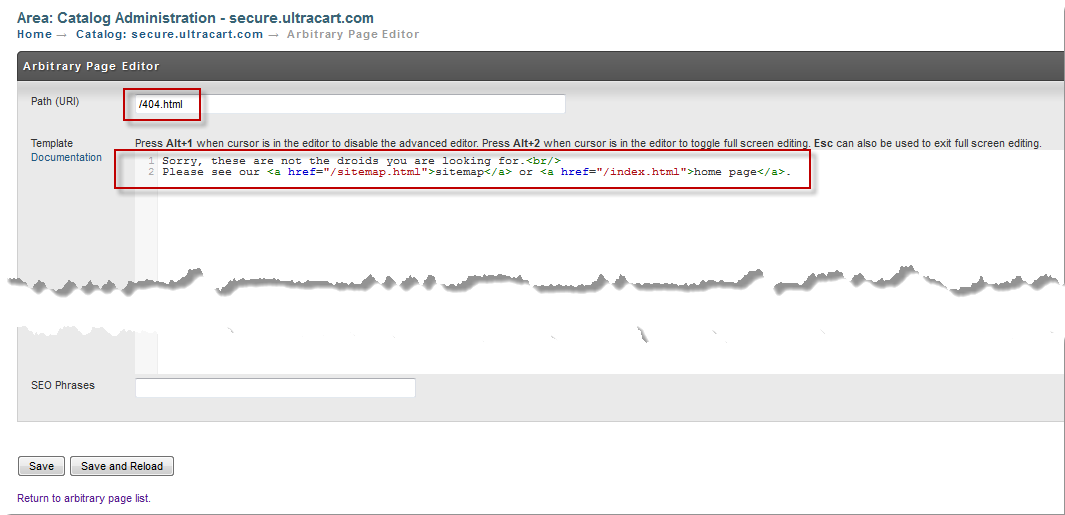
Make sure that if you receive any style sheets or graphics from this page that you DO NOT use relative URLs. Because the page can be rendered at any URL on the site that is requested, relative URLs would confuse the browser and lead to broken images