Transcluded from Legacy Catalog Warning.
Catalog Optimization
Catalog Optimization
The catalog system is built to handle a tremendous amount of optimization automatically. The goal is to provide a superior customer experience by scoring high in a Google PageSpeed ranking. To accomplish this, the UltraCart system can automatically perform the following tasks:
- CSS Spriting
- Minify HTML/CSS/JS
- GZip compress responses
- Image Optimization
- Offload images to CDN
Below we will discuss each of these optimizations.
CSS Spriting
CSS Spriting is the process of taking multiple images on a page, combining them into a single image, and then adjusting the page using CSS to reference the portion of the combined image in a specific location. The huge benefit of sprites is on product group pages. For example if you have 50 products on your group page with small thumbnails, the web browser needs to make 50 requests to the server to load that page. When spriting is enabled it is a single image request.
All the web designer needs to do is use basic image tags throughout the pages and UltraCart will automatically generate the sprites.
Do not use CSS styles that add padding/margin to IMG tags. Surround a basic image tag with a DIV and add the padding/margin to the DIV
To enable sprites click the "Enable CSS Sprites" option under optimizations as shown below.
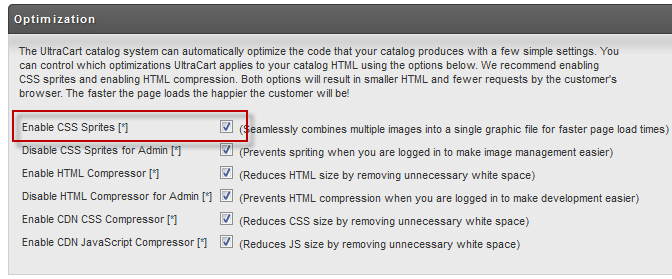
There is also an option labeled "Disable CSS Sprites for Admin". When this box is checked, if you are logged into your UltraCart account then the catalog page will not display sprites for you. This can make a web master's job easier when making changes to the site. We recommend having this turned on, but make sure you check your site after coding with a browser that is not logged in just to verify everything looks good once the sprites are created.
Sprite Format
The default format for the sprite image is JPEG. This is typically a good image format, but JPEG images always have lossy compression so there is some degradation to the image. You can change the sprite format to PNG by adding the following line of code anywhere within your template.
#set($spriteFormat = "PNG")
Disable Sprites on Entire Page
If there is some reason a particular page should not have a sprite you can disable spriting by placing the following line of code anywhere within your template.
#set($spriteDisable = "true")
Disable Sprites for a Section of HTML
If you want to disable Spriting for a section of HTML you can output the following comment in your template:
<!-- ucSpriteDisable -->
Then to enable spriting again you can output this comment.
<!-- ucSpriteEnable -->
So if you have a piece of code that is problematic to sprite, just surround it with the disable and enable comment.
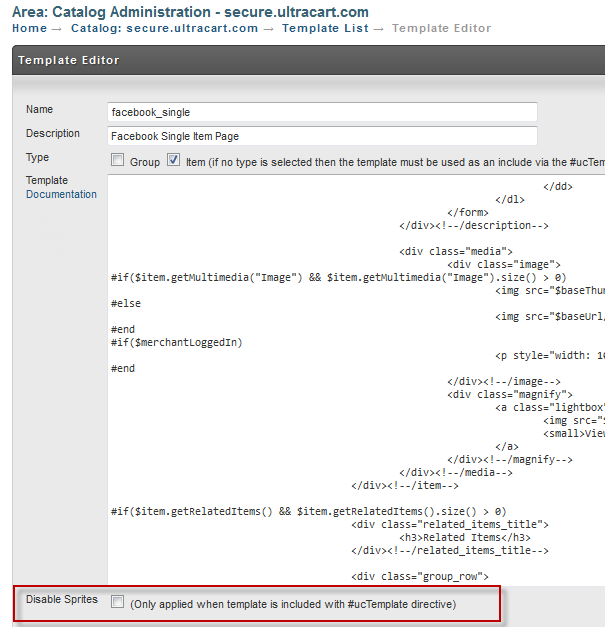
Disabling Sprites for a Template
You can also disable spriting for an entire template under:
Minify HTML/CSS/JS
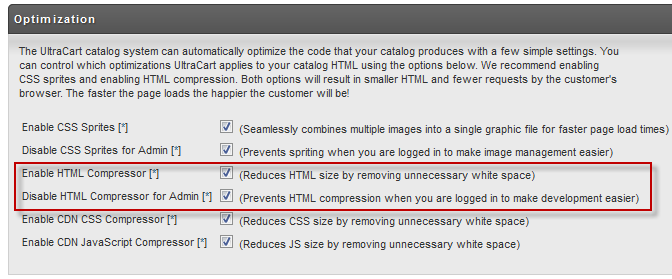
Minification is the process of stripping content from web files without changing any of the behavior. Typically this means removing unnecessary white space, line feeds, comments, etc. Minification typically reduces file sizes 20-30%, but makes things very hard to read if you are looking at source on the browser. Similar to the CSS Spriting, we provide an option to enable the HTML compressor, but then disable this when the admin is logged in as shown below.
UltraCart can also minify CSS and JS content before shipping a copy off to the CDN (content delivery network). This is typically safe to enable for JavaScript and CSS files, but you should always test your site after enabling this option.
GZip Compress Responses
UltraCart will always GZip compress the response sent to the customer. This loss-less form of compression to common on almost all web servers across the internet. It will typically reduce the amount of bandwidth consumed by a HTML, CSS or JavaScript by 40-80%.
Image Optimization
UltraCart automatically optimizes images before sending them off to the CDN. Image optimization can reduce image size with lose-less operations by 10-30% typically. The following operations are attempted:
- GIF to PNG conversion if it reduces site
- JPEG unnecessary header removal
- PNG re-compression
Offload images to CDN
UltraCart will automatically offload graphic, CSS, JS, etc. off to the CDN (content delivery network) for faster page loading times. Our CDN helps UltraCart scale to handle high traffic times for your website, but also provides faster load times for your customer. If certain assets on your website are loaded repeatedly, UltraCart will also push them to the edge of the CDN so that it is even fewer hops across the internet for a customer's browser to fetch the content. The entire goal is to make the page load times optimal for the customer. When graphics, CSS, and JS is offloaded to the CDN you many notice slight changes to the files. UltraCart will utilize the following suffixes in file naming.
| Original Filename | Suffix | Reason |
|---|---|---|
| site.css | original | |
| site_g.css | _g | GZip compressed |
| site_m.css | _m | Minified Content |
| site_mg.css | _mg | Minified and GZip compressed Content |
The reason for the various versions browser compatibility (don't use GZip if a browser can't support it) and disabling for admin users.
Checking Your PageSpeed
We recommend installing the Google PageSpeed plugin for FireFox or Chrome to check your page speed. It will help you identify areas of your website that need further optimization. We have seen catalog sites score 97/98 out of 100 which is about as close to perfection as you can get.