Wishlist Member Integration - Version 1
⚠️ ARCHIVED — LEGACY CONTENT (Version 1)
This page documents the original Version 1 integration method. It is preserved for historical reference only and is no longer maintained.
For the current integration guide, please see: Wishlist Member Integration (Version 2)
Wishlist Member Integration
Integrating Wishlist Member with UltraCart
Wishlist Member is one of the most powerful and easy to use WordPress membership plugins available. By following this document, you can configure your UltraCart account to seamlessly integrate with your Wishlist Member installation.
Configuring Wishlist Member in UltraCart
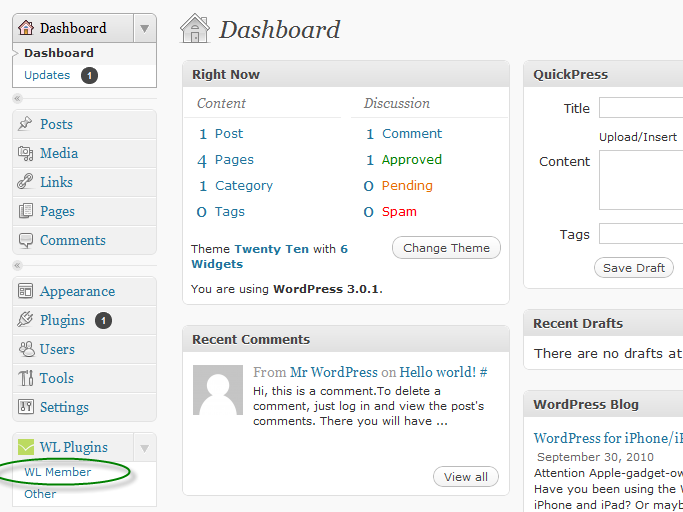
The first thing you will need to do is to log into your WordPress administration console. From your WL Plugins menu, select WL Member to bring up the Wishlist Member console:
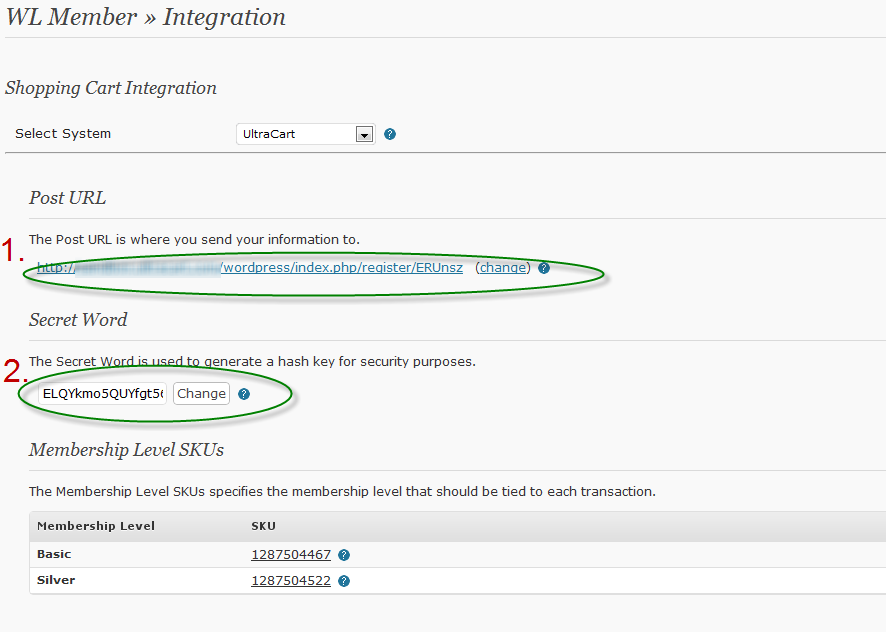
Next, log into your UltraCart account, and navigate to:
Main Menu → Configuration → Wishlist Member
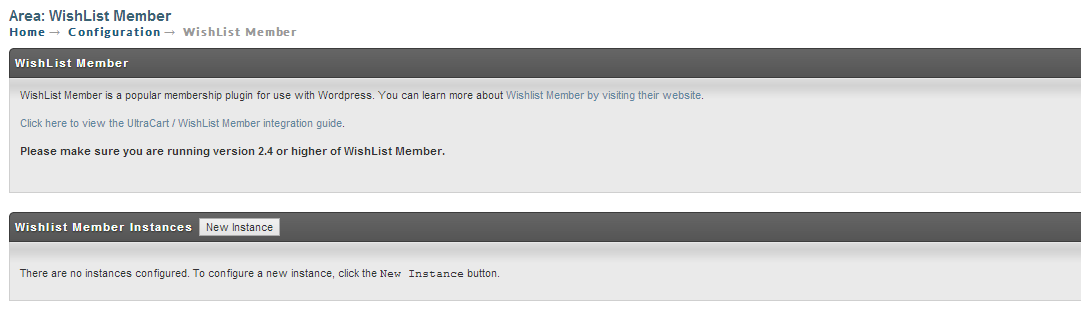
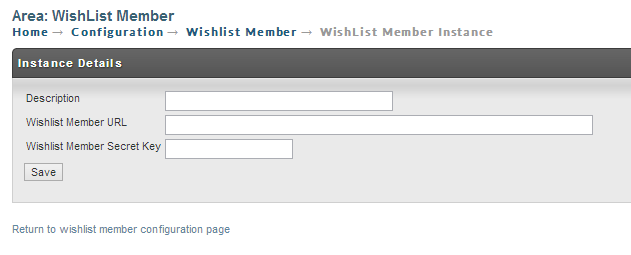
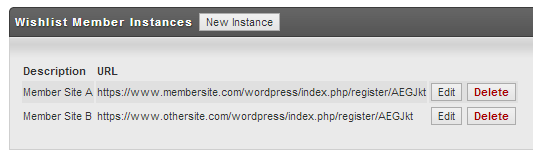
The next step is to configure your items to use your Wishlist Member integration.
Configuring Items in UltraCart
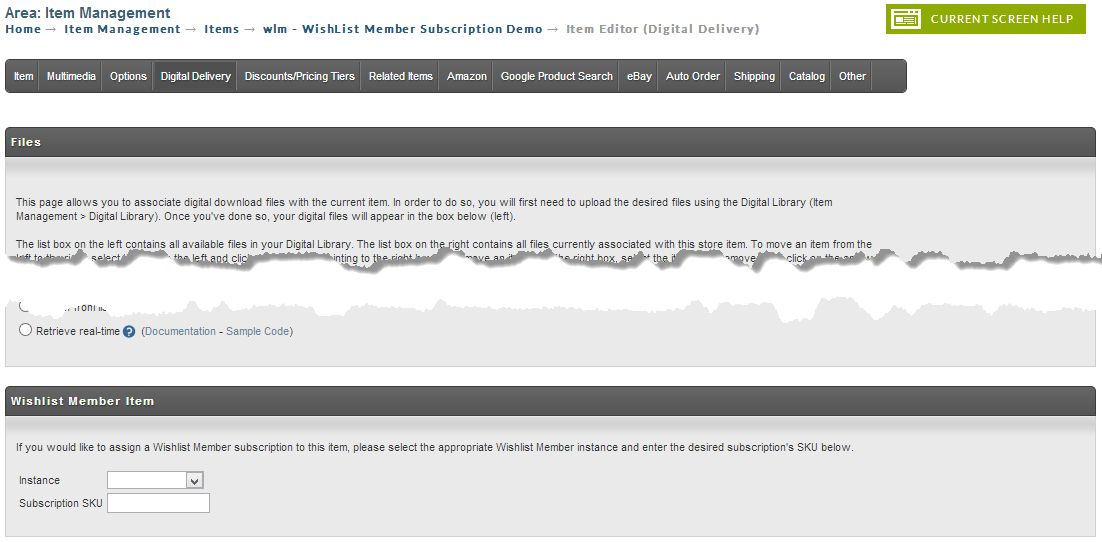
If you have configured Wishlist Member, you will see a section at the bottom of the screen titled "Wishlist Member Item". Select the desired Wishlist Member instance from the dropdown, then copy the SKU for the desired membership level from Wordpress, and paste it into the Subscription SKU field, and press Save.
Notification to the Customer of their login credentials
When the order is placed and processed for payment, UltraCart communicates the purchase to Wishlist and Wishlist then generates the login credentials and emails them to the customer.
Storefronts
In the storefronts Receipt template and Email Notification receipt template you can use the $order.isPurchased velocity statement to customize the receipt page and email notification to notify the customer of the emailing coming form Wishlist member that contains their login credentials.
Example:
## Start Conditional if item "monthly_subscription" is purchased
#if ($order.isPurchased("monthly_subscription"))
<p>Attention: Your login credentials are being sent to you in a separate message from wishlistmember.</p>
#end
## End Conditional if item "monthly_subscription" is purchased
For Legacy "Screen Branding Themes"
In UltraCart email notification and screen branding, you can use the IfPurchased token to customize the receipt to notify the customer of the email coming from Wishlist member containing their login credentials.
[IfPurchased=item1,item2,item3, etc.] Your item specific text or html goes here between the opening and closing IfPurchased tags [/IfPurchased]
Auto Order Considerations
If you are planning to use UltraCart's auto-order functionality to allow for recurring subscriptions, simply set the auto-order duration to be equal to the amount of time specified by the membership SKU in Wishlist Member. UltraCart will automatically update the existing subscription with each subsequent order.
Cancelling from WishList directly
Cancellations directly from Wishlist trigger notifications to you the merchant. Since the Wishlist member integration does not communicate back to UltraCart, you will be required to log into UltraCart and cancel the Auto Order.
Common Questions
Can I use Wishlist Member on an upsell item?
Yes, the configuration for Wishlist Member happens on a per item basis within your UltraCart account. It is very common for a merchant to make an item that represents a membership to their members only area and then offer that as an upsell after during the checkout process.
Can I integrate more than one Wishlist Member account into a single UltraCart Account?
Yes, you now have the ability to integrate any number of Wishlist Member instances in your UltraCart Account. You should be aware of some of the limitations, however:
-
If an order contains items that are subscriptions from two different Wishlist Member instances, and one or more of the instances is unable to process the subscription, the other instance may receive an additional subscription request when we retry the failed instance's subscription call.
-
Queues and logs are shared among all configured Wishlist Member instances, so it is important that you monitor the performance of all of your Wishlist Member instances, using both the UltraCart logs and the tools provided in Wordpress.
What happens if the subscription is cancelled from the wishlist side directly?
Wishlist member does not communicate back to UltraCart. Therefore, if a cancellation occurs there, then you will need to log into UltraCart to locate the customers auto order and cancel it.