Abandon Interval
Introduction
In e-commerce, customers often add items to their shopping carts but leave without completing a purchase. This is known as an abandoned cart. UltraCart provides powerful features to help you manage these abandoned carts and re-engage customers, potentially recovering lost sales.
The Abandon Interval sets how long a cart can sit inactive before UltraCart treats it as abandoned. At that point UltraCart releases the inventory the cart was holding and runs its abandon processing: abandon webhooks, abandon events to marketing integrations, and abandon records for reporting.
Configuration → Checkout → Abandon Interval
Understanding the Abandon Interval
The Abandon Interval is how many hours of inactivity UltraCart waits before abandoning a cart. Until then, the cart holds its items. If you have Track Inventory enabled, items in those carts are subtracted from your available inventory, so a long interval can make items appear out of stock even when you have them on hand.
The Abandon Interval does not control how long a return-cart link works. Abandoned carts are archived for up to one year, and a return-cart link restores the cart at any point in that time. Raising the interval to keep links alive longer has no effect on the link, and it delays everything listed in What happens when a cart is abandoned.
Setting the Abandon Interval
To configure the Abandon Interval:
-
Navigate to Configuration > Checkout > Abandon Interval.
-
From the drop-down menu, select the number of hours of inactivity before a cart is abandoned. The default setting is 1 hour. (Minimum 1 hour, maximum 672 hours)
-
Click the Save button.
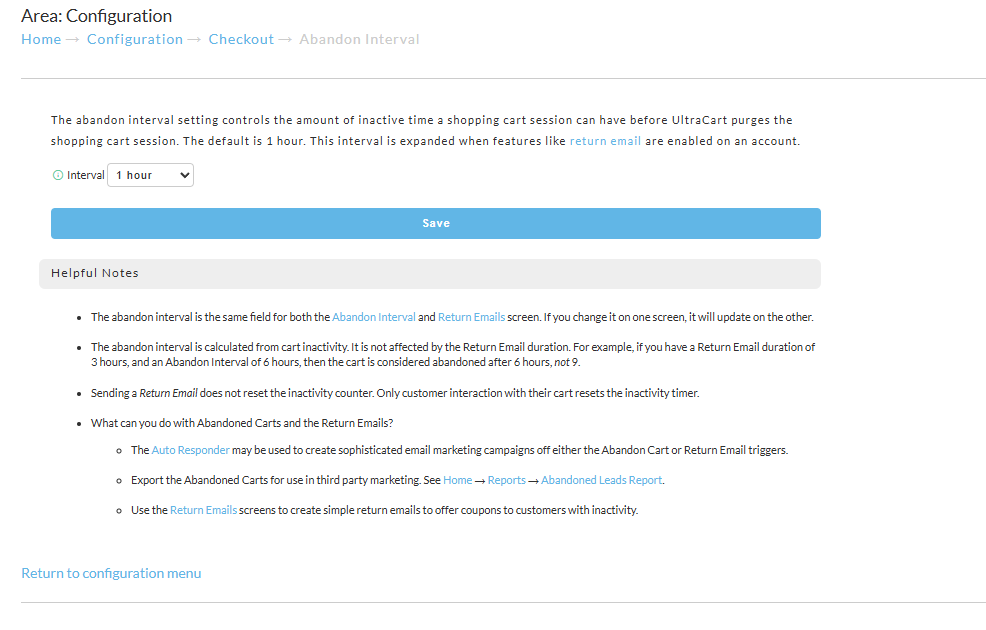
The Abandon cart after field on the ActiveCampaign, Klaviyo, Mailchimp, Drip, and Iterable integration pages is this same setting. Changing it on any of those pages changes your Abandon Interval.
Choosing a value
Keep the Abandon Interval short. A few hours is right for most stores.
- No return cart events or return emails: 1 to 4 hours.
- With return cart events or return emails: a few hours longer than the return cart delay. For example, Trigger return cart event after 1 hour and Abandon cart after 4 hours.
- Iterable: UltraCart sends
updateCartto Iterable when the cart is abandoned, so the Abandon Interval is the delay before your Journey starts. Add longer waits as Delay steps in the Journey instead.
Use the timing settings in your email platform, such as flow delays, to space out follow-up messages over days. The return-cart link in those messages keeps working because the cart is archived.
How the abandon interval works with return cart events
The Abandon Interval must be longer than your return cart delay, because UltraCart only sends a return cart event or return email for a cart that has not been abandoned yet. The return cart delay is the Trigger return cart event after setting on your marketing integration, or the send delay for UltraCart return emails.
What happens when a cart is abandoned
Abandoning a cart does not delete it. When a cart reaches the Abandon Interval, UltraCart:
- Releases the inventory the cart was holding.
- Archives the cart for up to one year. If the customer comes back through a return-cart link, UltraCart restores their cart right away.
- Sends the cart abandon webhook, if you subscribe to it.
- Sends abandon events to marketing integrations that use them, such as
updateCartfor Iterable. - Records the abandon for the Abandon Lead Report and, if you stream data to BigQuery, the
uc_cart_abandonstable. The BigQuery record is time-stamped when the cart is abandoned, not when the customer was last active.
A longer Abandon Interval delays all of these. It does not change how long the return-cart link works.
Why equal settings stop return cart events
When the Abandon Interval is equal to the return cart delay, or shorter, each cart is abandoned at the moment it becomes due for its return cart event, so the event is never sent. Nothing appears in your integration log for those carts, because UltraCart never attempts to send them.
To prevent this, when you save a marketing integration page or the Abandon Interval page with an Abandon Interval that is not longer than the return cart delay, UltraCart sets the Abandon Interval to the return cart delay plus 1 hour. The return email settings page asks you to correct the values instead. For example:
- Trigger return cart event after 1 hour and Abandon cart after 24 hours: saved as entered.
- Trigger return cart event after 1 hour and Abandon cart after 1 hour: Abandon cart after is saved as 2 hours.
- Trigger return cart event after 2 hours and Abandon cart after 1 hour: Abandon cart after is saved as 3 hours.
If you turn return cart events off (a return cart delay of 0 hours), UltraCart saves your Abandon Interval as entered.
Leveraging an Abandon Cart Flow
An Abandon Cart flow is an effective way to prompt customers to complete abandoned purchases. These emails can include incentives, such as coupons, to encourage customers to return to their carts.
How Abandon Cart flows Work
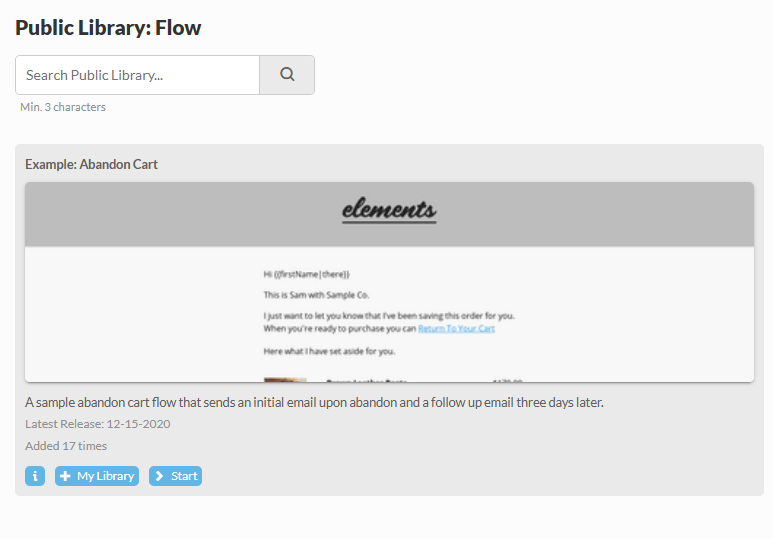
Abandon Cart is triggered by customer inactivity in their shopping cart or by closing the session. They are sent after a specified duration of inactivity and can offer a coupon that remains valid.
Configuring an Abandon Cart Flow
To access the Abandon Cart flow configuration:
-
Navigate to Main Menu > Storefronts > Select your host > Communications > Flows.
-
Click on Flow Library
-
From the Public Library section select Example: Abandon Cart > Start
Advanced Strategies
Beyond the basic settings, you can use UltraCart's features to enhance your abandoned cart recovery efforts.
Abandoned Cart Leads
UltraCart provides a report to export information about abandoned carts, which can then be used in third-party marketing systems or for further analysis.
To access the Abandon Lead Report:
- Navigate to Operations > Reporting > Abandon Lead Report.
If the customer abandons the cart either via the abandon interval or by leaving the checkout, if they have filled in at least their email and email their information will be sent to the Abandon Lead report.
Related Documentation:Abandon Lead Report
Conclusion
Effectively managing abandoned carts and utilizing Abandon Cart Flows are crucial strategies for maximizing your sales. By understanding and configuring the Abandon Interval and leveraging the Return Email feature, you can significantly improve your chances of recovering lost revenue and keeping your inventory accurate.