Introduction
UltraCart provides a flexible and comprehensive set of payment methods to help you accept payments from customers worldwide. This guide covers all configurable payment options available in your UltraCart account, organized by category easy setup and management.
Payment methods are configured in Configuration → Checkout → Payments. Each method can be individually enabled or disabled, and many offer advanced settings for restrictions, gateways, and compatibility with third-party services.
If you’re just getting started and want to offer the broadest variety of payment methods (credit cards, Apple Pay, Google Pay, PayPal, PayPal Credit, PayPal Fastlane, and more), we recommend connecting PayPal. PayPal supports multiple payment types and integrates seamlessly into your checkout process, making transactions quick and easy for your customers.
Note: Some payment methods require third-party integrations (e.g., Stripe, PayPal, Sezzle) and valid credentials. Always review setup requirements and test configurations in a sandbox before going live.
Prerequisites
-
An active UltraCart account with administrative access.
-
For gateway-integrated methods (e.g., Stripe, PayPal), valid credentials from the provider.
-
Test your configurations in a sandbox environment before going live.
Sectional Overview
There are five main sections to this page:
| Section | Description |
|---|---|
| PayPal | This is the section for configuring PayPal as a wholistic payment solution. Enable PayPal to allow your customers to checkout using: - Credit and Debit cards - Crypto wallet - Apple Pay - Google Pay - PayPal - PayPal Pay Later - Venmo - PayPal Fastlane. |
| Credit and Debit Cards | This section is where you will configure your payment gateway (Stripe, http://Authorize.net , Quickbooks, etc.) to accept credit/debit cards. - Visa - MasterCard - Discover - AMEX - JCB - Diners Club - E-check |
| Stripe | Stripe serves as a primary gateway for cards and alternative payments. Connect Stripe to unlock these methods, which appear under the Stripe section. - Stripe: Core Stripe integration for cards and ACH. - Amazon Pay: One-click payments for Amazon customers. - Link: Stripe's saved payment method for faster checkouts. - Klarna: "Buy now, pay later" installments (Europe/U.S.). - Afterpay/ClearPay: Short-term interest-free payments (Australia/U.S.). - Zip: Flexible payment plans for higher AOV. |
| Sezzle | Connect and enable Sezzle to offer Buy now, pay later to your customers. |
| Advanced Payments | This section contains additional payment types that you may provide to your customers. This section includes the following payment types: - Affirm - Cash - Cash On Delivery (COD) - Electronic Checks - Insurance - Loan Hero - Money Orders - Paper Checks - Purchase Orders - Quote Requests - Wire Transfers |
PayPal
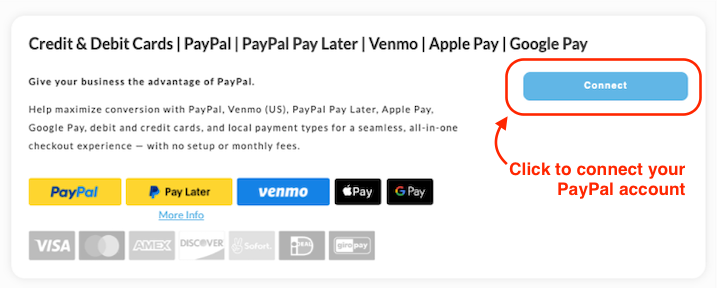
PayPal integration allows for quick, secure payments via PayPal accounts, guest checkout, and related services. Connect your PayPal account once, then enable individual options.
-
PayPal: Standard PayPal payments, including guest checkout.
-
PayPal Pay Later: Offers "buy now, pay later" financing options at checkout.
-
PayPal Fastlane: Speeds up checkout for returning PayPal users with one-click.
-
Venmo: Accepts Venmo payments (U.S. only, via PayPal integration). *Preferred by Millennials-GenZ
-
Apple Pay: Mobile wallet payments for iOS devices.
-
Google Pay: Android and web-based wallet payments.
-
Crypto: Cryptocurrency payments processed through PayPal's crypto service.
Note: PayPal services may incur additional fees; review PayPal's pricing for details.
noteada1c5b8-1e29-4fe9-954c-44a8f1beee02
If you’ve already connected your PayPal account and enabled credit and debit card payments in PayPal settings, you’re all set! Customers can enter their card details directly at checkout without logging into PayPal.
If you’ve already connected your PayPal account and enabled credit and debit card payments in PayPal settings, you’re all set! Customers can enter their card details directly at checkout without logging into PayPal.
Credit and Debit Cards
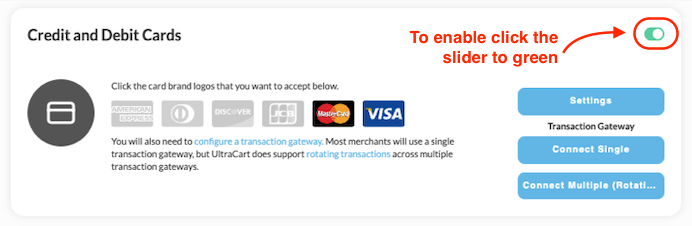
If you already have a preferred payment gateway or processor (e.g., Stripe, http://Authorize.net , QuickBooks Payments), you can configure them in the Credit and Debit Cards section.
| Description | |
|---|---|
| Settings | Click the box to the left of the payment method that you wish to configure. In almost all cases, there will be additional information to add to complete the configuration. Once you have completed the required configuration details, click the "Save" button at the bottom of the screen. |
| Connect Single (Gateway) | Here you will configure your specific credit card gateway with its configuration credentials. |
| Connect Multiple (Rotating) | This is an advanced configuration option which allows you to configure multiple credit card gateways. See: Rotating Transaction Gateway for more details. |
Credit and Debit Card Settings
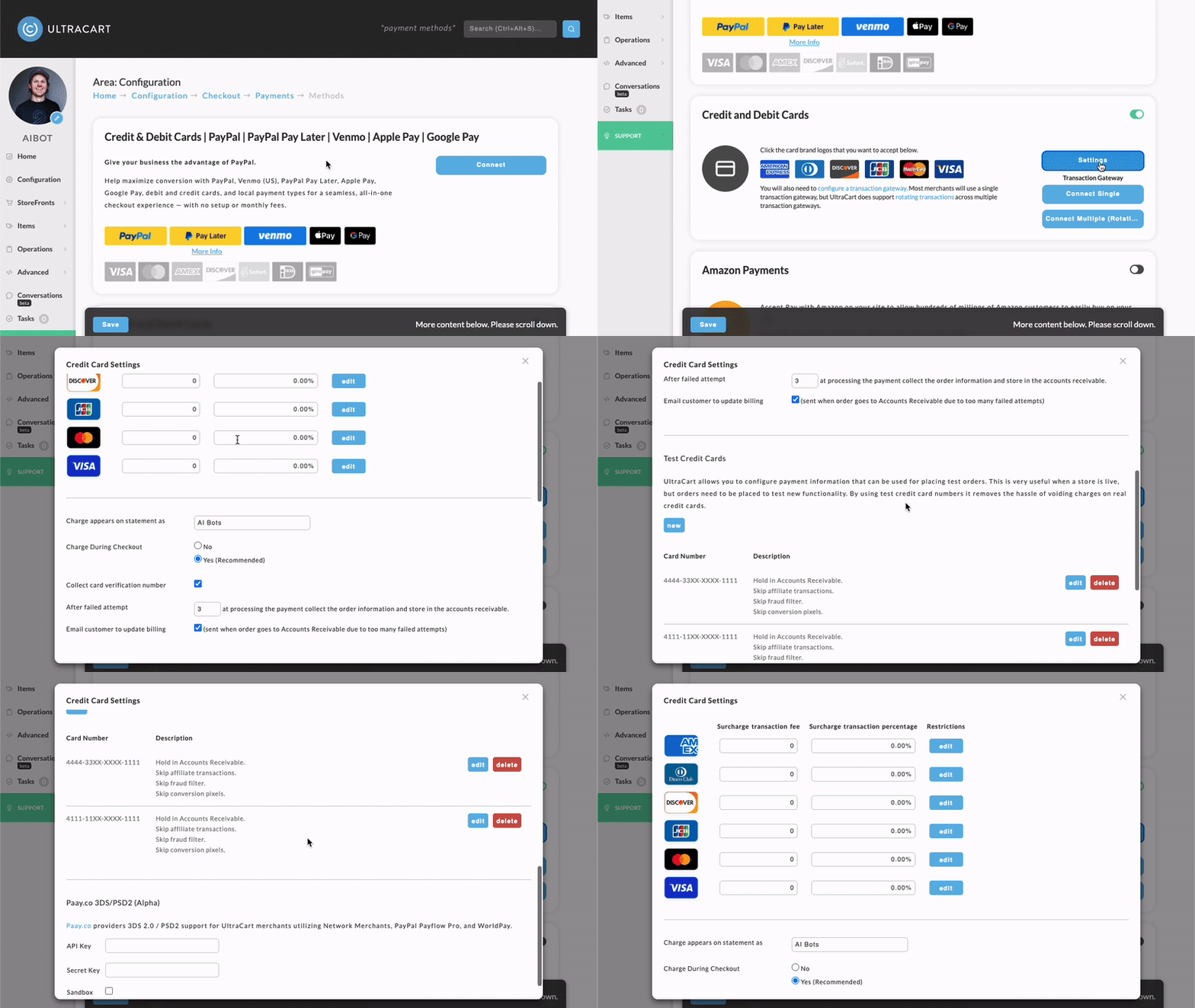
Credit Card Settings
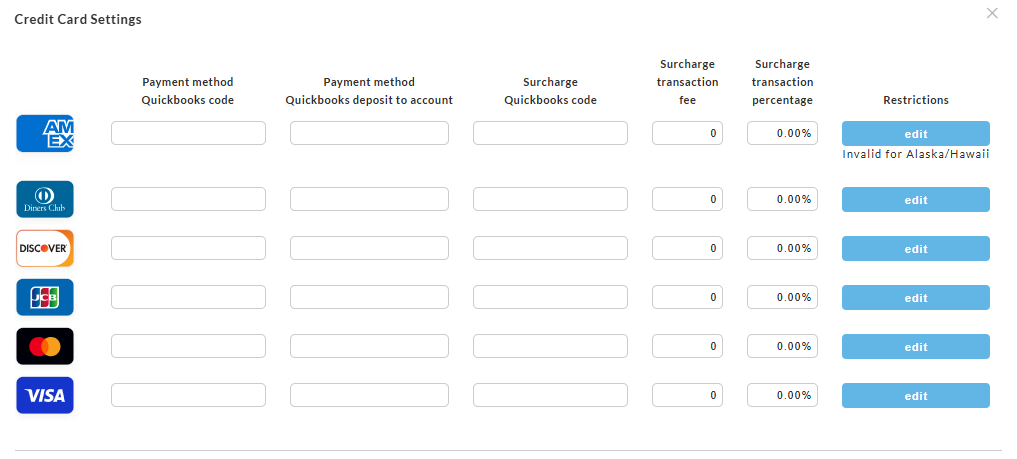
| Field Name | Description |
|---|---|
| Card Type | Displays the credit or debit card brand being configured (American Express, Diners Club, Discover, JCB, Mastercard, Visa). Each row contains settings specific to that card type. |
| Payment method QuickBooks code | Enter the QuickBooks payment method code that should be associated with transactions for this card type when exporting orders to QuickBooks. |
| Payment method QuickBooks deposit to account | Specifies the QuickBooks account where deposits for this card type should be recorded during QuickBooks synchronization. |
| Surcharge QuickBooks code | Defines the QuickBooks payment or surcharge code used when exporting surcharge-related transactions for this card type. |
| Surcharge transaction fee | Enter a fixed surcharge fee amount to apply to transactions processed with this card type. |
| Surcharge transaction percentage | Enter the percentage-based surcharge to apply to transactions processed with this card type. |
| Restrictions | Displays any configured restrictions for the card type. For example, a card type may be restricted from use in specific regions or states. |
| Edit | Opens the restriction configuration window for the selected card type, allowing the merchant to configure or modify usage restrictions. |
An Important Note About Surcharge Fees
Warning: Credit card surcharges are additional fees added to an order to offset the merchant’s credit card processing costs. While surcharging is legal in many jurisdictions, it is heavily regulated by card network rules, federal law, and state-specific requirements. Merchants should carefully review their merchant account agreement and card brand compliance requirements before enabling surcharges. Many merchant accounts prohibit or strictly limit passing surcharge fees to customers, and violations can result in fines, processing holds, or even termination of the merchant account.
Important restrictions may include:
-
Debit and prepaid cards generally cannot be surcharged, even when processed as credit transactions.
-
American Express equal-treatment rules can create compliance conflicts with Visa and Mastercard surcharge limitations.
-
Some states and territories prohibit or restrict surcharges entirely.
-
Card brands impose caps on allowable surcharge percentages and require the fee to not exceed the actual processing cost.
-
Visa and Mastercard typically require advance registration and customer disclosure signage before surcharging is implemented.
Due to the complexity of these requirements, merchants should consult both their payment processor and merchant agreement before implementing any surcharge program.
General Credit Card Transaction Information
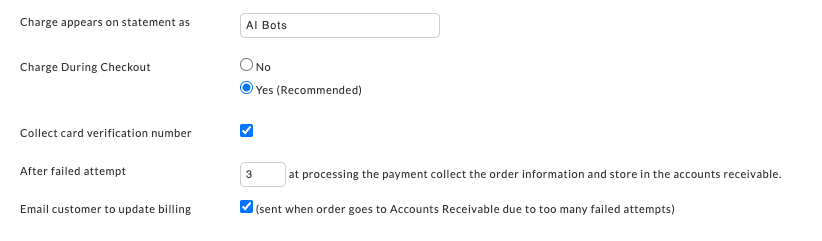
Test Credit Card Configuration
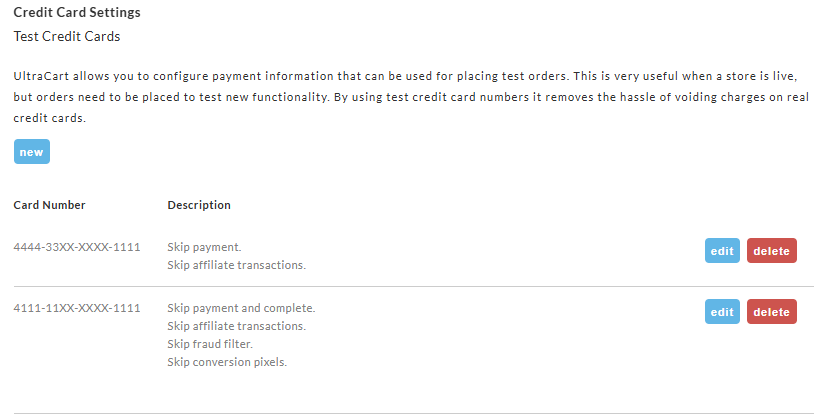
UltraCart allows you to configure payment information that can be used for placing test orders. This is very useful when a store is live,
but orders need to be placed to test new functionality. By using test credit card numbers it removes the hassle of voiding charges on real credit cards.
For more, see the following knowledge base article: Test Credit Card or Electronic Check Payments
http://Paay.co 3DS/PSD2 (Alpha)
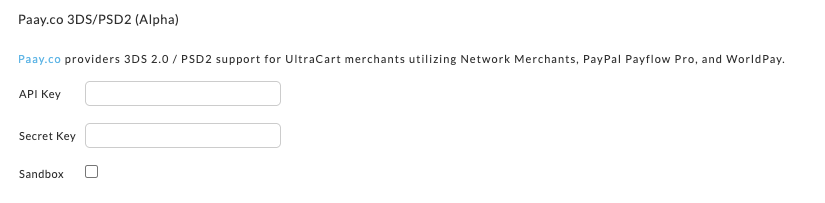
EMV 3DS is a global payment security standard. You can think of it like the chip & pin on your physical credit card, but for card-not-present (CNP) purchases.
3-D Secure is a protocol that enables card issuers to authenticate consumers, secure purchases, and prevent CNP fraud.
Also referred to as 3DS2, EMV 3DS allows card issuers to authenticate consumers without adding friction to the payment process. Everything happens behind the scenes using risk-based-authentication.
Provides issuers with access to over 150 additional data parameters resulting in a 95% authentication rate
Is optimized for web, mobile, and in-app purchases
Enables Strong Customer Authentication (SCA) so merchants are able to comply with PSD2
The Payment Services Directive 2 is a banking regulation issued in the European Economic Area (EEA) by the European Banking Authority (EBA). PSD2 is an open banking initiative that seeks to improve consumer protection, boost competition, and innovation. The legislation states that merchants must use Strong Customer Authentication (SCA) on e-commerce transactions when the acquirer and the issuer are both in the EEA.
Unlike the frictionless authentication, SCA doesn’t happen behind the scenes. Instead, it requires consumers to verify their identity using two of three elements:
-
Something they are (biometric)
-
Something they have (phone)
-
Something the know (password)
-
This is known as two-factor authentication.
PAAY supports SCA by enabling the use of two-factor authentication. Its flexibility allows issuers to set authentication preferences using their preferred risk and regulatory factors. In other words, issuers decide how the customer will be authenticated by using a one-time-passcode, knowledge-based questions, or biometrics.
to learn more about http://Paay.co , please see FAQ, Case Studies, & contact us
Stripe
Stripe serves as a primary gateway for cards and alternative payments. Connect Stripe to unlock these methods, which appear under the Stripe section.
-
Stripe: Core Stripe integration for cards and ACH.
-
Amazon Pay: One-click payments for Amazon customers.
-
Link: Stripe's saved payment method for faster checkouts.
-
Klarna: "Buy now, pay later" installments (Europe/U.S.).
-
Afterpay: Short-term interest-free payments (Australia/U.S.).
-
Zip: Flexible payment plans for higher AOV.
Prerequisite: A Stripe account with API keys. Use the Connect button to link.
Question: What if I don't have a gateway?
Sezzle
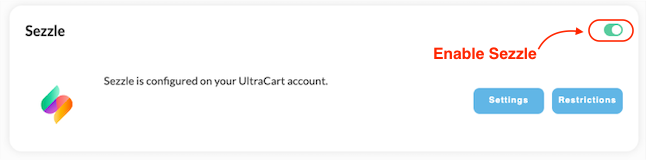
Sezzle is a payment method that allows the customer to split their purchase into four equal payments over a period of several weeks. Sezzle assumes all credit risk associated with offering the customer this purchase option.
Learn more about the Sezzle integration.
Advanced Payment Methods
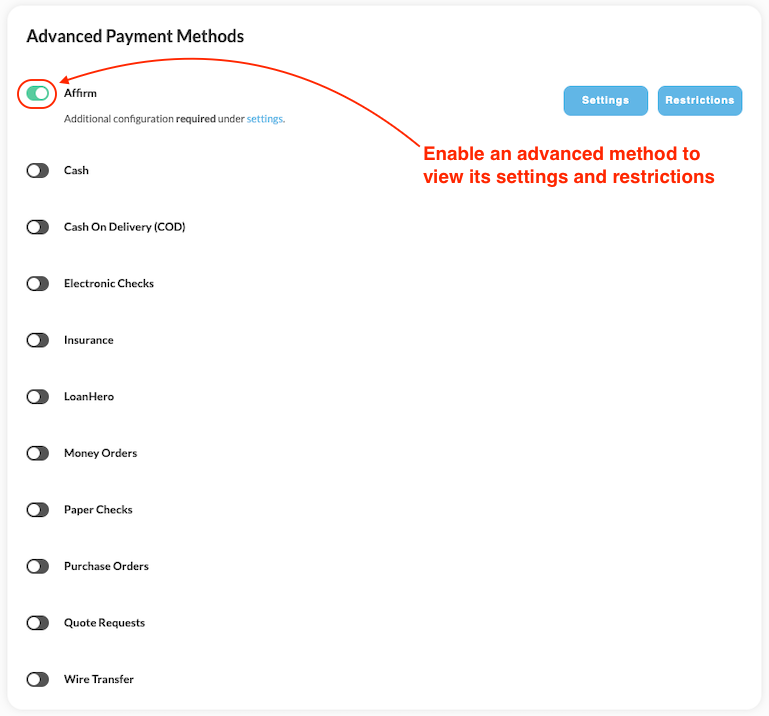
The advanced payment methods are considered "advanced" because they are used in a more limited fashion. This is in part due to the fact that many of these payment options are not based on a real-time validation process like the "Common" Methods. These methods may not be appropriate for many storefronts.
To configure an Advanced Method simply click on the Slider to make it green.
Once you've made your selection and configured any additional details, click the Save button on the bottom of the screen. You will be returned to the "Configuration" screen. (In most cases you'll configure more than one Payment Method.)
The following are brief descriptions of the Advance Methods:
| Method | Notes |
|---|---|
| Affirm | Provides installment payment options, including a 4-payment plan and monthly installments. |
| Cash | Allows cash payments; not recommended for most merchants due to operational challenges. |
| C.O.D | Enables "Cash on Delivery" payments; typically not recommended for most merchants. |
| Coinbase (Deprecated) | Previously supported Bitcoin wallet and exchange service. No longer available due to deprecated API. :::warning ### Deprecated API Coinbase eliminated the Payment API. ::: |
| Electronic Checks | Supports payments via electronic checks; recommended only with a properly configured gateway. |
| Insurance | Specialty payment solution designed for medical industry applications. |
| LoanHero | Custom payment plan tailored for medical financing needs. |
| Money Orders | Adds a money order payment option; not generally recommended for most merchants. |
| Paper Checks | Allows payment via paper checks with configurable "payable to" details. |
| Purchase Orders | Adds a purchase order payment method. Typically for business-to-business transactions. |
| Quotes Requests | Lets customers request a quote instead of completing payment immediately. Quotes Tutorial |
| Wire Transfer | Supports direct bank transfers; not typically recommended for most merchants. |
Payment Restrictions
This feature allows you to place payment restrictions on any particular payment method configured on your account. Learn more about Payment Restrictions.
Transaction Gateways
Purpose
Transaction gateways provide Internet based interfaces into the major credit card processing networks like FDC, NDC, Nova, and many more. Transaction gateways are analogous to a retail merchant's point-of-sale terminal.
Integrated Gateways
note5c225761-7aab-4e89-9ec1-806cba02fa4d
Reasons to Signup with a Gateway
Even if a merchant has a retail point of sale terminal already, they will still require a transaction gateway, due to PCI regulations that prohibit the exposure of the full credit card number. Since the full credit card number is obfuscated, having an credit card gateway configured with the account is integral to the payment processing of the placed orders. Additional benefit of having an integrated gateway include reduced data entry by keeping merchants from having to reenter order information to process the order. This reduces the time to process orders and removes potential errors from having to retype the order details into another system. In addition, UltraCart also has the ability to process orders in batch in a parallel fashion, which means authorizing even hundreds of orders can be accomplished in a matter of seconds. The Accounts Receivable chapter will cover processing orders with the transaction gateway in more detail.
Reasons to Signup with a Gateway
Even if a merchant has a retail point of sale terminal already, they will still require a transaction gateway, due to PCI regulations that prohibit the exposure of the full credit card number. Since the full credit card number is obfuscated, having an credit card gateway configured with the account is integral to the payment processing of the placed orders. Additional benefit of having an integrated gateway include reduced data entry by keeping merchants from having to reenter order information to process the order. This reduces the time to process orders and removes potential errors from having to retype the order details into another system. In addition, UltraCart also has the ability to process orders in batch in a parallel fashion, which means authorizing even hundreds of orders can be accomplished in a matter of seconds. The Accounts Receivable chapter will cover processing orders with the transaction gateway in more detail.
notea6c2d8ce-bcee-4cbb-a078-428eef790072
Credit Card processing Gateway Credentials
The credentials will be provided to you by the gateway, or you will log into the account to generate the configuration credentials that you'll configure in Ultracart.
Credit Card processing Gateway Credentials
The credentials will be provided to you by the gateway, or you will log into the account to generate the configuration credentials that you'll configure in Ultracart.
View of Gateways Configuration page
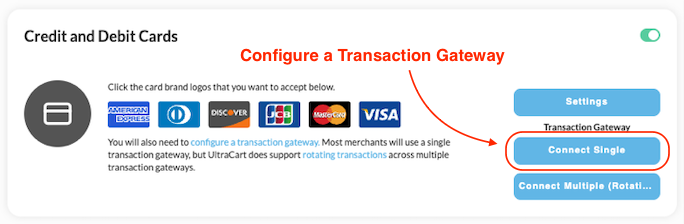
To set up and configure your transaction gateway, click the Connect Single button in the Credit and Debit Cards block. This will direct you to a page displaying the available payment gateways along with their configuration requirements.
.gif)
Transaction Gateway Authorization Model
The "Authorization Model" refers to how the credit card authorization transaction are handled.
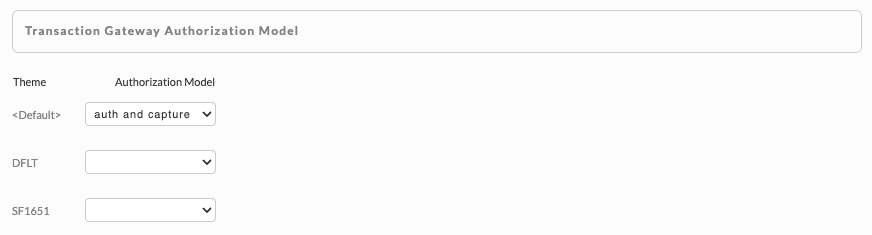
There are three "Authorization Model" options:
| Authorization Model | Description |
|---|---|
| Auth and Capture | means that both authorization and flagging for settlement occur in one transaction, in real-time. :::tip This is the default setting and the appropriate authorization model for most merchants. ::: |
| Auth then Capture | means an AUTH transaction (real time) followed by a delayed CAPTURE transaction for settlement, which will occur when the order is marked as shipping in the shipping department. :::info non shippable items will be processed in Auth and Capture mode. ::: |
| Auth Only | means the transactions simply are authorizing for checking the validity of the card and available credit for the payment transaction. :::note These transactions are NOT flagged for capture of payment. This model is not recommended fro the vast majority of merchants. ::: |
Supported Gateways
Currently UltraCart supports over 35 of the top transaction gateways. The transaction gateway a merchant selects is dependent on the ones that their merchant credit card processing bank will support. Contact the bank account representative to determine available options, pricing information, and setup information. After establishing an account with one of the transaction gateways, complete UltraCart's gateway configuration section for your gateway by selecting the checkbox for it from the list of gateways.
Limitations of Support
UltraCart has some limitations with regards to transaction gateway integration. UltraCart only supports charging the customer's credit card. The transaction gateway's web site provides the remaining functionality such as issuing credits, transaction activity inquiry, etc.
You can review the integration details for the integrated payment gateways here: Credit Card Processing Transaction Gateway Integration list
PCI regulations that prohibit the exposure of the full credit card number. Since the full credit card number is obfuscated, having an credit card gateway configured with the account is integral to the payment processing of the placed orders and wel as for processing refund, when needed.
Due to PCI requirements to protect the integrity of the stored CC details (the CC number is obfuscated through out the order lifecycle) when looking for a new gatewway, UltraCart strongly recommends selecting one of the gateways listed as supporting ***refund*** transaction.
Unsupported Gateways
There are literally hundreds of different transaction gateways available. UltraCart supports some of the most popular transaction gateways on the market today. If a merchant credit card processing bank does not offer one of UltraCart's supported transaction gateways, please contact support@ultracart.com. Typically, a short amount of time is required to add support for additional gateways.
Requirements for integration of new gateway
UltraCart requires the gateway to have an API integration rather than a web site handoff. This is due to the inherent lack of robustness to the website handoff approach.
Test Gateway
Only certain gateways allow for a "test" mode, which means you can only use a valid credit card, and real funds are processed. So, to help with initial account setup and testing, UltraCart has created a test transaction gateway, selectable from the Transaction Gateways tab on the Payments Configuration screen.
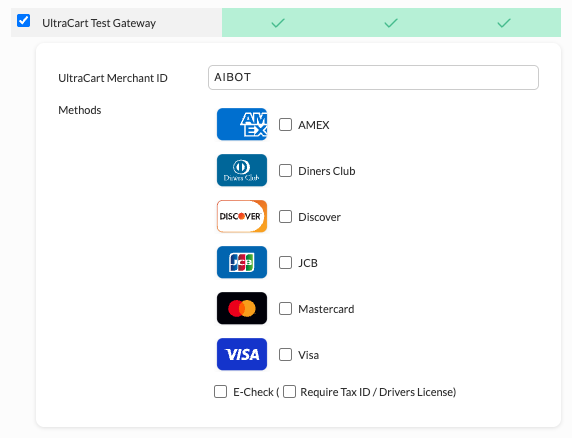
After selecting the test gateway, enter your Ultracart MerchantID and select the card types, then scroll to bottom of the page and click the save button to save the changes.
This gateway behaves like a "real" gateway, allowing you to completely test the system's functionality.
While it does not actually capture payments, it does allow you to perform a complete checkout to a receipt
so that you can add orders without actual transaction charges being accrued against a real credit card.
Test Gateway is for Testing only!
The UltraCart Test Gateway is for initially testing only, so make sure to configure your real credit card gateway after initial testing against the test gateway is completed.
To use the gateway, simply select it from the Transaction Gateways screen, and enter your Merchant ID. Select the payment types you want the gateway to handle, and press "Save".
Rotating Transaction Gateways
Rotating transaction gateways allow a merchant to spread credit card transactions across multiple gateways. While available to all UltraCart merchants, it is primarily intended for merchants with substantial transaction volume. Merchants should thoroughly test their configuration before going live with this feature.
For more regarding Rotating Transaction Gateways, navigate here: Rotating Transaction Gateway.
Frequently Asked Questions
When are Credit Cards Charged?
The answer depends on various details. Please visit the following document for more information: When are Credit Cards Charged.
Transparent Payment Processing Status
If an order is captured after the specified number of failed authorization attempts, the customer receives a receipt for the placed order. While the receipt does not directly reference the final transaction authorization attempt, it may be interpreted by the customer as proof of a successful payment. You can alter the default settings for the emailed receipt and the text displayed in the receipt provided in the customer's web browser to make things more transparent. See the following for more details: Tutorial - Transparent payment processing status of placed orders.
Recommended Payment Types
We are considering adding a gateway that offers e-check processing along with credit card processing. There are a number of gateways that offer e-check processing, for example Authorize.Net offers e-check support. However, customers rarely use e-check payments when offered. E-check transactions amount to fractions of a percent for most merchants because most people/businesses that want to draft money out of their account will already have a PayPal account with their checking account linked (or prefer to send a paper check). Our advice regarding payment processing is as follows:
-
Visa/MC is a given.
-
AMEX is a good idea as many business customers have AMEX.
-
PayPal - always a good idea. Some merchants have seen a 30% boost in transactions by supporting PayPal.
-
Amazon Payments - new, but gaining strong traction with customers.
Connecting Your Bank Account for Payouts
UltraCart does not directly store or manage your bank account information for receiving payouts. Bank account configuration is handled within the specific payment processing gateway or service you have enabled.
For Credit Card / ACH Gateways
-
Log in to your account with the payment gateway provider.
-
Navigate to their merchant settings or payout/banking section.
-
Add and verify your bank account details (routing number, account number, account type).
-
Once verified, the gateway will automatically deposit funds from settled transactions according to their schedule (typically 1-3 business days after settlement).
For PayPal and Similar Services
-
In your PayPal Business account, go to Wallet > Bank accounts (or the equivalent section).
-
Add and confirm your bank account.
-
Set your preferred withdrawal method and schedule.
UltraCart Configuration Notes
-
Ensure the gateway is correctly configured in your UltraCart merchant account under Payments > Payment Methods.
-
Test a small transaction end-to-end to confirm funds flow to the correct account.
-
Contact your gateway provider's support for any verification delays or payout issues.
Important: Never enter sensitive banking details directly into UltraCart (besides the payment service credentials for integrating the payment service). All bank account management occurs in the external gateway interface for security and compliance reasons.