PayPal Agentic Commerce
PayPal Agentic Commerce allows your products to be discovered and purchased directly within AI-powered chat conversations. When enabled, UltraCart syncs your product catalog to PayPal, which distributes it to supported AI assistant surfaces. Customers can browse, select, and pay for products without ever leaving their chat — reducing friction and opening a new sales channel for your store.
For more details on how conversational commerce works, see AI-Powered Conversational Commerce.
How It Works
-
Catalog Sync — UltraCart synchronizes your product catalog and pricing to PayPal.
-
AI Distribution — PayPal distributes your catalog to supported agentic commerce surfaces (AI chatbots and assistants).
-
In-Chat Checkout — Customers discover your products through natural conversation with AI assistants and complete purchases using PayPal payments, all within the chat.
-
Order Fulfillment — Orders flow directly into UltraCart for standard processing and fulfillment.
Benefits
-
New Revenue Channel — Reach customers already spending time in AI chat interfaces with reduced purchase friction.
-
Better Product Discovery — AI assistants intelligently surface the right products from your catalog based on customer queries.
-
Lower Cart Abandonment — Inline checkout eliminates the redirects that typically increase abandonment rates.
-
Expanded Reach — Display your products across multiple AI agent surfaces without additional marketing spend.
-
Data Insights — Track top-searched items, identify catalog gaps, and monitor conversion by surface.
Prerequisites
Before enabling PayPal Agentic Commerce, you must have PayPal connected as a payment method on your account.
If you have not yet configured PayPal, navigate to Configuration → Checkout → Payments and connect your PayPal Business account. See the PayPal Integration documentation for complete setup instructions.
PayPal Agentic Commerce is currently available to US-based merchants only. Additional countries are planned for future rollout.
Enabling PayPal Agentic Commerce
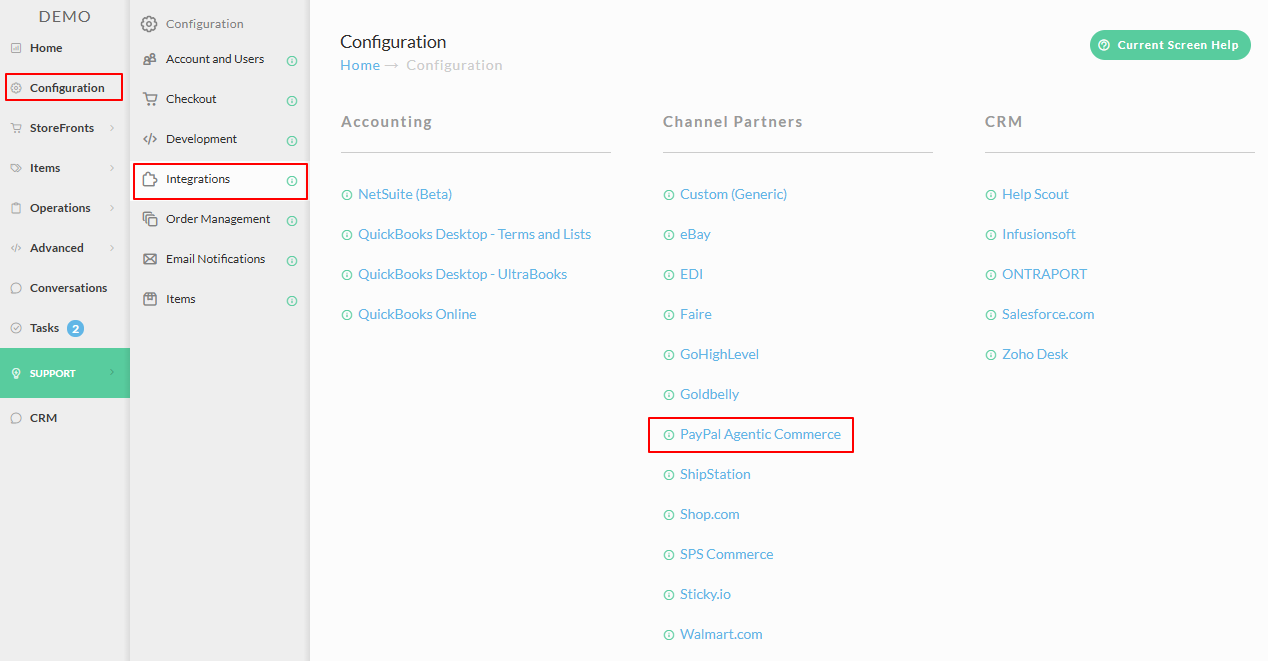
Step 1: Navigate to Integrations
From the UltraCart back office, go to Configuration → Integrations.
You will see PayPal Agentic Commerce listed under the Channel Partners section.
Step 2: Open PayPal Agentic Commerce Settings
Click on PayPal Agentic Commerce to open the settings page.
Step 3: Select Your StoreFronts
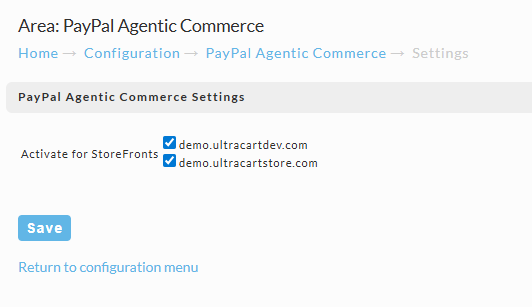
On the PayPal Agentic Commerce Settings page, you will see a list of your StoreFronts with checkboxes. Select the StoreFronts you want to enable for agentic commerce.
Each selected StoreFront will have its product catalog synced to PayPal and made available through AI assistant surfaces.
Only items that are assigned to a selected StoreFront will be distributed to agentic commerce surfaces. Make sure your items are assigned to the appropriate StoreFront(s) or they will not appear in AI chat results.
Step 4: Save
Click the Save button to apply your changes.
That's it — your selected StoreFronts are now enrolled in PayPal Agentic Commerce. Products from those StoreFronts will begin appearing in supported AI chat surfaces as PayPal processes the catalog sync.
Eligibility Requirements
To participate in PayPal Agentic Commerce, your store should meet the following criteria:
| Requirement | Details |
|---|---|
| PayPal Account | PayPal Business account connected to UltraCart |
| Product Feeds | Structured product catalog with complete item details |
| Policies | Documented fulfillment and return policies |
| Product Types | Digital or shippable physical goods (beauty, apparel, electronics accessories, digital gift cards) |
| Location | US-based merchants (additional countries planned) |
Related Documentation
-
PayPal Integration — Setting up PayPal as a payment method
-
AI-Powered Conversational Commerce — Overview of how agentic commerce works