PayPal Customer Telephone Number
Some merchants prefer to conduct customer support via telephone rather than email. However, if you do not have the following option turned "on" in your PayPal Profile settings, the customer's phone number will not be collected.
Here's how to get it set up from your PayPal account:
- Log in to your account at www.PayPal.com
- Hover over your name in the right hand corner of the screen and select Account Settings
- From your settings, select **Website Payments **in the menu on the left
- Next to Website preferences, select Update
- Scroll down and under Contact Telephone Number you can turn it on.
In the Contact Telephone Number section you will see 3 options
- On (Optional Field)
- On (Required Field) ← Choose this option!
- Off (PayPal recommends this option)
Select the On (Required Field) as shown below.
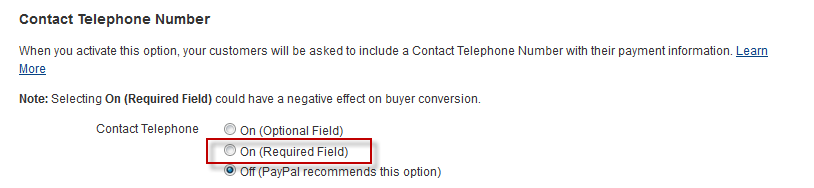
Click the "Save" button after you have made your selection. Now PayPal orders will flow into UltraCart with a phone number.
Was this page helpful?