Overview
Merchants can configure the amount of contact information that customers are required to provide during the checkout process.
If there is a problem processing the payment or shipping the order, the merchant can contact the customer using the information provided.
note
Home → Configuration (Checkout) → Checkout Information
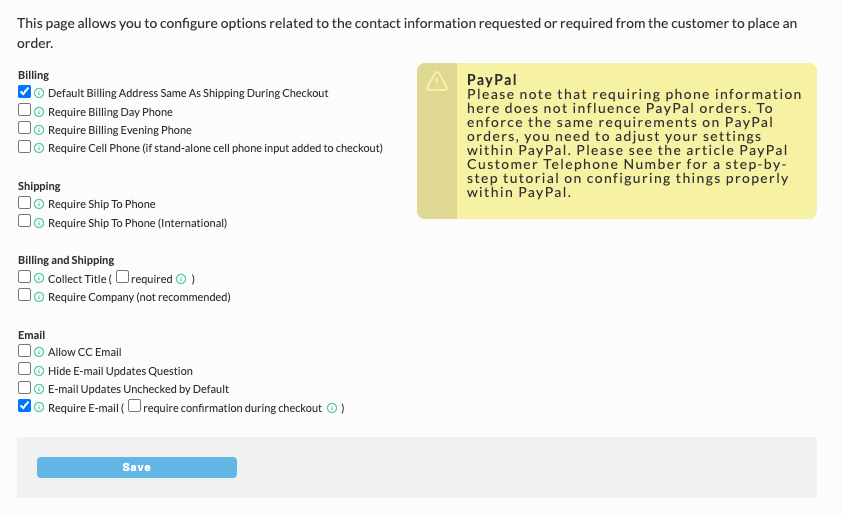
Configuration Options
Typically, merchants require a daytime phone number and email address from customers so they can resolve issues quickly. Below is a description of all of the contact options.
| Billing | |
|---|---|
| Default Billing Address Same As Shipping During Checkout | If this option is checked then the checkbox to use the shipping address as the billing address will be preselected during the checkout process. Typically this is a good option to turn on. This option is not applicable for the single page checkout which uses this behavior by default. |
| Require Billing Day Phone | Requires the customer to specify their billing day time telephone. |
| Require Billing Evening Phone | Requires the customer to specify their billing evening time phone number. |
| Shipping | |
| Require Ship To Phone | Requires the customer to specify the phone number for the recipient at the shipping address. This option should be enabled if you are shipping UPS or FedEx. ### PayPal Phone Number Issue :::note PayPal - Please note that requiring phone information here does not influence PayPal orders. To enforce the same requirements on PayPal orders, you need to adjust your settings within PayPal. Please see the article PayPal Customer Telephone Number for a step-by-step tutorial on configuring things properly within PayPal. ::: |
| Require Ship To Phone (International) | Requires the customer to specify the phone number of the shipping recipient if the address is international. |
| Billing and Shipping | |
| Collect Title | Allow the customer to specify a title for the billing and/or shipping address. A good option if you are selling to professionals where knows their title helps you customize the order. |
| Require Company | Require a company name for the billing and shipping address. Only enable this option if you are shipping exclusively to businesses. |
| Allow CC Email | Allow the customer to specify an address email that should be carbon copied on the receipt and shipment email notifications. |
| Hide E-mail Updates Question | Removes the email update subscription checkbox from the checkout. note Note: If you turn on the option to hide the email updates during the checkout then the customer can not opt-in to receive your emails. This will prevent you from subscribing customers to the internal UltraCart marketing engine as well as third party autoresponders like iContact, MailChimp, etc. Note: If you turn on the option to hide the email updates during the checkout then the customer can not opt-in to receive your emails. This will prevent you from subscribing customers to the internal UltraCart marketing engine as well as third party autoresponders like iContact, MailChimp, etc. note Note: Ontraport is treated slightly different than the 3rd party marketing integrations. UltraCart sends the order over to Ontraport with a "mailing list" field showing if they were opted-in or not. So, while UltraCart is not filtering Ontraport transmissions, you should check with Ontraport to determine exactly how they will treat the transmission on there end depending on this field. Note: Ontraport is treated slightly different than the 3rd party marketing integrations. UltraCart sends the order over to Ontraport with a "mailing list" field showing if they were opted-in or not. So, while UltraCart is not filtering Ontraport transmissions, you should check with Ontraport to determine exactly how they will treat the transmission on there end depending on this field. |
| Require E-mail (and confirmation email) | Require the customer to provide an email during the checkout. UltraCart recommends enabling this option. (If checked, you can also enable "Email confirmation", which displays a second email address field for confirming that the address has been entered correctly.) Single Page Checkout: the single page checkout in your theme may not include the email confirmation field by default. On a Visual Builder theme, you can add it in Visual Builder. See Single Page Checkout. |
About Google Phone Number Validation
During the checkout, when the customer enters their phone number and then tabs through to the next field, the phone number will be validated using Google's phone number validation API, in order to eliminate fake phone numbers such as "111-222-3333".
Was this page helpful?