Configuring a Gateway that Supports Authorize.Net Emulation
Authorize.net is one of the most popular gateways on the internet. As a testament to their product, the API hasn't had to change a whole lot since it was introduced in the mid 90's. One popular approach for competing gateways to take is to expose an interface to their gateway that looks identical to the Authorize.Net API. This allows existing shopping carts to quickly support a range of additional gateways that allow look and act like Authorize.Net. If your payment gateway is not listed on UltraCart, but has Authorize.Net emulation then you can still use it with UltraCart.
To configure your gateway go to:
Main Menu → Configuration → Checkout → Payments → Transaction Gateways
Scroll down and check the box for Authorize.Net Emulator as shown below.
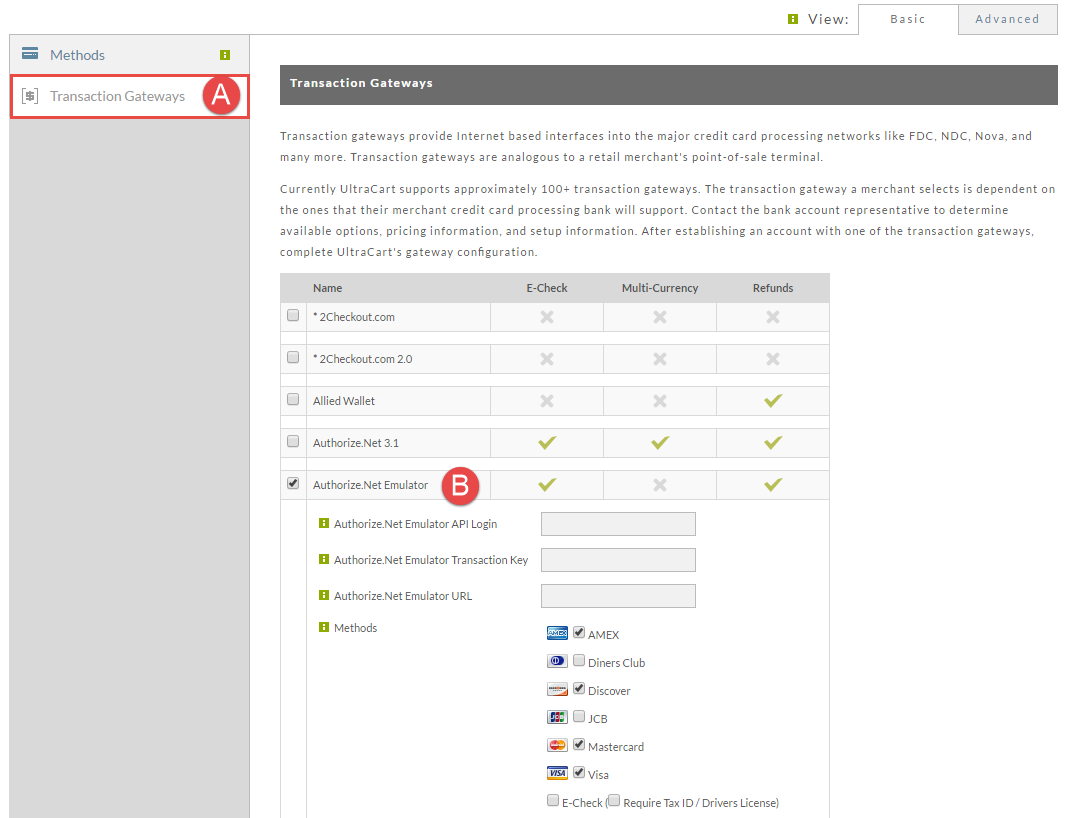
After you check the box a set of configuration options for the gateway will appear. Below is an explanation of each option.
| Field | Description |
|---|---|
| Authorize.net Emulator API Login | This is the login name that is provided by your gateway. If you are unsure of this value, ask your payment gateway for the x_login value. |
| Authorize.net Emulator Transaction Key | This is basically the password that UltraCart uses with your gateway. If you are unsure of this value, ask your payment gateway for the x_tran_key value. |
| Authorize.net Emulator URL | This is the URL to the script on your payment gateways website that receives the API requests. Your payment gateway should be able to product you this complete URL. |
| Methods | Check the boxes for each card type that this gateway supports |
Known Payment Processors with Authorize.Net Emulation
| Name | Emulator URL |
|---|---|
| eProcessingNetwork | https://test.authorize.net/gateway/transact.dll |
| InstaBill | https://secure.instabillgateway.com/gateway/transact.dll |
| Network Merchants | https://secure.networkmerchants.com/gateway/transact.dll |
| Pivotal Payments | https://emulator.pivotalpayments.com/Emulator/PaymentGateway.aspx |
| Plug N Pay | ??? Contact Plug N Pay for their Emulator URL (please paste the URL into the comments field below so we can update this page with the correct URL |
| PowerPay | https://verifi.powerpay.biz/gateway/transact.dll |
| Transaction Services | https://gateway.trxservices.com/authnet |
Gateway Providers: If your gateway has Authorize.Net emulation and is not on our list, please email support@ultracart.com
Frequently Asked Questions:
_Question: Is the UltraCart integration based on AIM or SIM emulation? Our gateway's Emulation URL needs to know? _
Answer: Our integration uses the AIM integration.