Paytrace Gateway Integration
Introduction
The PayTrace integration allows UltraCart merchants to securely process credit card transactions using the PayTrace payment gateway.
This guide walks you through:
-
Creating PayTrace API credentials
-
Configuring the PayTrace gateway in UltraCart
-
Testing and validating your integration
This integration uses OAuth 2.0 token-based authentication, aligning with modern payment security standards. ucdoc-Paytrace Gateway Integrat…
Prerequisites
Before configuring PayTrace in UltraCart, ensure you have the following:
-
An active PayTrace merchant account
-
Permission to create API Users within PayTrace
-
UltraCart administrative access to:
-
Payment gateway configuration
-
Checkout settings
-
Prerequisite: Do not use your primary PayTrace login credentials. Always create a dedicated API user for integrations. ucdoc-Paytrace Gateway Integrat…
Step 1: Create a PayTrace API User
To authenticate UltraCart with PayTrace, you must create a dedicated API user.
-
Log in to your PayTrace account
-
Navigate to:
Users → New User -
Select API User as the user type
-
Enter:
-
Username
-
Password
-
-
Assign permissions:
- Recommended: Select All (or minimum required permissions)
-
Click Save
The API username and password created here will be used in UltraCart.
Note: The API password is separate from your PayTrace account login password. ucdoc-Paytrace Gateway Integrat…
Step 2: Understand PayTrace Authentication
PayTrace uses an OAuth 2.0 authentication flow to generate a bearer token.
UltraCart handles this process automatically, but understanding it helps with troubleshooting.
Example Token Request
curl -X POST https://api.paytrace.com/oauth/token \
  -H "Accept: */*" \
  -d "grant_type=password&username=YourUserName&password=YourPassword"
This request returns a Bearer token, which is used for all subsequent API requests.
Warning: Never expose API credentials in client-side code or public repositories. ucdoc-Paytrace Gateway Integrat…
Step 3: Configure PayTrace in UltraCart
Navigate to the UltraCart payment gateway configuration:
Main Menu → Configuration → Checkout → Payments → Transaction Gateways
-
Create or edit a Single Transaction Gateway
-
Select PayTrace as the gateway type
Configuration Fields
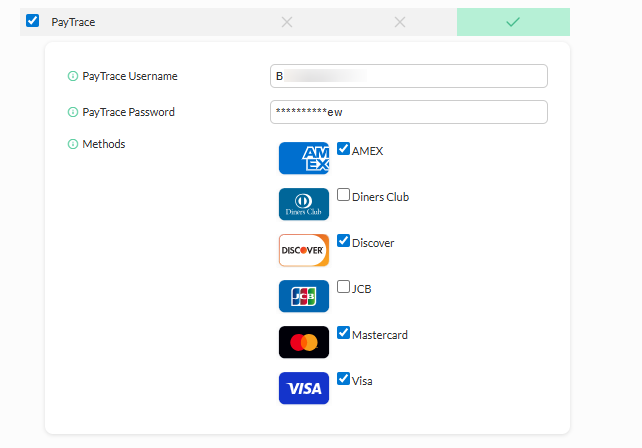
| Field | Description |
|---|---|
| Gateway Type | Select PayTrace |
| API Username | API user created in PayTrace |
| API Password | API password for the API user |
| Transaction Source Key | Provided by PayTrace (if applicable) |
| Test Mode | Enable for sandbox/testing |
| Currency | Must match your PayTrace account |
| Authorization Type | Authorize or Authorize + Capture |
Step 4: Save and Test the Configuration
-
Click Save
-
Place a test order in your storefront
-
Verify:
-
Transaction completes successfully
-
No gateway errors appear in order logs
-
Authorization/capture behavior is correct
-
Security Best Practices
Follow these best practices to protect your integration:
-
Use dedicated API users for integrations
-
Assign minimum required permissions
-
Store credentials securely (server-side only)
-
Rotate API credentials periodically
Never expose credentials in:
-
JavaScript
-
Public repositories
-
Client-side applications
Tip: Use PayTrace Protect.js or equivalent client-side encryption tools for secure card handling. ucdoc-Paytrace Gateway Integrat…
Troubleshooting
Invalid Credentials Error
Error Example:
Invalid Credentials
Resolution:
-
Verify API username and password
-
Ensure API user is active
-
Reset API password if needed
-
Confirm OAuth request format
Transactions Failing
-
Confirm the gateway is active
-
Check for:
-
Currency mismatches
-
Authorization type conflicts
-
-
Review UltraCart order logs for gateway responses
Unable to Generate Token
Verify the following:
-
Endpoint is correct:
https://api.paytrace.com/oauth/token -
Grant type is
password -
Credentials are valid
If issues persist, contact PayTrace support.
FAQ
Q: Can I use my PayTrace login credentials?
No. You must create a dedicated API user. Using your primary login is not supported and introduces security risks. ucdoc-Paytrace Gateway Integrat…
Q: Where is the API password generated?
The API password is created when defining the API user:
Users → New User → API User
Q: Should I give full permissions to the API user?
-
Initial setup: Select All is acceptable
-
Production: Reduce to only required permissions
Q: Does UltraCart store the OAuth token?
No action is required. UltraCart manages authentication internally using the credentials you provide. ucdoc-Paytrace Gateway Integrat…
Conclusion
Integrating PayTrace with UltraCart provides a secure and scalable way to process payments using modern API authentication.
By properly configuring API users and following security best practices, you ensure:
-
Reliable transaction processing
-
Secure handling of payment data
-
Reduced risk of credential exposure