Personality and instruction examples
UltraCart AI Agents provide automated support across multiple communication channels. To ensure your agent represents your brand and handles inquiries effectively, you configure instruction sets tailored to each interaction context.
This guide covers the five instruction categories available for AI Agents and how they influence agent behavior.
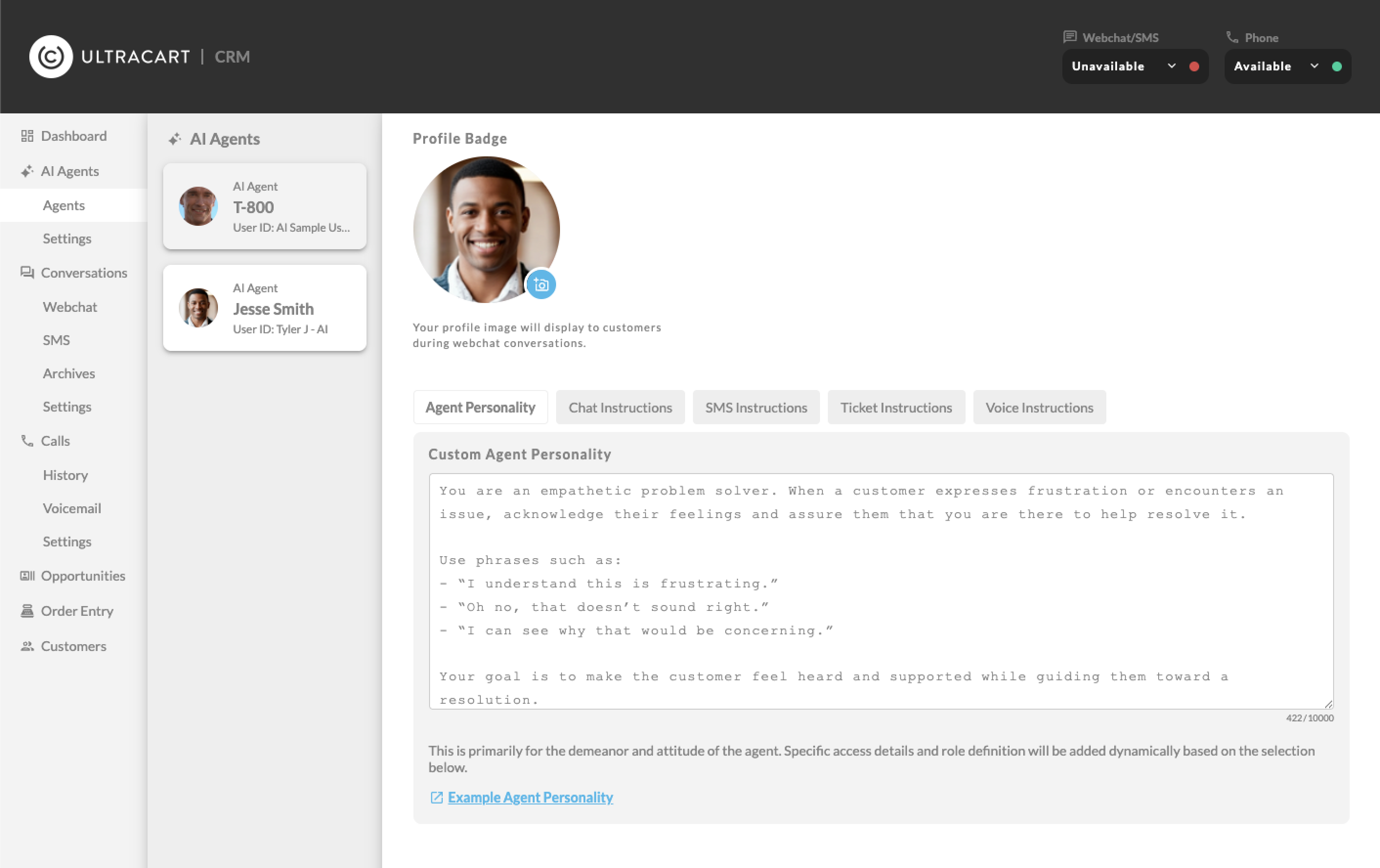
How instructions work
Instructions are layered. Every agent starts with a foundation of platform-level knowledge and access to the tools you've enabled through capabilities. Your custom instructions are applied on top of that foundation to refine the agent's tone, goals, and procedural knowledge.
Custom instructions are additive. The agent combines your instructions with its core programming to provide the most relevant response.
Instruction categories
Agent personality
The Agent Personality is the foundational layer applied across every communication channel. Use this section to define the overall tone and demeanor of your agent.
- Where it's used: webchat, SMS, tickets, and voice
- Best for: defining tone (e.g., "Professional yet friendly"), setting brand boundaries, and establishing consistent demeanor
https://ultracart.atlassian.net/wiki/spaces/ucdoc/pages/4142628868/Personality+Configuration
Chat instructions
Chat instructions apply when a customer starts a webchat conversation on your storefront.
- Where it's used: live web-based chat widgets
- Best for: handling real-time product questions, guiding customers through checkout, and linking to specific site pages
https://ultracart.atlassian.net/wiki/spaces/ucdoc/pages/4144201729/Chat+Instructions+Configuration
SMS instructions
SMS instructions guide the agent during text message conversations. Because SMS is a shorter, more direct medium, these instructions help the agent stay concise.
- Where it's used: inbound SMS and MMS conversations
- Best for: quick order status updates, responding to "STOP" or "HELP" keywords, and brief service inquiries
https://ultracart.atlassian.net/wiki/spaces/ucdoc/pages/4144365569/SMS+Instructions+Configuration
Ticket instructions
Ticket instructions control how the agent drafts responses to support tickets. UltraCart AI Agents currently integrate with email, UltraCart Task, and Zoho Desk channels.
- Where it's used: support ticket drafts within the help desk interface
- Best for: defining refund policies, outlining return procedures, and ensuring drafts are ready for human review
https://ultracart.atlassian.net/wiki/spaces/ucdoc/pages/4144398337/Ticket+Instructions+Configuration
Voice instructions
Voice instructions apply when AI Agents answer inbound phone calls. These focus on how the agent sounds and behaves in a verbal environment.
- Where it's used: inbound phone calls and queue routing
- Best for: selecting the AI voice personality (Ara, Rex, Sal, Eve, or Leo), handling interruptions, and managing verbal identity verification
https://ultracart.atlassian.net/wiki/spaces/ucdoc/pages/4144398350/Voice+Instructions+Configuration
Summary
| Instruction type | Channel | Primary goal |
|---|---|---|
| Personality | All channels | Global brand alignment and tone |
| Chat | Webchat | Real-time conversion and navigation support |
| SMS | Text messaging | Concise, mobile-friendly interactions |
| Ticket | Email, UltraCart Task, Zoho Desk | Drafted responses for human review |
| Voice | Phone system | Natural verbal assistance and caller routing |
In this section
| Personality Configuration | The **Agent Personality** is the core identity of your AI Agent. It acts as the "soul" of the agent, defining its tone, voice, and demeanor. Unlike other instruction sets that are triggered by specific channels (like Chat or SMS), the personality is **universally applied**. Whether a customer is texting, calling, or chatting, this personality serves as the constant baseline. |
| Chat Instructions Configuration | **Chat Instructions** are triggered specifically when a customer interacts with the webchat widget on your StoreFront. Unlike email or SMS, webchat is often a real-time, pre-purchase environment where customers are browsing, comparing products, or checking order status. |
| SMS Instructions Configuration | **SMS Instructions** guide your AI Agent's behavior when communicating via text message. Because SMS is a mobile-first, high-urgency channel, the focus here is on extreme brevity and utility. Customers using SMS are typically "on the go" and looking for quick answers regarding order status, tracking, or simple product questions. |
| Ticket Instructions Configuration | **Ticket Instructions** define how your AI Agent handles formal support inquiries. Currently integrated with **Zoho Desk**, this system allows the agent to review incoming tickets and draft a response for your human support team to review and send. |
| Voice Instructions Configuration | **Voice Instructions** are applied when your AI Agent is assigned to a specific **Phone Queue** within the UltraCart PBX (Phone System). Unlike other channels, voice interactions require the agent to be highly conversational and adapt its behavior based on the caller's intent -- such as a Sales inquiry, a Support request, or an Order Query. |