Channel Partner API - HTTPS POST Guide
The HTTPS POST interface for the channel partner API is intended to allow interaction with the API by posting name/value pairs and receiving back simply formatted data.
Call Center Checklist
This is a checklist of commonly need information for call centers who are implementing this API to take orders for a merchant. If you are the developer in charge of the integration, you should contact the merchant and request the following information. The merchant can (and should) provide all of this to you.
- Merchant ID. This is a CHAR5 string that identifies the merchant. It is uppercase. You will need to include it in every communication with UltraCart.
- Item IDs. These are CHAR20 strings that identify product. They are not skus or external identifiers. The merchants create them as they see fit. You will need a "Merchant Item ID" and (optionally) a description for each item you take orders for.
- Available Shipping Methods. You need a list of available shipping method. The methods are configured and turned off/on by the merchant. Examples are:
UPS: Ground,FedEx: Residential. Most shipping methods will contain, but the merchant is free to give them custom names. - If the merchant requires an "Advertising Source", i.e., where did you hear from us?, you may need a list of sources from them. The merchant has the option to require/not require advertising sources, and also the option for free form or pick list. If the merchant requires advertising sources and requires a pick list, you will need that list to complete an order.
- If coupons are being used, you will need a list of applicable coupon codes.
Summary: Merchant ID, Item IDs, Shipping Methods, Advertising Sources, Coupon Codes
URL
The URL for the API is:
[https://secure.ultracart.com/cgi-bin/UCChannelPartnerAPIV1](https://secure.ultracart.com/cgi-bin/UCChannelPartnerAPIV1)
HTTP POST is required and HTTP GET will be rejected with a 400 Bad Request response. To illustrate, click the link above.
Your post must have a Content-type header of application/x-www-form-urlencoded and must indeed be url encoded. Our firewalls will not allow un-encoded data to pass through. Will not happen.
Credentials
You'll notice below three fields (credentials.merchantId, credentials.channelPartnerCode, credentials.channelPartnerPassword) used to authenticate each request. These are NOT your normal login credentials. You must create a custom channel partner and specify these values in the UltraCart backend.
Steps:
- Navigate to Home → Configuration
- Scroll down to the Channel Partners section
- Click on the Custom (Generic) link
- Click the
newbutton. - Enter the values.
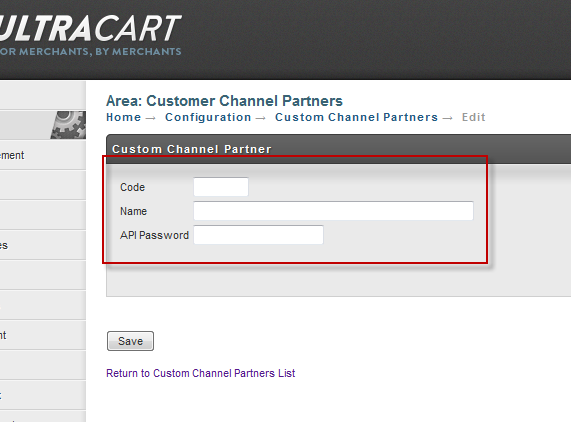
Code | Up to 5 characters. This code identifies the channel. LGCY for a legacy system? It can be anything you desire to identify the source of data. |
|---|---|
Name | This is a login, up to 50 characters. Save yourself trouble and keep these simple. letters. numbers, underscores. Don't add spaces. You can. Just don't. |
API Password | Min 8 characters and up to 50 characters. A password for the login. Go nuts. |
Importing an Order
The table below shows all the possible parameters for the HTTPS POST.
Acceptable values for boolean parameters:
true: true, TRUE, yes, YES, on, ON, y, Y, 1
false false, FALSE, no, NO, off, OFF, n, N, 0
| Parameter Name | Format | Description | Required |
|---|---|---|---|
| method | String | This should be the value importOrder to trigger this particular API. | Y |
| credentials.merchantId | String | UltraCart merchant ID to import into. | Y |
| credentials.channelPartnerCode | String | Channel partner code to use. | Y |
| credentials.channelPartnerPassword | String | API password configured on the channel partner | Y |
| order.channelPartnerOrderId | String | A unique order ID from the external system. | Y |
| order.paymentMethod | String | The method of payment. Allowed values are: - Amazon (order.skipPaymentProcessing must be passed as true) - Cash - Check - COD - Credit Card - eCheck - Money Order - PayPal (order.skipPaymentProcessing must be passed as true) - Purchase Order - Wire Transfer | Y |
| order.noRealtimePaymentProcessing | Boolean | Leaves the order in Accounts Receivable instead of processing the card in real-time. | |
| order.skipPaymentProcessing | Boolean | Skip over the payment processing and move the order on to shipping. | |
| order.considerRecurring | Boolean | If the order is a recurring one generated by an outside system and you set this field to true, we will indicate the recurring flag to gateways that support it (Authorize.Net and PayPal Web Payments Pro) | |
| order.autoApprovePurchaseOrder | Boolean | Automatically approve the purchase order. | |
| order.storeIfPaymentDeclines | Boolean | Store the order in Accounts Receivable if the credit card declines | Recommend - Y |
| order.treatWarningsAsErrors | Boolean | Consider all warnings (such as a pre-order warning) as errors that prevent the order from importing. | Defaults to Y |
| order.storeCompleted | Boolean | Store the order in the completed orders stage. This is useful for importing historical orders from another system. | |
| order.creditCardAuthorizationReferenceNumber | String | If you authorized the order outside of UltraCart, this is the transaction identifier that UltraCart will use to capture the order. :::note Review your payment gateway's integration guide to make sure you pass the correct value. For example, Authorize.Net gateways need to pass the transaction ID in this field and not the six character authorization ticket number. ::: | |
| order.creditCardAuthorizationAmount | Number | If you authorized the order outside of UltraCart, this is the amount of the authorization. | |
| order.creditCardAuthorizationDts | Timestamp | If you authorized the order outside of UltraCart, this is the timestamp of the authorization in the format MM/DD/YYYY HH:MM:SS | |
| order.creditCardType | String | Visa, MasterCard, AMEX, or Discover | Y - CC Orders |
| order.creditCardNumber | String | 15 or 16 digit credit card number (spaces or dashes OK) | Y - CC Orders |
| order.creditCardToken | String | Token of the credit card (Stripe.com or other tokenizing gateway supported by UltraCart). | |
| order.creditCardExpirationMonth | Number | Month 1 through 12 (January = 1, December = 12) | Y - CC Orders |
| order.creditCardExpirationYear | Number | Four Digit Year | Y - CC Orders |
| order.creditCardExpirationMonthYear | String | The format MM/YY or MM/YYYY | |
| order.creditCardVerificationNumber | Number | ||
| order.rotatingTransactionGatewayCode | String | The rotating transaction gateway code to use for this order. | |
| order.purchaseOrderNumber | String | The purchase order number. | Y- Purchase Order |
| order.billToFirstName | String | Y | |
| order.billToLastName | String | Y | |
| order.billToTitle | String | ||
| order.billToCompany | String | ||
| order.billToAddress1 | String | Y | |
| order.billToAddress2 | String | ||
| order.billToCity | String | Y | |
| order.billToState | String | Y | |
| order.billToPostalCode | String | Y | |
| order.billToCountry | String | Use the full spelling that UltraCart uses or provide the ISO-3166 two letter country code. | Y |
| order.billToDayPhone | String | ||
| order.billToEveningPhone | String | ||
| order.email | String | ||
| order.ccEmail | String | ||
| order.associatedWithCustomerProfileIfPresent | String | If this is yes, the order will be associated with the customer profile that has the same email (if it exists) and they will receive their discounted pricing. | |
| order.shipToFirstName | String | Y - physical goods | |
| order.shipToLastName | String | Y - physical goods | |
| order.shipToTitle | String | ||
| order.shipToCompany | String | ||
| order.shipToAddress1 | String | Y - physical goods | |
| order.shipToAddress2 | String | ||
| order.shipToCity | String | Y - physical goods | |
| order.shipToState | String | Y - physical goods | |
| order.shipToPostalCode | String | Y - physical goods | |
| order.shipToCountry | String | Use the full spelling that UltraCart uses or provide the ISO-3166 two letter country code. | Y - physical goods |
| order.shipToPhone | String | Y - physical goods | |
| order.shipToEveningPhone | String | ||
| order.shippingMethod | String | If the order requires shipping then you either need to specify the name of the method in this field, or pass order.leastCostRoute = true and let UltraCart pick the method of shipment | Maybe |
| order.arbitraryTax | Number | The tax charged by the external system | |
| order.arbitraryTaxableSubtotal | Number | The taxable subtotal the tax was based upon by the external system | |
| order.arbitraryTaxRate | Number | The tax rate used by the external system | |
| order.arbitraryShippingHandlingTotal | Number | The shipping/handling cost charged by the external system | |
| order.taxExempt | Boolean | ||
| order.giftMessage | String | ||
| order.deliveryDate | Date | If specified, use the format MM/DD/YYYY | |
| order.shipOnDate | Date | ||
| order.ipAddress | String | The IP address of the remote customer (pass 127.0.0.1) if not available | Y |
| order.shipToResidential | Boolean | Will default to a business if not specified | Recommended |
| order.mailingListOptIn | Boolean | Will default to opted out if not specified | Recommended |
| order.specialInstructions | String | Special instructions from the customer about shipment | |
| order.screenBrandingThemeCode | String | The screen branding theme code to associate the order with. | Y |
| order.advertisingSource | String | ||
| order.customField1 | String | Custom value such as the DNIS of the caller up to 50 characters. | |
| order.customField2 | String | Custom value up to 50 characters. | |
| order.customField3 | String | Custom value up to 50 characters. | |
| order.customField4 | String | Custom value up to 50 characters. | |
| order.customField5 | String | Custom value up to 50 characters. | |
| order.customField6 | String | Custom value up to 50 characters. | |
| order.customField7 | String | Custom value up to 50 characters. | |
| order.taxCounty | String | Tax county name if the state the order is going to charges tax at the county level. | |
| order.affiliateId | String | The affiliate ID to associate the order with. | |
| order.gift | Boolean | True/False if the order is a gift (defaults to false) | |
| order.giftEmail | String | Email to send the gift receipt to. | |
| order.leastCostRoute | Boolean | Either this needs to be True or the name of a shipping method must be specified in *order.shippingMethod* | Maybe |
| order.leastCostRouteShippingMethods[#] | String | Restrict the least cost routing to these shipping methods. | |
| order.coupons[#] | String | Coupons to apply to the order. | |
| order.items[#].itemId | String | Item ID of the item | Y |
| order.items[#].quantity | Integer | Quantity to purchase | Y |
| order.items[#].arbitraryUnitCost | Number | Specific price for the item. If not specified, the unit cost will be whatever value is currently configured on the item within UltraCart. Only use this field if the integration allow for price overrides. | |
| order.items[#].autoOrderSchedule | Boolean | Auto order schedule if the item is a customer selectable auto order. | |
| order.items[#].upsell | Boolean | Flag indicating the item was an upsell (default to false) | |
| order.items[#].autoOrderLastRebillDate | String | The last time the order was rebilled. This will determine when the next shipment occurs. This is used for importing historical auto orders from another system. The format for the date is MM/DD/YYYY. | Y - if importing historical orders for items that have auto order schedules. |
| order.items[#].options[#].name | String | Name of the option | Y - if the item has options |
| order.items[#].options[#].value | String | Value of the option | Y - if the item has options |
Understanding the Nested Data Structures
As you can see from the parameter names we're representing the nested data structure of an order using familiar dot and array notation. Let's look at the example of passing two items on the order, one of which has options associated with it. The psuedo code would look like:
parameters.put("order.items[0].itemId", "HAT");
parameters.put("order.items[0].quantity", "1");
parameters.put("order.items[1].itemId", "TSHIRT");
parameters.put("order.items[1].quantity", "1");
parameters.put("order.items[1].options[0].name", "Sizes");
parameters.put("order.items[1].options[0].value", "Medium");
parameters.put("order.items[1].options[1].name", "Color");
parameters.put("order.items[1].options[1].value", "Blue");
Processing the Results
The API will return back an HTTP 200 (OK) for successful API calls and an HTTP 400 (Bad Request) when the API call fails. If the importOrder call is successful then the body of the response will be the new UltraCart order ID (you may want to store this in your system). If it fails for any reason, the body of the response will be error messages (one per line in plain text format).
Retries
If you API call fails, you should code your system to gracefully retry in the future. Give yourself time to review the failure in your logs before hitting the order repeatedly against the system.
Cancel an Order Using the UltraCart Order Id
The table below shows all the possible parameters for the HTTPS POST.
| Parameter Name | Format | Description | Required |
|---|---|---|---|
| method | String | This should be the value cancelOrderByUltraCartOrderId to trigger this particular API. | Y |
| credentials.merchantId | String | UltraCart merchant ID to import into. | Y |
| credentials.channelPartnerCode | String | Channel partner code to use. | Y |
| credentials.channelPartnerPassword | String | API password configured on the channel partner | Y |
| orderId | String | The UltraCart Order ID returned from importOrder to cancel. | Y |
Processing the Results
The API will return back an HTTP 200 (OK) for successful cancellation, HTTP (409) Conflict if the cancellation was not successful, and an HTTP 400 (Bad Request) when the API call due to error or missing parameters.
Retries
If you API call fails, you should not retry call the API and instruct the user to manually handle the order.
Cancel an Order Using the Channel Partner Order Id
The table below shows all the possible parameters for the HTTPS POST.
| Parameter Name | Format | Description | Required |
|---|---|---|---|
| method | String | This should be the value cancelOrderByChannelPartnerOrderId to trigger this particular API. | Y |
| credentials.merchantId | String | UltraCart merchant ID to import into. | Y |
| credentials.channelPartnerCode | String | Channel partner code to use. | Y |
| credentials.channelPartnerPassword | String | API password configured on the channel partner | Y |
| channelPartnerOrderId | String | The channel partner's order ID passed into the original importOrder call. | Y |
Processing the Results
The API will return back an HTTP 200 (OK) for successful cancellation, HTTP (409) Conflict if the cancellation was not successful, and an HTTP 400 (Bad Request) when the API call due to error or missing parameters.
Retries
If you API call fails, you should not retry call the API and instruct the user to manually handle the order.
Examples
HTML Page
Here's a simple example using a web page. Test out your data with this example to make sure any issue you're having is not content related.
<!DOCTYPE HTML PUBLIC "-//W3C//DTD HTML 4.01 Transitional//EN">
<html>
<head>
  <style type='text/css'>
  table input{
     width:200px;
  }
  </style>
</head>
<body>

<form id='orderForm' method='post' action='https://secure.ultracart.com/cgi-bin/UCChannelPartnerAPIV1'>
  <input type='submit' value='create order' />
  <table>
    <tr>
      <td>method</td>
      <td><input type='text' name='method' value='importOrder' /></td>
    </tr>
    <tr>
      <td>credentials.merchantId</td>
      <td><input type='text' name='credentials.merchantId' value='' /></td>
    </tr>
    <tr>
      <td>credentials.channelPartnerCode</td>
      <td><input type='text' name='credentials.channelPartnerCode' value='' /></td>
    </tr>
    <tr>
      <td>credentials.channelPartnerPassword</td>
      <td><input type='text' name='credentials.channelPartnerPassword' value='' /></td>
    </tr>
    <tr>
      <td>order.channelPartnerOrderId</td>
      <td><input type='text' name='order.channelPartnerOrderId' value='' /></td>
    </tr>
    <tr>
      <td>order.paymentMethod</td>
      <td><input type='text' name='order.paymentMethod' value='' /></td>
    </tr>
    <tr>
      <td>order.noRealtimePaymentProcessing</td>
      <td><input type='text' name='order.noRealtimePaymentProcessing' value='' /></td>
    </tr>
    <tr>
      <td>order.skipPaymentProcessing</td>
      <td><input type='text' name='order.skipPaymentProcessing' value='' /></td>
    </tr>
    <tr>
      <td>order.autoApprovePurchaseOrder</td>
      <td><input type='text' name='order.autoApprovePurchaseOrder' value='' /></td>
    </tr>
    <tr>
      <td>order.storeIfPaymentDeclines</td>
      <td><input type='text' name='order.storeIfPaymentDeclines' value='' /></td>
    </tr>
    <tr>
      <td>order.creditCardAuthorizationReferenceNumber</td>
      <td><input type='text' name='order.creditCardAuthorizationReferenceNumber' value='' /></td>
    </tr>
    <tr>
      <td>order.creditCardAuthorizationAmount</td>
      <td><input type='text' name='order.creditCardAuthorizationAmount' value='' /></td>
    </tr>
    <tr>
      <td>order.creditCardAuthorizationDts</td>
      <td><input type='text' name='order.creditCardAuthorizationDts' value='' /></td>
    </tr>
    <tr>
      <td>order.creditCardType</td>
      <td><input type='text' name='order.creditCardType' value='' /></td>
    </tr>
    <tr>
      <td>order.creditCardNumber</td>
      <td><input type='text' name='order.creditCardNumber' value='' /></td>
    </tr>
    <tr>
      <td>order.creditCardExpirationMonth</td>
      <td><input type='text' name='order.creditCardExpirationMonth' value='' /></td>
    </tr>
    <tr>
      <td>order.creditCardExpirationYear</td>
      <td><input type='text' name='order.creditCardExpirationYear' value='' /></td>
    </tr>
    <tr>
      <td>order.creditCardVerificationNumber</td>
      <td><input type='text' name='order.creditCardVerificationNumber' value='' /></td>
    </tr>
    <tr>
      <td>order.purchaseOrderNumber</td>
      <td><input type='text' name='order.purchaseOrderNumber' value='' /></td>
    </tr>
    <tr>
      <td>order.billToFirstName</td>
      <td><input type='text' name='order.billToFirstName' value='' /></td>
    </tr>
    <tr>
      <td>order.billToLastName</td>
      <td><input type='text' name='order.billToLastName' value='' /></td>
    </tr>
    <tr>
      <td>order.billToCompany</td>
      <td><input type='text' name='order.billToCompany' value='' /></td>
    </tr>
    <tr>
      <td>order.billToAddress1</td>
      <td><input type='text' name='order.billToAddress1' value='' /></td>
    </tr>
    <tr>
      <td>order.billToAddress2</td>
      <td><input type='text' name='order.billToAddress2' value='' /></td>
    </tr>
    <tr>
      <td>order.billToCity</td>
      <td><input type='text' name='order.billToCity' value='' /></td>
    </tr>
    <tr>
      <td>order.billToState</td>
      <td><input type='text' name='order.billToState' value='' /></td>
    </tr>
    <tr>
      <td>order.billToPostalCode</td>
      <td><input type='text' name='order.billToPostalCode' value='' /></td>
    </tr>
    <tr>
      <td>order.billToCountry</td>
      <td><input type='text' name='order.billToCountry' value='' /></td>
    </tr>
    <tr>
      <td>order.billToDayPhone</td>
      <td><input type='text' name='order.billToDayPhone' value='' /></td>
    </tr>
    <tr>
      <td>order.billToEveningPhone</td>
      <td><input type='text' name='order.billToEveningPhone' value='' /></td>
    </tr>
    <tr>
      <td>order.email</td>
      <td><input type='text' name='order.email' value='' /></td>
    </tr>
    <tr>
      <td>order.ccemail</td>
      <td><input type='text' name='order.ccemail' value='' /></td>
    </tr>
    <tr>
      <td>order.shipToFirstName</td>
      <td><input type='text' name='order.shipToFirstName' value='' /></td>
    </tr>
    <tr>
      <td>order.shipToLastName</td>
      <td><input type='text' name='order.shipToLastName' value='' /></td>
    </tr>
    <tr>
      <td>order.shipToTitle</td>
      <td><input type='text' name='order.shipToTitle' value='' /></td>
    </tr>
    <tr>
      <td>order.shipToCompany</td>
      <td><input type='text' name='order.shipToCompany' value='' /></td>
    </tr>
    <tr>
      <td>order.shipToAddress1</td>
      <td><input type='text' name='order.shipToAddress1' value='' /></td>
    </tr>
    <tr>
      <td>order.shipToAddress2</td>
      <td><input type='text' name='order.shipToAddress2' value='' /></td>
    </tr>
    <tr>
      <td>order.shipToCity</td>
      <td><input type='text' name='order.shipToCity' value='' /></td>
    </tr>
    <tr>
      <td>order.shipToState</td>
      <td><input type='text' name='order.shipToState' value='' /></td>
    </tr>
    <tr>
      <td>order.shipToPostalCode</td>
      <td><input type='text' name='order.shipToPostalCode' value='' /></td>
    </tr>
    <tr>
      <td>order.shipToCountry</td>
      <td><input type='text' name='order.shipToCountry' value='' /></td>
    </tr>
    <tr>
      <td>order.shipToPhone</td>
      <td><input type='text' name='order.shipToPhone' value='' /></td>
    </tr>
    <tr>
      <td>order.shipToEveningPhone</td>
      <td><input type='text' name='order.shipToEveningPhone' value='' /></td>
    </tr>
    <tr>
      <td>order.shippingMethod</td>
      <td><input type='text' name='order.shippingMethod' value='' /></td>
    </tr>
    <tr>
      <td>order.shipToResidential</td>
      <td><input type='text' name='order.shipToResidential' value='' /></td>
    </tr>
    <tr>
      <td>order.screenBrandingThemeCode</td>
      <td><input type='text' name='order.screenBrandingThemeCode' value='' /></td>
    </tr>
    <tr>
      <td>order.items[1].ItemID</td>
      <td><input type='text' name='order.items[1].ItemID' value='' /></td>
    </tr>
    <tr>
      <td>order.items[1].quantity</td>
      <td><input type='text' name='order.items[1].quantity' value='' /></td>
    </tr>
    <tr>
      <td>order.items[1].arbitraryUnitCost</td>
      <td><input type='text' name='order.items[1].arbitraryUnitCost' value='' /></td>
    </tr>
  </table>
</form>

</body>
</html>
Visual Basic Module
This script comes with zero support. It works, and UltraCart support cannot help you if you can't get it to work.
Imports System.IO
Imports System.Net

Module Module1

    Public Sub Post(ByVal strPostURLArgs As String, Optional ByVal strPostURL As String = "https://secure.ultracart.com/cgi-bin/UCChannelPartnerAPIV1")

        Dim request As System.Net.HttpWebRequest = System.Net.WebRequest.Create(strPostURL)
        request.Method = System.Net.WebRequestMethods.Http.Post
        request.ContentLength = strPostURLArgs.Length
        request.ContentType = "application/x-www-form-urlencoded"

        Dim writer As New StreamWriter(request.GetRequestStream())
        writer.Write(strPostURLArgs)
        writer.Close()

        Dim response As HttpWebResponse

        Try

            response = request.GetResponse()
            Dim reader As New StreamReader(response.GetResponseStream())
            Dim tmp As String = reader.ReadToEnd()
            response.Close()

            Console.WriteLine("===================================================")
            Console.WriteLine("SUCCESS")
            Console.WriteLine(tmp)
            Console.WriteLine("===================================================")


        Catch e As WebException

            response = e.Response
            Console.WriteLine("===================================================")
            Console.WriteLine("ERROR")
            Console.WriteLine("Error code: {0}", response.StatusCode)
            Dim data As Stream = response.GetResponseStream()
            Dim text As String = New StreamReader(data).ReadToEnd()
            Console.WriteLine(text)
            Console.WriteLine("===================================================")

        End Try

    End Sub


    Sub Main()

        ' FILL IN THE MISSING VALUES BELOW
        Dim params As New Hashtable
        params.Add("method", "importOrder")
        params.Add("credentials.merchantId", "") ' FILL IN
        params.Add("credentials.channelPartnerCode", "") ' FILL IN
        params.Add("credentials.channelPartnerPassword", "") ' FILL IN
        params.Add("order.channelPartnerOrderId", "") ' FILL IN
        params.Add("order.paymentMethod", "Credit Card")
        params.Add("order.noRealtimePaymentProcessing", "N")
        params.Add("order.skipPaymentProcessing", "N")
        params.Add("order.autoApprovePurchaseOrder", "N")
        params.Add("order.storeIfPaymentDeclines", "N")
        params.Add("order.creditCardType", "Visa")
        params.Add("order.creditCardNumber", "4444333322221111")
        params.Add("order.creditCardExpirationMonth", "10")
        params.Add("order.creditCardExpirationYear", "2015")
        params.Add("order.creditCardVerificationNumber", "233")
        params.Add("order.billToFirstName", "TEST")
        params.Add("order.billToLastName", "TEST")
        params.Add("order.billToAddress1", "55 Main Street")
        params.Add("order.billToAddress2", "#130")
        params.Add("order.billToCity", "Duluth")
        params.Add("order.billToState", "GA")
        params.Add("order.billToPostalCode", "30097")
        params.Add("order.billToCountry", "US")
        params.Add("order.billToDayPhone", "5555551212")
        params.Add("order.billToEveningPhone", "5555551212")
        params.Add("order.email", "joe@test.com")
        params.Add("order.shipToFirstName", "TEST")
        params.Add("order.shipToLastName", "McGroovy")
        params.Add("order.shipToAddress1", "44 Main Street")
        params.Add("order.shipToAddress2", "#130")
        params.Add("order.shipToCity", "Duluth")
        params.Add("order.shipToState", "GA")
        params.Add("order.shipToPostalCode", "30097")
        params.Add("order.shipToCountry", "US")
        params.Add("order.shipToPhone", "5555551212")
        params.Add("order.shipToEveningPhone", "5555551212")
        params.Add("order.shippingMethod", "USPS: Priority Mail")  ' FILL IN - MIGHT NEED TO CHANGE BASED ON YOUR STORE
        params.Add("order.shipToResidential", "Y")
        params.Add("order.items[1].ItemID", "") ' FILL IN
        params.Add("order.items[1].quantity", "1")
        params.Add("order.items[1].arbitraryUnitCost", "49.97")

        Dim payload As String
        Dim firstParam As Boolean
        firstParam = True

        Dim item As DictionaryEntry
        payload = ""
        For Each item In params
            If Len(Trim(item.Value)) = 0 Then
                Continue For
            End If
            If Not firstParam Then
                payload = payload & "&"
            End If
            payload = payload & item.Key & "=" & System.Web.HttpUtility.UrlEncode(CStr(item.Value))
            firstParam = False ' no matter what, set this to true to ensure first run gets set.
        Next

        Console.WriteLine(payload)
        Post(payload)

        Console.Beep()
        Console.ReadLine()


    End Sub

End Module