Batch Review Import
Batch Review Import loads product reviews from a spreadsheet, which is how you bring review history across when migrating from another platform or a separate review service.
Opening the tool
Main Menu → Items → Tools → Batch Review Import
The screen itself is titled Upload Reviews.
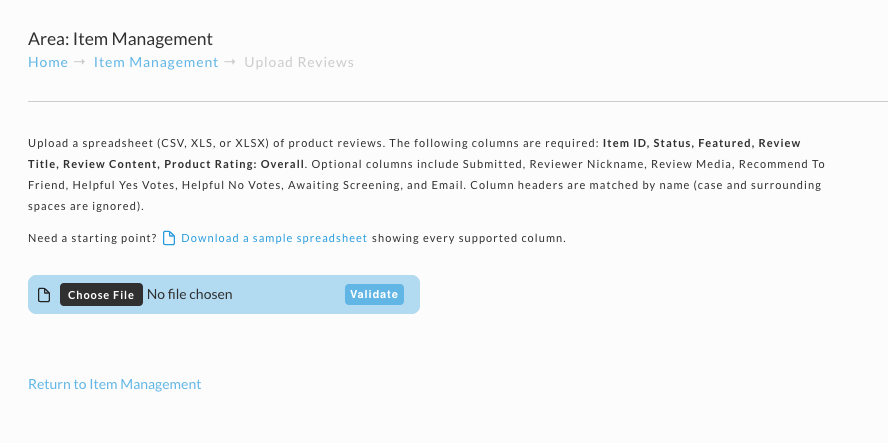
Preparing the spreadsheet
Accepted formats are CSV, XLS, and XLSX.
Column headers are matched by name, and matching ignores case and surrounding spaces. So
item id, Item ID, and ITEM ID all work. Column order does not matter.
Required columns
Every row needs all six:
| Column | Holds |
|---|---|
| Item ID | The item the review belongs to |
| Status | The review's state |
| Featured | Whether the review is promoted |
| Review Title | The review's headline |
| Review Content | The review body |
| Product Rating: Overall | The overall star rating |
Optional columns
Include these when you have the data:
Submitted, Reviewer Nickname, Review Media, Recommend To Friend, Helpful Yes Votes, Helpful No Votes, Awaiting Screening, Email.
Carrying Submitted across matters when you are migrating, because without it the reviews lose their original dates.
Use Download a sample spreadsheet on the screen to get a file containing every supported column. Starting from it is quicker than building headers by hand, and it removes any doubt about spelling.
Importing
- Click Choose File and select your spreadsheet.
- Click Validate. UltraCart checks the file's structure only: that it can be read, that every required column is present, and that it has at least one review row. Nothing is imported yet. If there is a problem, the screen lists it and you can fix the file and validate again.
- When the screen shows Spreadsheet structure looks good., check the detected column list, then click Start Import.
- Keep the page open while the import runs. When it finishes, a summary shows how many reviews were imported, how many were skipped because they already exist, and which rows had problems.
Rows with problems are skipped while the rest of the file imports. Fix those rows and upload the whole file again: reviews that already imported are recognized and skipped, so you do not get duplicates. For the accepted values in each column and the full list of messages, see Importing Product Reviews.
Return to Item Management takes you back to the item list without importing.
Related Documentation
- Importing Product Reviews - column values, validation messages, and duplicate handling
- Batch Item Import - import items rather than reviews
- Item Tools - the full set of bulk tools