Inventory Update Table
The Inventory Update Table puts every item in your catalog on one screen so you can correct stock levels and inventory settings without opening items individually.
Opening the tool
info
Main Menu → Items → Tools → Inventory Update Table
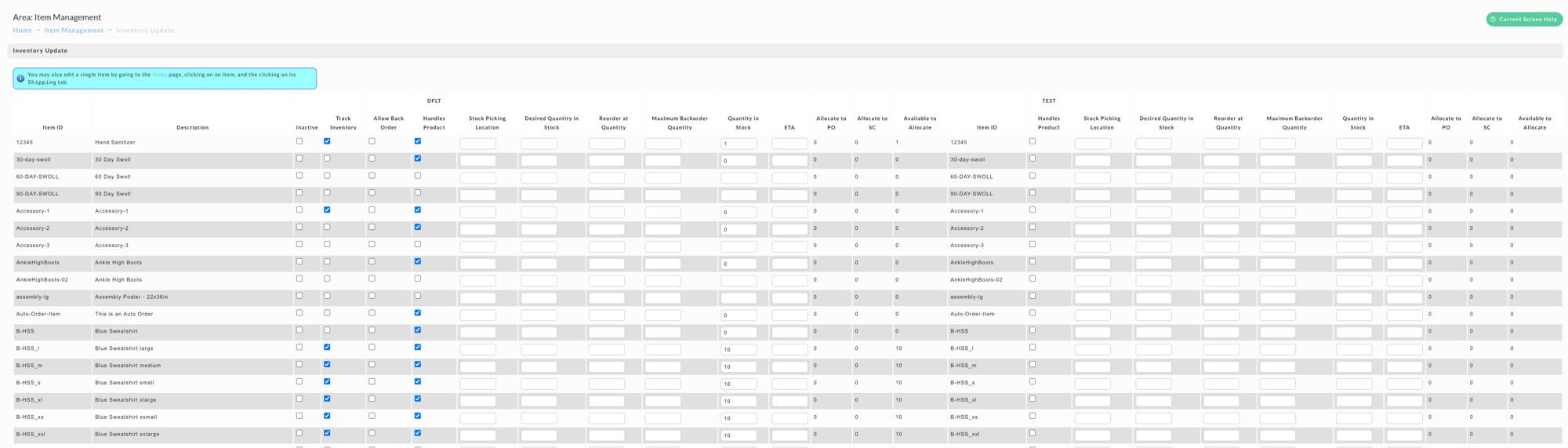
What you can edit
Each item row carries the settings that drive stock handling:
| Column | Meaning |
|---|---|
| Inactive | Takes the item out of circulation |
| Track Inventory | Whether UltraCart counts stock for this item at all |
| Allow Back Order | Whether customers can order past zero |
| Handles Product | Whether this distribution center stocks the item |
| Stock Picking Location | Where the item sits in the warehouse |
| Desired Quantity in Stock | The level you want to hold |
| Reorder at Quantity | The level that should trigger a reorder |
| Maximum Backorder Quantity | How far past zero you will accept orders |
| Quantity in Stock | The current count |
| ETA | When more stock is expected |
The Allocate to PO, Allocate to SC, and Available to Allocate columns are shown for reference rather than edited here.
note
The columns repeat once per distribution center, with the center's code above each block. Edit the block belonging to the center you mean, since the same item can hold different stock in each.
To change a single item instead, open it from the item list and use its Shipping tab.
Was this page helpful?