Refer a Friend Coupon Tutorial
This tutorial builds a referral program out of three pieces you already have: a coupon, a StoreFront Communications flow, and your cashback loyalty program.
The result is a loop that runs without staff involvement. A customer buys something, waits out a delay you choose, then receives an email containing a coupon code that belongs only to them. When they pass that code to a friend and the friend buys, the original customer earns loyalty cashback. That cashback is store credit, so it is spendable on their next order.
How it works
The mechanism is the coupon element inside the flow's email. On each send it mints a unique child code from a base coupon you create, and it records which customer it minted that code for. That binding is what lets the system pay the right person when the code is later redeemed.
Everything in this tutorial hinges on one setting, Generate Unique Code. It is off by default, and while it is off the entire Sharing Loyalty Reward section is hidden in the editor and ignored when the email sends. Turn it on first and the rest of the configuration becomes available.
Prerequisites
Have these in place before you start. The flow will not behave correctly without them.
| Requirement | Why it matters |
|---|---|
| Loyalty program active in Cashback mode | The Sharing Loyalty Reward pays in store credit. A points-based program has no cashback to pay. See Loyalty Program. |
| A base coupon with unique code generation available | The email element mints a child code per recipient from this base. Without it every recipient gets the same code and attribution is impossible. See Coupons. |
| A discount worth sharing on that coupon | This is the friend's incentive. It is separate from the sharer's cashback. |
| StoreFront Communications configured and sending | The flow needs a working sending domain. See StoreFront Communications. |
Set the loyalty program to Cashback mode first. The Sharing Loyalty Reward section discussed below is tied to cashback, and configuring the coupon before the program is in the right mode makes the settings harder to find.
Part 1: Create the base coupon
Create the coupon your customers will be sharing. This is an ordinary coupon in your catalog, and the discount on it is what the friend receives.
-
Go to Main Menu, then Configuration, then Checkout, then Coupons.
-
Create a coupon with whatever discount you want the referred friend to get. A percent-off or dollar-off order-level coupon is the usual choice.
-
Give it a code you will recognize later, for example
SHARE15. This is the base code. Recipients never see it. They receive a generated child code derived from it. -
Set Valid with Other Coupons to No.
Do not set this coupon to one per customer. The flow needs to mint many child codes from it.
Step 4 matters more than it looks. If referral codes stack with other coupons, they also stack with each other, and a group of customers can form a closed loop: each person redeems the others' codes, everyone collects cashback, and the discounts compound on every order. Blocking the coupon from combining keeps each referred order to a single discount and makes that arrangement far less rewarding. See Coupons for the full field reference.
Part 2: Create the flow
-
Go to Main Menu, then StoreFront, then your storefront, then Communications, then Flows.
-
Create a new flow and set the trigger to Order - when a payment is processed.
-
Add a wait step of one to two weeks.
-
Add an email step after the wait.
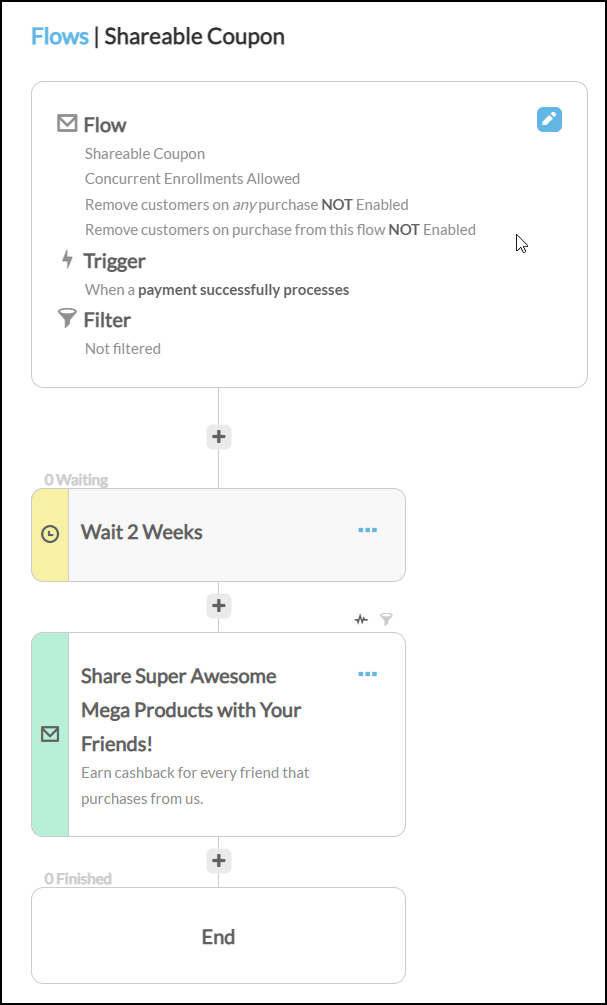
The wait is doing real work here, so do not skip it. It gives the customer time to receive the product, form an opinion about it, and reach the point where recommending it to someone feels natural. Asking for a referral the same day the order is placed asks for a recommendation the customer is not yet in a position to make.
Part 3: Build the email
Inside the email step's editor, add a coupon element. Place it between two text block elements: one above to explain the offer, one below for terms or a closing line.
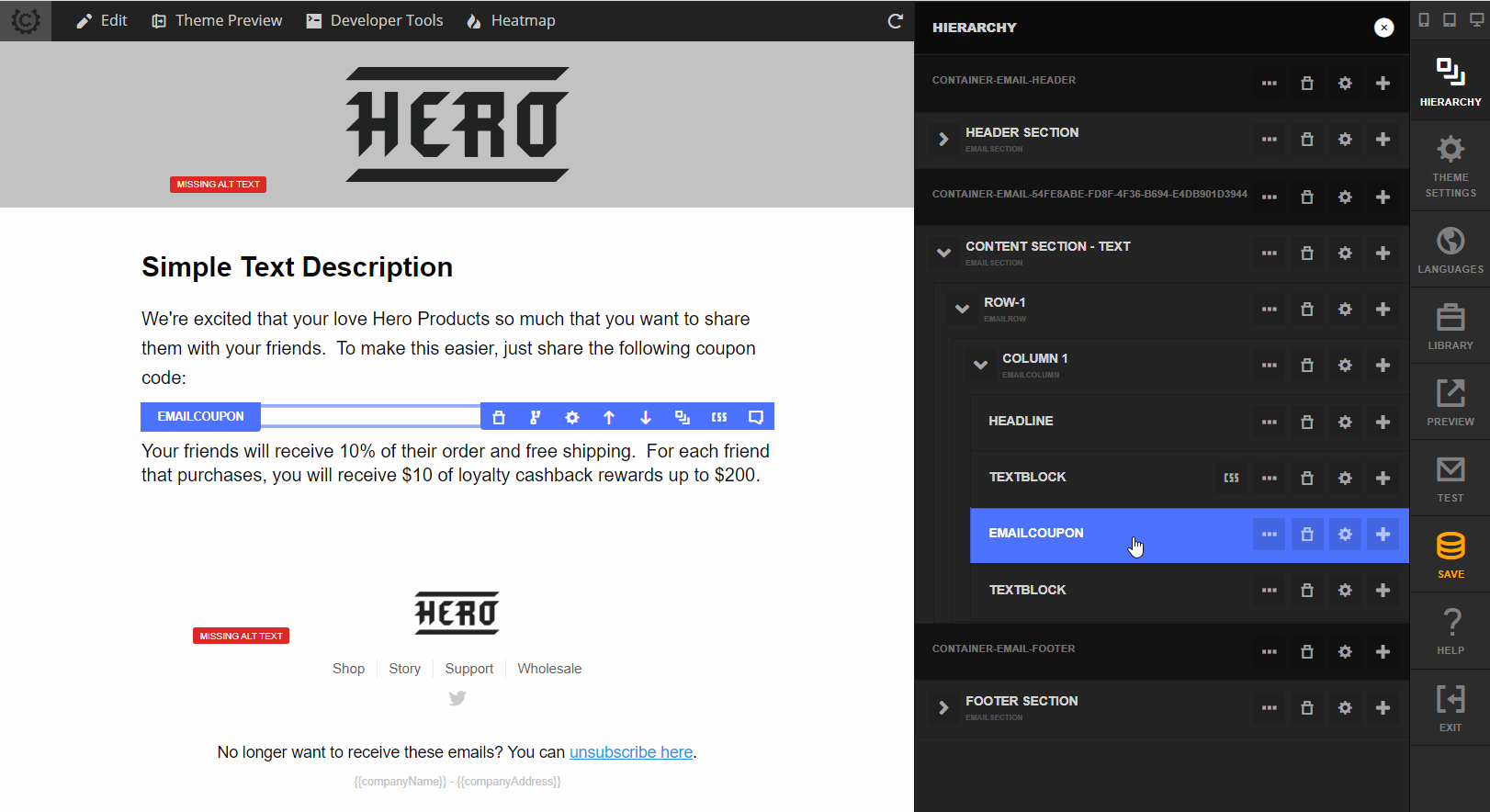
Then open the coupon element's settings.
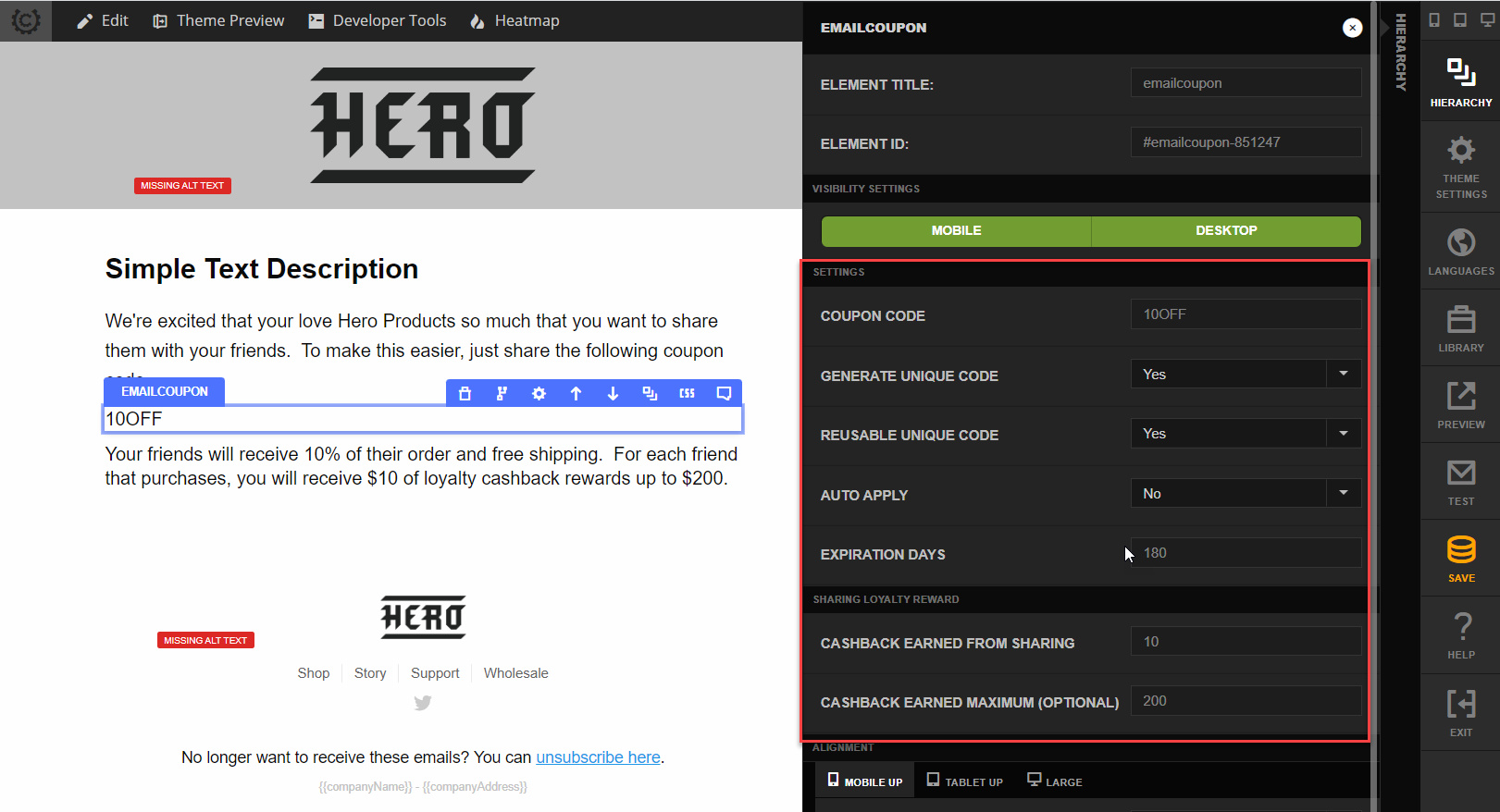
The element's settings are split across two groups, Settings and Sharing Loyalty Reward.
Set Generate Unique Code to Yes first, before anything else in this panel.
Five of the settings below, including both Sharing Loyalty Reward fields, are hidden while Generate Unique Code is No. They are also ignored at send time. If you configure a cashback amount and later switch Generate Unique Code back to No, the cashback value stays in the saved configuration but is never applied, and the emails go out with no referral reward attached.
Settings group
| Setting | Type | Default | What to enter |
|---|---|---|---|
| Coupon Code | Text | empty | The base coupon code from Part 1, for example SHARE15. |
| Generate Unique Code | No / Yes | No | Yes. Mints a child code per recipient. This is what makes attribution possible, and it gates every setting below. |
| Reusable Unique Code | No / Yes | No | Yes if one customer should be able to refer several friends with the same code. No allows a single use. |
| Auto Apply | No / Yes | No | Yes applies the coupon automatically when the friend arrives through the link, rather than requiring them to type the code. |
| Expiration Days | Number, 1 to 365 | 90 | How long the generated code stays valid. Values outside the range are clamped to the nearest limit. The clock starts when the email is generated, not when the friend receives the code, so budget for the time your customer spends sitting on it before sharing. |
| Register in MyAccount | No / Yes | No | Yes registers the generated code on the customer's profile so they can find it later in the MyAccount customer portal. Recommended, since a referral code is one a customer will want to look up again after the email is buried. |
Reusable Unique Code is the setting that decides whether this is a one-shot referral or an ongoing one. Set it to Yes for a standing refer-a-friend program. Left at the default of No, each customer can generate exactly one successful referral and then their code is spent.
Sharing Loyalty Reward group
| Setting | Type | Shown when | What to enter |
|---|---|---|---|
| Cashback Earned From Sharing | Number | Generate Unique Code is Yes | The cashback the sharer earns each time a friend purchases with their code. |
| Cashback Earned Maximum (optional) | Number | Cashback Earned From Sharing is filled in | Cap on total cashback a single customer can earn from sharing. Leave blank for no cap. |
These two values are the referral program itself. The first is your per-referral payout, the second is your exposure limit per customer. The maximum field stays hidden until you enter a per-referral amount, so fill in the first field before looking for the second.
Sizing the offer
Set these two numbers against your acquisition economics rather than picking round figures.
Your cost per referred order is the friend's discount plus the sharer's cashback. Both are paid on the same order, so the pair is what you compare against what you already spend to acquire a customer another way:
friend discount + sharer cashback < your cost per acquisition on paid search
If the combined figure lands above your PPC cost per acquisition, the program is buying customers at a premium, and doing it while also discounting the first order. Work backwards from the acquisition cost you already know and split the remainder between the two sides.
How you split it is a judgment call. Weighting the friend's side harder improves conversion on the referred order. Weighting the sharer's side harder increases how often codes get shared in the first place. Start with the total the economics allow, then divide.
On a reusable code both halves recur on every referral, so the per-order figure is the one that matters, not a one-off cost.
Always set a maximum
Cashback Earned Maximum is optional in the editor. Treat it as required.
A shared code is designed to travel, and it does not stop travelling at the edge of your customer's friend group. Nothing prevents a recipient from posting their code to a coupon aggregator, a deal forum, or social media. Once that happens the code is being redeemed by strangers at scale, and a program with no cap pays cashback on every one of those orders.
Three settings bound that exposure, and it is worth being clear that they bound different things:
| Setting | What it limits |
|---|---|
| Cashback Earned Maximum | The total cashback one sharer can earn. This caps what you pay out. |
| Reusable Unique Code set to No | The code can be redeemed once. This is the only setting that hard-limits the number of redemptions. |
| Expiration Days | How long the code stays redeemable at all. This is the only limit still operating once the maximum is exhausted. |
Reaching the maximum stops the cashback, not the coupon.
Once a sharer has earned their Cashback Earned Maximum, further redemptions of their code still succeed and still give the friend the discount. Only the cashback stops. On a reusable code, the cap bounds what you pay the sharer, it does not bound what you give away in discounts.
Past that point Expiration Days is what eventually stops new customers from redeeming the code. It is the only thing that closes the window, so on a reusable code treat it as your backstop on discount exposure rather than a housekeeping detail. A code set to the 90 day default keeps discounting orders for the rest of those 90 days after the sharer has stopped earning anything from it.
This is the distinction that matters for a code that escapes into the wild. A reusable code posted publicly keeps discounting orders until it expires, whether or not the sharer is still earning on it. The cap protects your loyalty liability and nothing else.
If your concern is uncontrolled distribution rather than payout size, set Reusable Unique Code to No. A single-use code limits a leaked code to one order, at the cost of limiting each customer to one successful referral. Reusable plus a maximum is the right choice when you want an ongoing referral relationship, understand that discounts are bounded only by the expiration date, and are willing to cap your cashback exposure in dollars.
Partial rewards are handled cleanly at the boundary. If a referral would earn more than the remaining allowance, the sharer is credited the remainder rather than the full amount, and the allowance goes to zero.
Writing the email copy
The text blocks above and below the coupon element are where the offer is actually made. Be explicit about both halves of the exchange, because a customer who does not understand that they get something will treat the email as an ordinary discount code and use it themselves.
State plainly: what the friend saves, what the customer earns, and any cap you configured.
Part 4: Prevent self-referral
The obvious abuse here is a customer using their own shareable code on their own next order, collecting both the discount and the cashback. Two independent layers address this.
The first is automatic and needs no configuration. Cashback is credited only when the redeeming order's email address differs from the address the code was issued to. A customer who redeems their own code receives the discount but earns nothing from it.
The second layer blocks the order outright, and that one you do configure. UltraCart has a fraud prevention rule for exactly this case.
Go to Main Menu, then Configuration, then Checkout, then Fraud Prevention, and configure the rule that blocks customers from redeeming coupons that were issued to them for sharing. See Fraud Prevention for the full rule set and how rules are evaluated.

The rule offers three responses. We recommend declining the transaction with a custom message, because it tells the customer why the code was rejected and steers them back to sharing it:
| Response | When to choose it |
|---|---|
| Decline with a custom message | Recommended. The customer learns immediately that the code is for sharing. |
| Flag for review | Use when you would rather inspect these orders by hand than turn away a sale. |
| Process payment and flag for review | Use when you want the revenue captured and will reverse the cashback manually if it was abuse. |
No rule catches everything. A determined customer can order to a different address under a different email. Treat this as reducing casual abuse rather than eliminating fraud, and use the cap in Part 3 to bound what any single account can extract.
Measuring the program
Enable statistics display on the flow, then open the individual email to see its performance. Selecting the Converted link opens a dialog listing the order IDs that came from the shared codes.
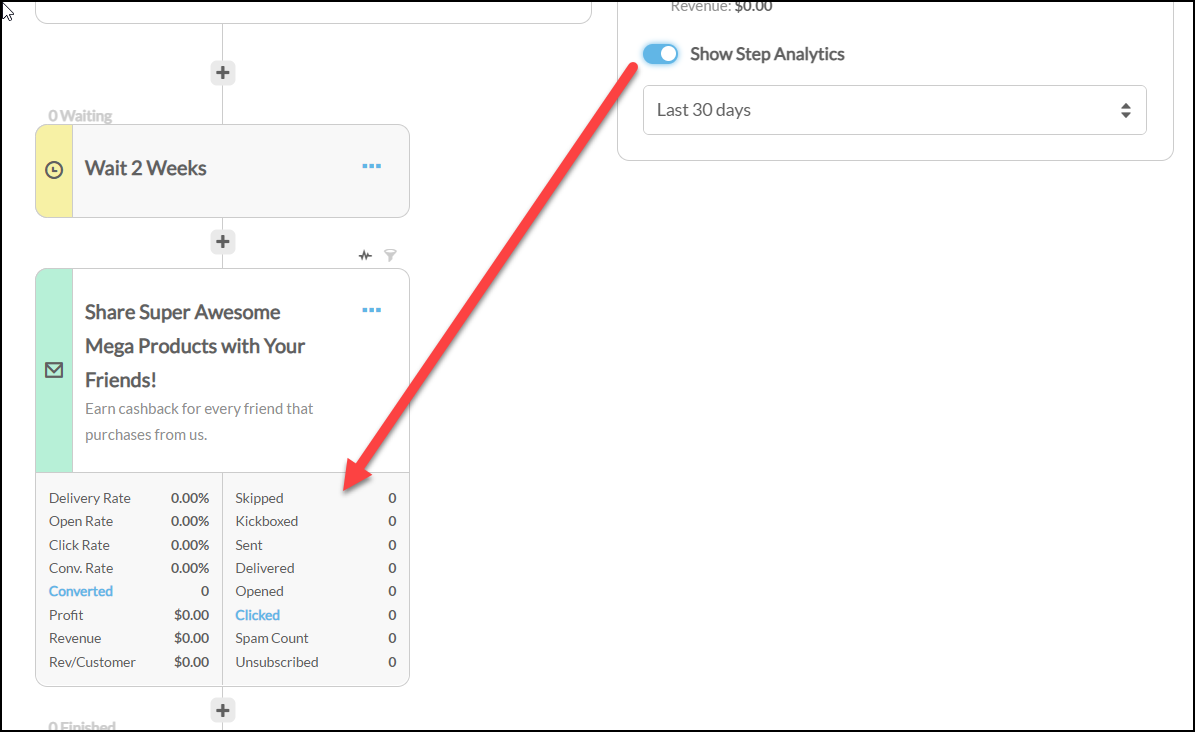
Codes minted by a flow also carry the sending step's UTM campaign and content values, so referred orders can be traced back to the specific email that produced the code rather than appearing as untracked direct traffic.
Where the reward lands
Each successful referral writes a ledger entry described as Earned from sharing coupon used on <order id>, so you can trace any credit back to the order that triggered it. The entry appears both in the loyalty ledger and on the sharer's store credit balance.
Two things about referral cashback differ from ordinary order cashback, and both work in the customer's favor:
-
It does not vest. The credit is written with no vesting period and is spendable immediately, rather than waiting out the vesting days configured on your loyalty program.
-
It does not expire. No expiration is set on the entry.
The credit goes into the same store credit balance the customer spends anywhere else, which includes auto order rebills. A customer on a subscription who refers friends is reducing their own future rebill charges. See Store credit on rebills.
The sharer does not need an existing customer profile. If they do not have one, a profile is created for them so the credit has somewhere to go.
Two numbers tell you whether the program is working. The first is conversions per email sent, which measures whether customers are sharing at all. The second is total cashback paid against revenue from referred orders, which measures whether the economics hold. Compare cashback paid to the margin on referred orders before increasing the per-referral amount.
You can also see the effect on an individual customer from their profile. The Loyalty tab shows their store credit ledger, with the referral credits listed alongside everything else they have earned. See Loyalty programs and store credit.
Troubleshooting
| Symptom | Where to look |
|---|---|
| Every recipient gets the same code | Generate Unique Code is No. Turn it on. Codes already sent cannot be attributed retroactively. |
| The Sharing Loyalty Reward fields are missing from the settings panel | They are hidden while Generate Unique Code is No. Set it to Yes and they appear. |
| Cashback Earned Maximum is missing but the first cashback field is visible | The maximum field only appears once Cashback Earned From Sharing has a value. Enter the per-referral amount first. |
| Emails send but no cashback is ever earned | Check Generate Unique Code is still Yes. When it is No, the saved cashback settings are ignored at send time rather than reported as an error. |
| Customer earned once and then stopped | Reusable Unique Code is set to No, which allows a single use per code. |
| Friend's order succeeded but the sharer earned nothing | Confirm the friend used the generated child code rather than the base code, and check whether the sharer has already reached Cashback Earned Maximum. |
| Codes stop working sooner than expected | Expiration Days defaults to 90, counted from when the email was generated rather than from when the friend tries to use it. A customer who waits a month before sharing leaves their friend only 60 days. |
| Customer cannot find their code after deleting the email | Register in MyAccount is No, so the code was never added to their profile. |
| Sharer earned nothing on an order you expected to count | Look on their Loyalty tab for an entry described as "Earned from sharing coupon used on <order id>". If it is absent, either the redeeming order used the same email address the code was issued to, or the sharer has exhausted Cashback Earned Maximum. |
| Codes still redeem after a sharer hits their maximum | Expected. The cap stops the cashback, not the coupon. Use Reusable Unique Code set to No, or a shorter Expiration Days, if you need to bound redemptions. |
| Customers are redeeming their own codes | The fraud prevention rule in Part 4 is not configured, or is set to flag rather than decline. |
Related Documentation
-
Loyalty Program - configuring cashback mode, tiers, and vesting.
-
Coupons - creating and managing the base coupon.
-
Loyalty programs and store credit - the customer-level ledger where referral credits land.
-
StoreFront Communications - the flow builder used in Part 2.
-
Fraud Prevention - the rule system used in Part 4 to block self-referral.
-
SMS Opt-In with One-Time Coupon - a related flow built on unique coupon codes, over SMS.