UltraCart + Iterable Integration (Marketing)
Introduction
The UltraCart + Iterable integration connects your storefront to a powerful cross-channel marketing automation platform, enabling real-time, behavior-driven messaging across email, SMS, and other channels.
This integration automatically synchronizes customer activity, order data, and engagement signals into Iterable—allowing you to build personalized campaigns without manual exports or data transformation.
Note: This document has been updated to incorporate full integration capabilities including SMS support and advanced event tracking based on the Iterable integration specification .
Prerequisites
Before configuring the integration:
-
An active UltraCart account
-
An active Iterable account
-
Access to your Iterable API Key
-
Appropriate permissions to configure marketing integrations in UltraCart
Accessing the Iterable Configuration
Navigation:
Main Menu → Operations → Marketing → 3rd Party Email (tab) → Iterable
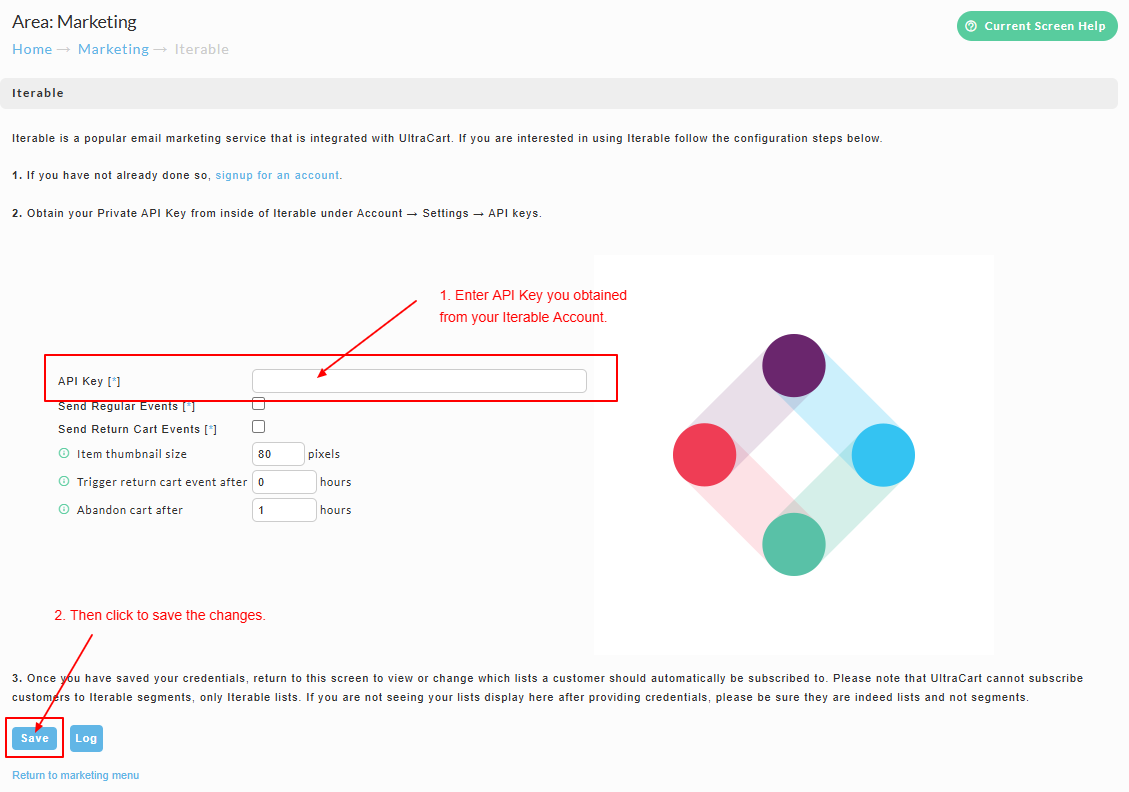
Step-by-Step Configuration
1. Create or Access Your Iterable Account
-
Navigate to Iterable and sign up or log in.
-
Go to:
Account → Settings → API Keys -
Copy your Private API Key
2. Configure Iterable in UltraCart
-
Navigate to:
Main Menu → Marketing → Iterable -
Enter your API Key
-
Configure the options described in Configuration Options below, then save.
Configuration Options
The Iterable configuration screen has the following settings:
| Setting | What it does |
|---|---|
| API Key | Your Iterable Private API Key. Required — this is what connects UltraCart to your Iterable project. |
| Send Regular Events | Master switch for the integration's baseline order and customer event stream. |
| Send Return Cart Events | Sends the updateCart event when a cart is abandoned. See Abandoned Cart Integration. |
| Send Order Updated Events | Sends the orderUpdated event on order edits and status changes. |
| Send Refund Events | Sends the refund event when a refund is issued on an order. |
| Send Auto Order Lifecycle Events | Sends the subscription lifecycle events (uc_autoorder_*). See Auto Order (Subscription) Events. |
| Send Initial Purchase Events | Sends the uc_initial_purchase event on every order that is not a subscription rebill, so you can count campaign conversions without renewals inflating them. Off by default. See Iterable Events Reference. |
| Send Profile With Events | Updates the customer's name, address and phone number in Iterable before each auto order lifecycle, order updated, refund and shipment event, so profiles first created by those events are not email-only. Off by default. See Iterable Events Reference. |
| Only Flag Subscription For Physical Items | Flags an order as a subscription only when at least one subscribed item is physical (has shipping weight), so one-time buyers who add a digital subscription stay out of your subscriber journeys. Off by default. See Auto Order (Subscription) Events. |
| Abandon cart after | How long UltraCart waits after the last cart activity before classifying a cart as abandoned and firing updateCart. |
| Item thumbnail size | The pixel size of the product images UltraCart includes with items. |
| Subscriber lists | Maps UltraCart to your Iterable lists so customers are subscribed to the lists you choose. |
The core commerce events — purchase and shipment — flow whenever the integration is configured. The checkboxes above control the additional event categories, so you can turn off any you do not use.
Events Sent to Iterable
UltraCart sends activity to Iterable server-to-server, in real time — purchases, shipments, order updates, refunds, review requests, cart abandonment, and the full subscription lifecycle. For the complete list of events, when each fires, and which setting controls it, see:
- Iterable Events Reference — every event and its fields
- Abandoned Cart Integration — the
updateCartrecovery flow - Auto Order (Subscription) Events — the
subscriptionflag and theuc_autoorder_*lifecycle
Troubleshooting
Lists Not Appearing
-
Ensure API key is correct
-
Confirm lists exist in Iterable (not segments)
Events Not Sending
-
Verify event toggles are enabled
-
Check integration logs (Reporting → Integration Logs)
SMS Not Working
-
Confirm:
-
Phone numbers are valid (E.164 format)
-
Customer has opted in
-
Iterable SMS is configured
-
Conclusion
The UltraCart + Iterable integration provides a fully automated, real-time marketing data pipeline that powers advanced, cross-channel campaigns.
With support for email, SMS, behavioral triggers, and attribution tracking, merchants can deliver highly personalized experiences that drive engagement and revenue.
Next Steps
-
Review the Iterable Events Reference to see everything UltraCart sends
-
Configure your first abandoned cart campaign
-
Build subscriber journeys with Auto Order (Subscription) Events
-
Build a post-purchase flow
-
Enable SMS campaigns for opted-in users
-
Use Iterable segmentation for VIP targeting
-
Review performance using attribution data