Iterable Abandoned Cart Integration
Last Updated: 2026-05-27
UltraCart's Iterable integration emits a single updateCart event to your Iterable project the moment UltraCart classifies a shopper's cart as abandoned. This page covers how the flow works, how to wire up the recovery email in an Iterable Journey, and how to use the return-to-cart link.
What you'll see in the integration log
Action column: update Cart (abandon). Iterable's API endpoint for cart state is called updateCart, so that's the action name. The "(abandon)" clarifier means the row was fired specifically by the cart-abandon event. Filter the dropdown by that action to see every abandoned cart UltraCart has pushed to Iterable.
The flow end-to-end
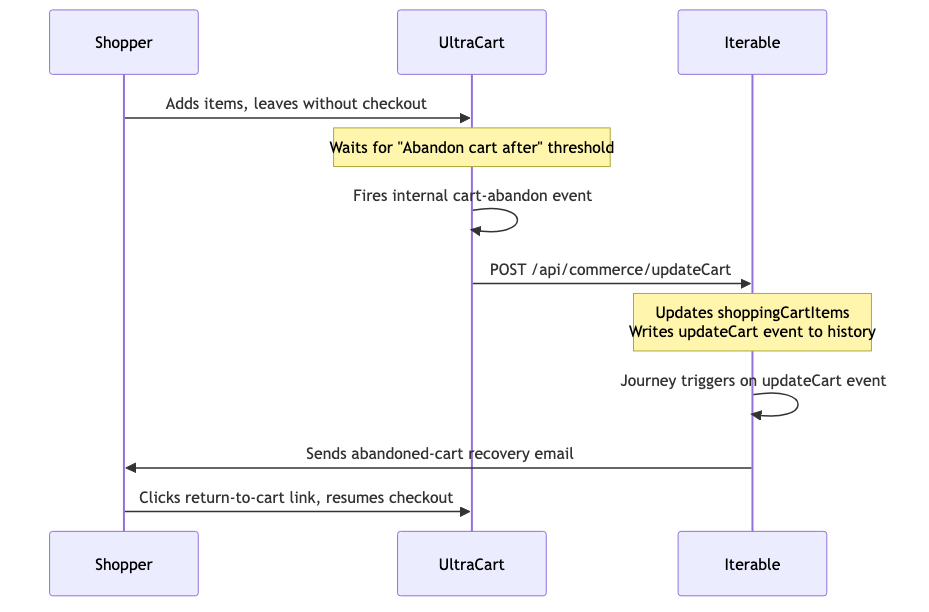
- Shopper adds items to a cart on your storefront and leaves without checking out.
- After the merchant-wide threshold elapses (controlled by the Abandon cart after setting in your UltraCart Iterable integration config, which you can change without code), UltraCart fires its internal cart-abandon event.
- That event triggers a
POST /api/commerce/updateCartto your Iterable project, carrying the cart contents and a return-to-cart link for each item. - Iterable updates
shoppingCartItemson the shopper's user profile and writes anupdateCartevent into their history. ThatupdateCartevent is the trigger your Iterable Journey watches for. - Your Iterable Journey fires the abandoned-cart email.
UltraCart fires once per abandoned cart, at the moment the cart is classified as abandoned. Iterable's updateCart endpoint doesn't have an "abandoned" semantic baked in: it's just a cart-state update, so the convention is to use it for whatever cart event the integrator is willing to fire. Single-shot at the abandon event keeps the cadence sane, the integration log readable, and the threshold tuning in one place.
Setting up the Iterable Journey
-
In Iterable → Journeys → New Journey → Trigger: Event, event name
updateCart. -
Add a filter step:
purchaseevent has NOT occurred since the trigger. This makes sure you don't email someone who came back and checked out on their own between the trigger firing and the email being sent. -
(Optional) Add a Delay node if you want to space the email out further from the trigger. Common patterns: send immediately on trigger, or add 30 to 60 minutes to give the shopper a window to come back on their own.
-
Add the send step. In your email template, iterate the cart items to render each one:
Each item carries SKU, name, price, quantity, product image URL, product page URL, and categories. Note that
{{this.url}}is the product page URL (so the shopper can click an individual item to view it on your storefront). The link that restores their cart is a separate field, covered below. -
For multi-step sequences (e.g. 24-hour follow-up with a discount, 72-hour final attempt), keep adding Delay + filter + send nodes inside the same Journey. UltraCart fires once; Iterable owns the cadence beyond that.
Iterable's Template Library has an out-of-the-box "Abandoned Cart" workflow that wires to exactly this trigger. Feel free to start from there and customize.
Using the return-to-cart link
This is the most important link in the abandoned-cart email. Clicking it sends the shopper back to your storefront with their cart fully restored, so they pick up checkout exactly where they left off. UltraCart's cart store retains the cart well past the typical abandon-to-recovery window, so the link stays valid even if your Journey delays sends for several days.
The link is delivered on each cart item under dataFields, in two flavors:
| Field | Description | When to use |
|---|---|---|
returnLink | Shortened URL (through UltraCart's URL shortener) | Visible link text and any context where short URLs render cleanly |
longReturnLink | Full URL | When you'd prefer the unshortened form, or as a fallback |
Both resolve to the same cart-restore endpoint. They're the same value across every item in the cart (it's a cart-level link, just stamped onto each item for template convenience), so you can read it off the first item in your template:
A typical email layout: hero "Return to your cart" CTA at the top using returnLink, then the per-item loop below showing each product with the product-page url as the per-item click target.
What's in the updateCart payload
- User identity: email
- Per cart item:
- SKU
- Name
- Price
- Quantity
- Product image URL
- Product page URL
- Categories
dataFieldscontainingreturnLinkandlongReturnLink
Threshold tuning
The Abandon cart after setting in your UltraCart Iterable integration config controls how long UltraCart waits after the last cart activity before classifying the cart as abandoned and firing the updateCart event to Iterable. Adjust this to tune how aggressive your abandoned-cart messaging cadence is.