About
This tutorial will cover the configuration of an Affiliate Network Pixel for the FlexOffers affiliate network.
For a complete tutorial regarding the Affiliate Network Pixel, please review the following:
Affiliate Network Pixel Configuration Tutorial
Configuring the FlexOffer Affiliate Network Pixel
Navigation
Main Menu > Storefronts > Choose SF Host > (Storefronts Menu) Privacy & Tracking > Affiliate Networks
Steps
- Click 'New' Button, then fill in the A.N.P editor:
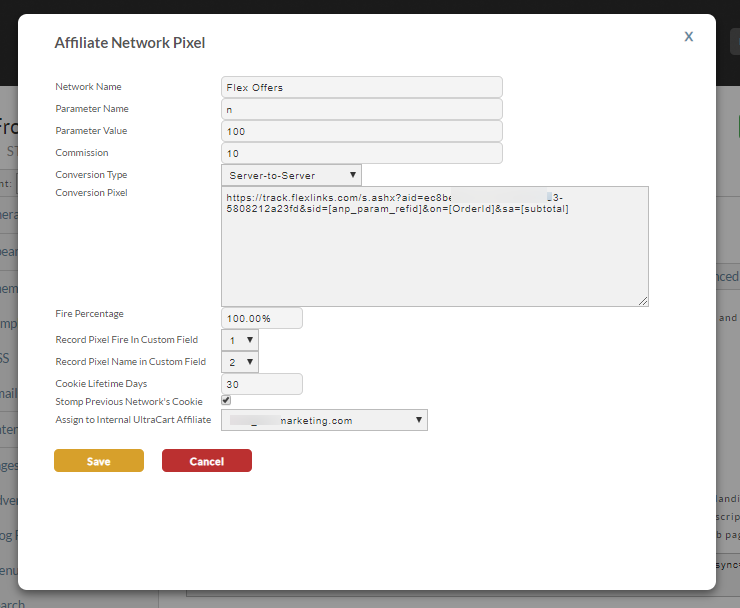
- Save the changes.
| Field | Description |
|---|---|
| Network Name | Name is FlexOffers |
| Parameter Name | Typical Name = n |
| Parameter Value | Typical value = 100 |
| Commission | Configure the commission percentage that applies here: 10.00% |
| Conversion Type | Server-to-Server |
| Conversion Pixel | You'll configure the FlexOffers 'Flexlinks' tracking URL here, appending to the URL these parameters: - sid=[anp_param_refid] - on=[OrderId] - sa=[subtotal] The configured URL will look something like this: https://track.flexlinks.com/s.ashx?aid=ec8be921-c11c-4dc3-c8f4-5808212a23fd&sid=\[anp\_param\_refid\]&on=\[OrderId\]&sa=\[subtotal\] NOTE: Your URL will have a unique "aid=xxxxx" parameter, so do not copy the URL above as your Conversion Pixel URL. |
| Fire Percentage | Default settings should be 100.00%. |
| Record Pixel Fire In Custom Field | Typical selection is CustomField1, unless CustomField1 is already in use. |
| Record Pixel Name in Custom Field | Typical selection is CustomField2, unless CustomField2 is already in use. |
| Cookie Lifetime Days | Determined the lifetime of the affiliate cookie placed on the customer browser when they clicked an affiliate link. |
| Stomp Previous Network's Cookie | If selected, then the last affiliate link clicked by customer will be credited with the sale. |
| Assign to Internal UltraCart Affiliate | Select the UltraCart Affiliate that is associated with this Affiliate Network Pixel, from the drop-down list. |
Was this page helpful?