Overview
This tutorial will cover the steps to processing payments to your affiliates for their commission-able sales.
Navigation
Home → Advanced → Affiliate Management
Determining Which Payment Method You Will Use
There are two payment options when processing payments for commissions owed to the affiliates: via Check & via PayPal
Check Payment
Check payment is the defaulted payment method. If the PayPal MassPay configured is not completed, then the payment process assumes cutting paper checks for the commission payments.
PayPal Payment
Paypal payment requires the Paypal payment integration using either the "Express Checkout" or "Website Payments Pro (Express checkout and Direct Payments)" integration options, which allow for the MassPayment API calls that are used to generate and send payments for the affiliates' paypal email address. In addition to the integration of paypal, you'll also need to configure the following options in the "Payment Options" section of the Affiliate Management "Settings" tab of the Affiliate Management area:
| Setting | Notes |
|---|---|
| Allow Payment via PayPal | When checked, UltraCart allows the affiliate to specify the email for their PayPal account. The merchant can then pay the affiliate via PayPal's MassPay electronically. We recommend this option. |
| Require Payment via PayPal | When selected, all affiliates will be required to specify a PayPal email address to receive their commission payments. Paying affiliates with PayPal MassPay is the easiest way to send commission payments. If you are not familiar with PayPal MassPay we recommend checking it out. |
Affiliate Management MassPay API Errors
If, while attempting to process payments for affiliates, an error appears on the page that says "PayPal MassPay API failed. You do not have permissions to make this API Call".
This error means that you need to grant access to that particular API call within your PayPal account so that UltraCart can call it. Log into your PayPal account, then navigate:
My Account -> Profile -> My Settings -> My Selling Tools -> API Access [update].
Under that section within PayPal.com, you'll need to give the UltraCart API login the additional permission to do MassPay.
Reviewing Accumulated Commission Owed To Your Affiliates
To see what commission are currently owed to your affiliates, log in and navigate:
Home → Advanced → Affiliate Management → Reports → ("Tools" section) Process Payments
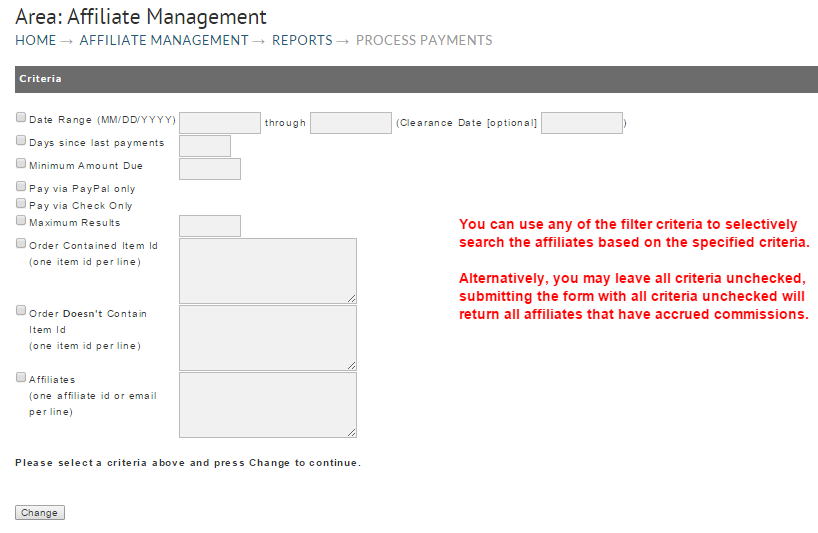
When you first navigate to the Process Payment page, you'll be presented with the following form which allows for selective filtering of the affiliate based on various criteria:
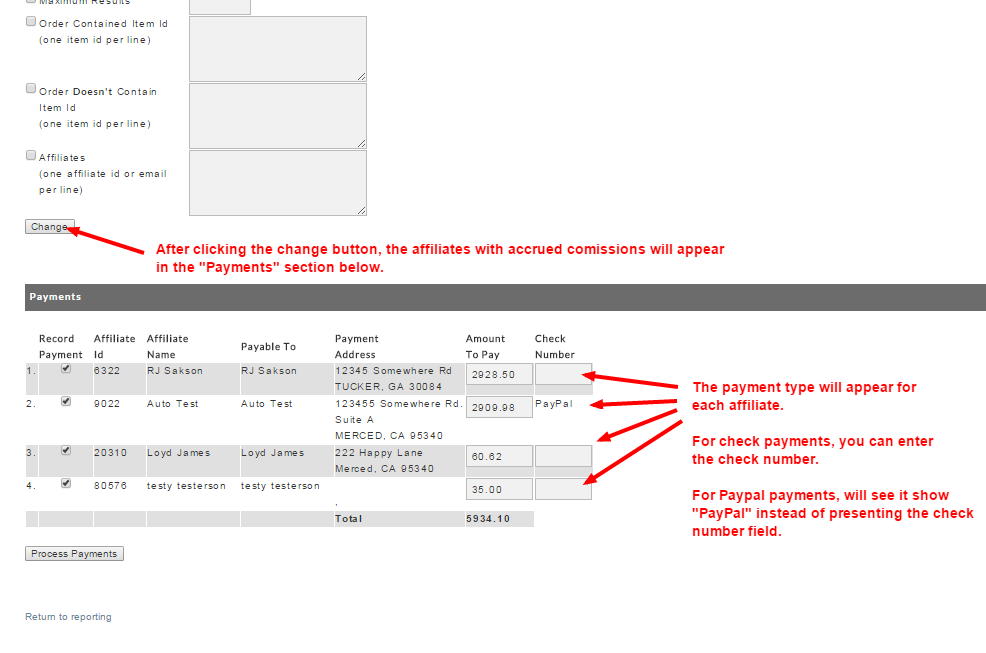
Upon clicking the "change" button the affiliates that accrued commissions will appear below the search criteria: