Introduction
The Attribution Analysis diagnostic tool provides an AI-powered analysis of an individual order’s shopping session. It evaluates tracking parameters, affiliate data, session history, and integration logs to determine how revenue attribution occurred and where tracking gaps may exist.
Attribution Analysis now includes server-side integration logs for 11 advertising platforms. You can now see exactly what data is being sent to each platform and verify that your conversion events are firing correctly — no more guessing whether the server-side handoff worked.
-
Facebook Conversion API
-
Google Measurement Protocol
-
TikTok
-
Twitter/X
-
Snapchat
-
Pinterest
-
Taboola
-
Everflow
-
Hyros
-
Northbeam
-
Wicked Reports.
This tool is designed to:
-
Identify how marketing attribution was applied
-
Detect missing or malformed UTM parameters
-
Analyze affiliate tracking and postback activity
-
Review conversion pixel execution
-
Flag potential test traffic or configuration issues
-
Provide actionable recommendations
The output includes an executive summary, attribution breakdown tables, and detailed step-by-step session analysis.
Navigation
To access Attribution Analysis:
Navigate:
Main Menu → Operations → Order Management → View Orders → Reviewing Order View
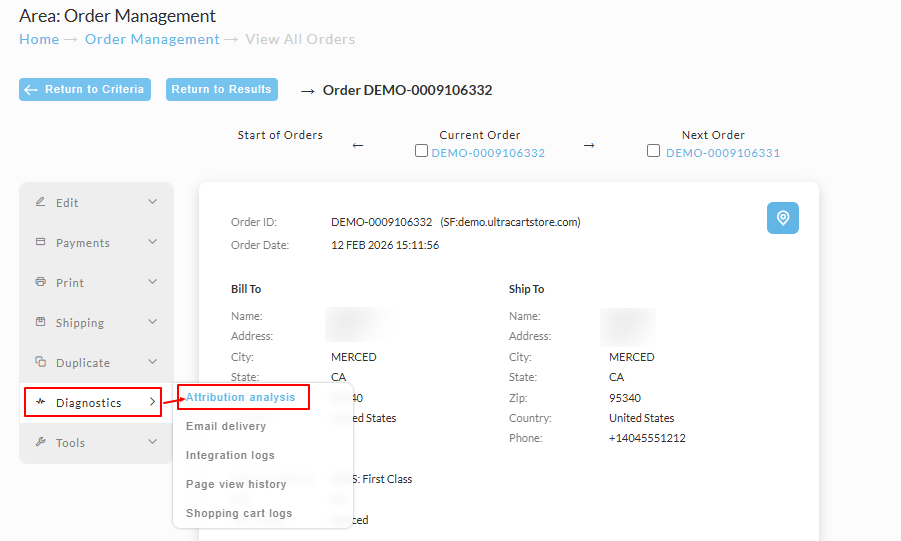
From the Review Order Page
Mouseover → Actions Menu → Diagnostics → Attribution Analysis
How UltraCart Uses AI for Attribution Analysis
UltraCart securely feeds structured diagnostic data into its AI models to analyze attribution behavior.
The AI model does not browse your storefront or external systems. It analyzes only structured session and order data captured internally by UltraCart.
Data Provided to the AI Model
The following data elements are included in the analysis:
1. Order Data
-
Order ID
-
Subtotal and total
-
Items purchased
-
Shipping method and destination
-
Payment method
-
Order timestamps
-
Marketing source flags
-
Paid traffic indicators
2. UTM Parameters
Captured from:
-
Landing page URLs
-
Session tracking properties
-
Order-level marketing fields
Includes:
-
utm_source -
utm_medium -
utm_campaign -
utm_content -
utm_term -
Click IDs (
gclid,msclkid, etc.)
The AI evaluates:
-
Single-touch vs multi-touch
-
Last-click vs first-click behavior
-
Missing parameters
-
Internal vs external attribution
3. Affiliate Tracking Data
-
Affiliate ID parameters in URLs
-
Affiliate network configuration
-
Commission structure
-
Order-level affiliate linkage
-
Affiliate postback status
The AI verifies:
-
Whether affiliate parameters were detected
-
Whether conversion pixels were configured
-
Whether postback calls were logged successfully
-
Whether commissions were recorded
4. Page View History
Full session journey including:
-
Timestamped page views
-
Time-on-page
-
URL paths
-
Query parameters
-
Session metadata
This allows the AI to reconstruct:
-
Entry point
-
Funnel progression
-
Checkout behavior
-
Duplicate page loads
-
Potential tracking drop-offs
5. Affiliate Network Configuration
The model reviews:
-
Active affiliate networks
-
Pixel-based vs postback-based tracking
-
Network-level integration settings
-
Conversion logging requirements
6. Integration Logs
UltraCart includes server-side diagnostic logs such as:
-
Affiliate postback attempts
-
Pixel handler execution logs
-
Conversion event dispatch attempts
-
Error states
-
Success confirmations
These logs are critical for identifying:
-
Silent failures
-
Unfired pixels
-
Handler syntax errors
-
Missing credentials
7. Tracking & Conversion Pixel Diagnostics
The Attribution Analysis tool evaluates both:
Client-Side Tracking Pixels
Examples:
-
Google Ads conversion pixels
-
Facebook/Meta Pixel
-
Bing Ads tracking
-
Custom HTML conversion scripts
The AI checks:
-
Whether pixel handlers were configured
-
Whether required parameters were present
-
Whether receipt-page firing conditions were met
-
Whether logging was enabled for diagnostics
Server-Side Conversion Logging
Where applicable, UltraCart logs:
-
Affiliate postbacks
-
API-based conversions
-
Secure webhook transmissions
-
Payment success state validations
Note: If conversion pixels are configured as client-side only and logging is disabled, attribution visibility may be limited.
8. Test Credit Card Usage Detection
The AI evaluates whether:
-
A known UltraCart test card was used
-
The order matches typical test patterns
-
The traffic appears internal
This helps prevent misinterpreting test traffic as marketing attribution.
Report Structure
The Attribution Analysis report is divided into structured steps.
Step 1: User Journey Overview
This section reconstructs the session timeline:
-
Homepage entry
-
Product add-to-cart
-
Cart view
-
Shipping entry
-
Payment selection
-
Order receipt
Includes a table showing:
-
Timestamp
-
Time on page
-
URL
-
Key parameters
-
Metadata actions
This helps identify:
-
Tracking drop-offs
-
Duplicate page loads
-
Abnormal session timing
-
Funnel anomalies
Step 2: UTM Analysis
Evaluates:
-
Number of UTM touches
-
Attribution model applied
-
Revenue allocation
-
Click ID presence
-
Paid traffic signals
If no external UTM parameters are found, the order may default to:
-
Internal attribution
-
Direct traffic
-
Demo/test campaign
Step 3: Affiliate Network & Pixel Tracking
Evaluates:
-
Affiliate parameters in URLs
-
Matched affiliate networks
-
Conversion pixel configuration
-
Postback logs
-
Commission entries
Common findings include:
-
Affiliate parameters missing
-
Pixels configured but not logging
-
Networks enabled but incomplete setup
-
No commission ledger entries
Step 4: Attribution & Revenue Breakdown
The AI calculates attribution using:
-
Last Click
-
First Click
-
Position-Based
-
Linear
Example output:
| Source | Subtotal | Total | Model |
|---|---|---|---|
| Internal (demo) | $20.00 | $31.12 | Single Touch |
If only one touch exists, 100% of revenue is assigned to that source.
Step 5: Potential Issues & Recommendations
The executive summary flags issues such as:
-
Conversion pixels configured but not firing
-
No affiliate postback detected
-
Missing UTM parameters
-
Paid traffic signals without attribution
-
Internal test order misidentified as real traffic
-
Landing pages not preserving click IDs
It concludes with clear action steps.
Step 6: Summary
Summarizes the track flow for the order.
Example Findings (Demo Order)
In the example test order:
-
No external UTMs were detected
-
No affiliate parameters were present
-
No affiliate pixels fired
-
No commission entries existed
-
Revenue was fully attributed to internal “demo” source
Tracking was technically functional for internal sessions, but no external marketing signals were captured.
Why Attribution Analysis Is Important
Without complete tracking:
-
Paid campaigns may appear underreported
-
Affiliate commissions may not trigger
-
Marketing ROI calculations may be inaccurate
-
External traffic may default to internal attribution
This diagnostic provides clarity into:
-
What was captured
-
What was missing
-
What failed to fire
-
Where configuration gaps exist
Best Practices
To ensure reliable attribution:
-
Always append proper UTM parameters to paid traffic URLs.
-
Enable conversion logging for affiliate pixels.
-
Verify postback URLs are configured correctly.
-
Confirm click IDs (gclid, msclkid) are preserved through checkout.
-
Test affiliate flows using non-test payment methods.
-
Review Attribution Analysis after configuring new integrations.
Conclusion
The Attribution Analysis diagnostic tool gives merchants a detailed, AI-assisted review of how attribution occurred for any individual order.
It combines:
-
Session reconstruction
-
UTM evaluation
-
Affiliate diagnostics
-
Pixel tracking verification
-
Integration log analysis
This ensures marketing attribution is transparent, accurate, and actionable.
Next Steps
-
Review your active affiliate networks under Marketing → Affiliates.
-
Validate conversion pixels under your StoreFront settings.
-
Run Attribution Analysis on recent paid orders.
-
Correct any flagged tracking gaps.
-
Re-test and confirm logs reflect successful firing.