DropStream (http://getdropstream.com/signup) integrations automate order fulfillment workflows between Ultracart and Dropstream.
Dropstream Sales & Support contact details.
For Sales:
Phone: (844)-336-3767
Email: info@getdropstream.com
For Support:
https://support.getdropstream.com/hc/en-us
Configuring Dropstream
Drop stream integrates using the “Web Service (SOAP)” transmission mechanism, within the UltraCart Distribution Center editor.
info
NAVIGATE:
Main Menu → Configuration → (middle menu) Checkout → Shipping → (Middle Menu) Distribution Centers → (Edit DC) → Transmission Mechanism (Tab) → “Web Service (SOAP)”
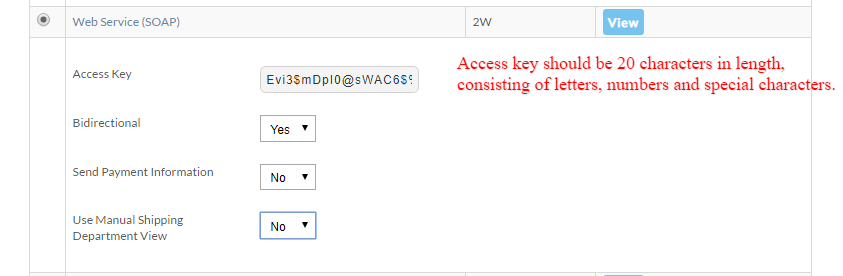
| Field | Description | |
|---|---|---|
| Access Key | The key is the password that is used by the program to access your order information. We recommend that you make it something very long (20 characters) with letters, numbers and a few punctuation characters. | |
| Bidirectional | If ‘No’ then the order is treated as completed after the fulfillment details have been sent to Dropstream. If 'Yes’, Drop Stream will be able to send back to UltraCart shipment confirmations and inventory updates. | Recommended setting is 'Yes' |
| Send Payment Information | Transmit the customer payment details to Fulfillment center. | Recommended setting is 'No' |
| Use Manual Shipping Department View |
Was this page helpful?