About
Worldwide Express Shipping Services is a value added UPS shipper popular with merchants that sell and ship perishable products.
Contact details for Worldwide Express:
Phone: 1-800-758-7447
Website: https://wwex.com/about-us/contact-us
Prerequisites
-
UPS Worldwide Express login credentials (Login ID, Password, & License Key)
-
UPS.com Account Number (Required to generate shipping labels)
There are two configuration sections for configuring WWEX:
-
Account credentials for basic integration.
-
Shipper details required for generating shipping labels.
Configuring Account Credentials
Navigate: Main Menu > Configuration > (middle menu) Checkout > Shipping
-
In the carriers tab, select 'UPS'
-
Click on UPS that appears under Carriers in the shipping configuration menu
-
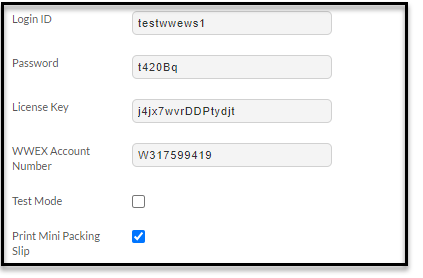
Configure your credentials into the first section:
| Field | Description | |
| Field | Description | |
|---|---|---|
| UPS Account Number | Obtain your UPS Account Number from UPS. | |
| Company Name | Company name as it appears on your UPS Account. | |
| Contact Name | Enter contact name. | |
| Phone Number | Enter your phone number. | |
| Billing Country Code | Enter the two character country code. | |
| Billing Postal Code | Enter your postal code. | |
| Label Size (drop-down list) | Select either “4x6” or “4x8” as desired. | |
| Required Signature (drop-down List) | Choose between “Yes” or “no” as desired. |
IMPORTANT NOTE:
*Currently domestic shipping labels only are supported for label printing.
For International labels, please log into your WWEX Account.
Please ensure your Distribution Centers contain all address fields or labels will fail.
Related
https://www.ups.com/us/en/Home.page?
https://wwex.com/about-us/contact-us
Worldwide Express Shipping Services