Introduction
ShipStation is a multi-carrier platform which provides an API interface allowing UltraCart to provide your customers with shipping rates from the carrier of your choice.
UltraCart has three different engines with connections to ShipStation: Channel Partners, Shipping, and Distribution Center fulfillment.
If you need information on configuring ShipStation to provide shipping ratings and print labels, you are reading the right document.
If you need information configuring UltraCart to send orders to ShipStation fulfillment and receive tracking numbers in return, please see Configuring ShipStation (Distribution Center Transport Mechanism).
If you need information on configuring ShipStation as a Channel Partner, please see ShipStation Channel Partner Integration .
All three areas (ratings, distribution centers, and channel partners) use separate credentials to allow for different ShipStation stores.
Creating your ShipStation API Key
First things first, you’ll need a ShipStation Version 2 API Key. Here are their instructions:
-
Within your ShipStation account, navigate to Settings Page (gear icon at top right) → Account –> API Settings.
-
Select “V2 API” for the API version and follow the instructions.
-
Copy your Production Key off somewhere secure. This key is visible later on if needed.
Main Settings
The main ShipStation settings are found within the “Shipper Specific” settings. These are shipping settings specific to each carrier.
Navigate to the Shipper Specific Options (Tab)
Home → Configuration → Shipping → Shipper Specific Options [tab] → ShipStation
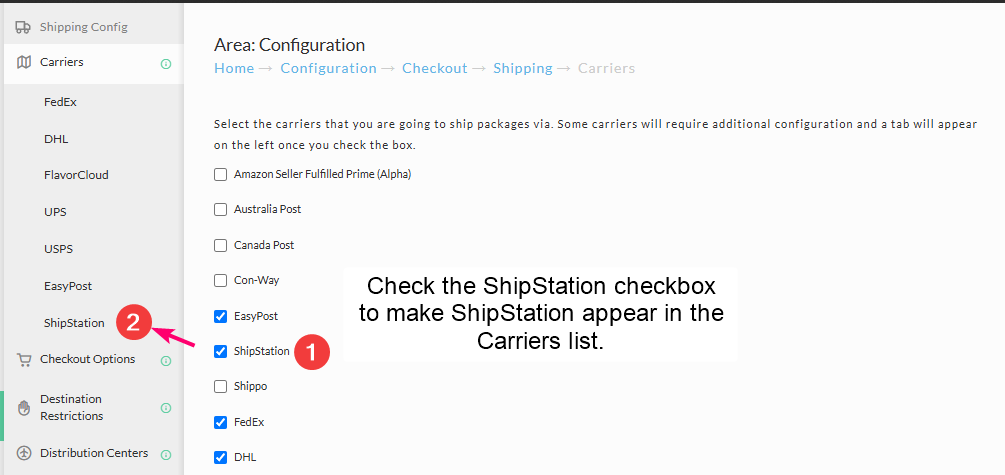
Click the ShipStation checkbox on the main screen. This will activate the Shipper Specific panel for ShipStation. The click on the ShipStation link in the Carriers list so view that screen.
| Field | Description |
|---|---|
| V2 API Key | Your ShipStation Version 2 API Key |
| Rate Type | “account” or “list” for whether you wish to show the customer account rates or list rates |
| Label Type | ZPL or PDF |
| Field | Description |
|---|---|
| Country of Origin | |
| Customs Form Description | Maximum length depends on which carrier you are using. |
| Customs Value | |
| HTS Commodity Code | See Harmonized Tariff Schedule for code reference |