Fulfillment by Amazon (FBA)
Fulfillment by Amazon is similar to other third party logistic providers. Merchants can send their products to an FBA warehouse and then have FBA fulfill those orders when they come into their UltraCart store.
Signing up for FBA
To get started with FBA visit:

Configuring UltraCart
UltraCart connects to Amazon through the Selling Partner API (SP-API) to send orders to FBA and receive tracking numbers and inventory levels. You set this up on a distribution center. Create a separate distribution center for FBA. Changing the transmission mechanism on a distribution center you already use replaces its current connection (for example ShipStation) when you save.
Amazon retired Marketplace Web Service (MWS). The transmission mechanism list still shows "Fulfillment by Amazon MWS - No longer works. Upgrade to SP-API". Do not choose it. Choose Fulfillment by Amazon SP-API.
-
Navigate to Main Menu → Configuration → Checkout → Shipping → Distribution Centers, then click New Distribution Center.
-
Enter the distribution center code, name, and address.
-
In the Transmission Mechanism list, select Fulfillment by Amazon SP-API. The authorize button and three fields appear below it.
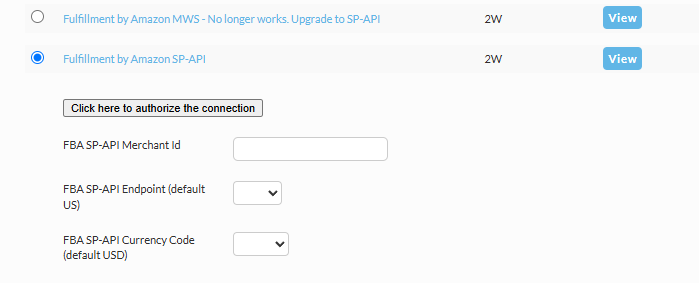
Field What it is FBA SP-API Merchant Id A text box for your Amazon seller Merchant ID. FBA SP-API Endpoint A list of Amazon regions. The default is US, and the list shows blank until you choose a value. FBA SP-API Currency Code A list of currencies. The default is USD, and the list shows blank until you choose a value. -
Choose the FBA SP-API Endpoint and FBA SP-API Currency Code that match your Amazon seller account.
-
Click Click here to authorize the connection. Sign in to Amazon as the primary account holder of your Seller Central account and approve access.

Make sure that you complete the connection by logging into your Amazon account:

-
Return to UltraCart and click Save on the distribution center.
UltraCart does not store the authorization until you save the distribution center. If you authorize but never save with Fulfillment by Amazon SP-API selected, nothing is connected.
For general distribution center settings, see Distribution Centers.
Troubleshooting
The authorize button is missing. The button and fields appear only while Fulfillment by Amazon SP-API is the selected mechanism. Reload the page and select it again.
Amazon shows a 404 page after I click the button. Make sure you are signed in to Amazon as the primary account holder of the Seller Central account, then try again. If the error persists, send the URL shown in the browser to UltraCart support.
Can I connect more than one Amazon account?
Shipping Method Mapping
Next, click on the Methods tab and edit each of your methods. You will need to click on the "Other" tab of the shipping method editor and specify the Fulfillment by Amazon speed category as shown below. UltraCart uses this information to translate from your shipping method names in the checkout to FBA's methods.

Item Assignment
You'll need to make sure to assign the items being handled by Amazon FBA.
You can assign items to the Distribution Center to which you've configured the Amazon FBA as the transmission mechanism either individually from within the item editor in the "Inventory Control and Distribution" tab of the Shipping tab of the item editor or via the "Inventory Update" tool in the Tools section of the Order Management page.