Domains & Hosting
Every StoreFront has a web address, and you can run each one on your own domain over HTTPS. This page covers changing that address, moving to a custom domain, and checking that the domain points at UltraCart.
Navigate: Main Menu → StoreFronts → [select your StoreFront] → General
Why move to your own domain
Every UltraCart account starts with two StoreFront hosts, and you can claim more on the same shared domains:
MERCHANTID.ultracartstore.comfor getting started and early public useMERCHANTID.ultracartdev.comfor your own development and testing
MERCHANTID is your UltraCart merchant ID. Both are shared UltraCart domains, built to get you
selling quickly rather than to be where you stay. Keep using the dev host as a development
environment for as long as it is useful. Once you are taking production traffic, or putting buy
links into email marketing, move to a custom domain that matches your business.
Four things change when you do:
- Your checkout URL matches your brand, which shoppers recognize at the moment they pay.
- Your SEO value accrues to your own domain rather than to UltraCart's.
- The links you place in email, ads, and print sit on a domain you control.
- Your domain reputation becomes your own. Spam filters and link scanners score reputation at
the domain level, so a shared host carries whatever every other merchant on it has done. A
buy link on
ultracartstore.comcan be flagged by an email platform because of activity that has nothing to do with your store.
Moving means getting an SSL certificate for the domain, pointing DNS at UltraCart, and then activating the new address. Every custom domain runs over HTTPS, because the certificate is part of setting it up. This page covers all three steps.
Find your StoreFront's web address
The General screen shows your StoreFront's current address in the box under the preview, with a status dot at its right end and Change StoreFront Location beside it.
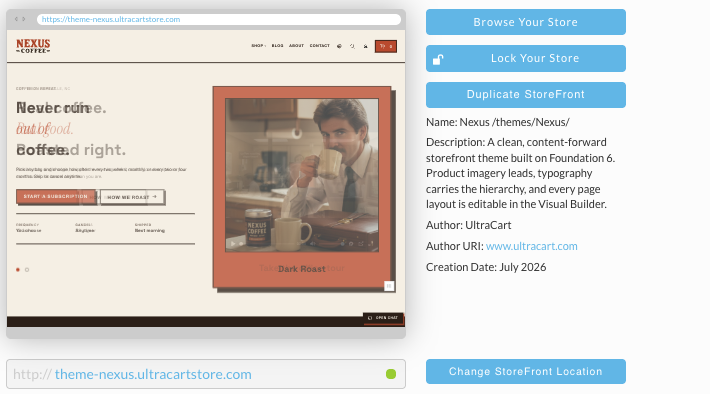
A green dot means the address passes UltraCart's DNS checks. See If you cannot see your website for what to do when it is red.
Change your StoreFront's web address
Click Change StoreFront Location to open the Edit StoreFront URL dialog. It has three parts, one for each kind of change.
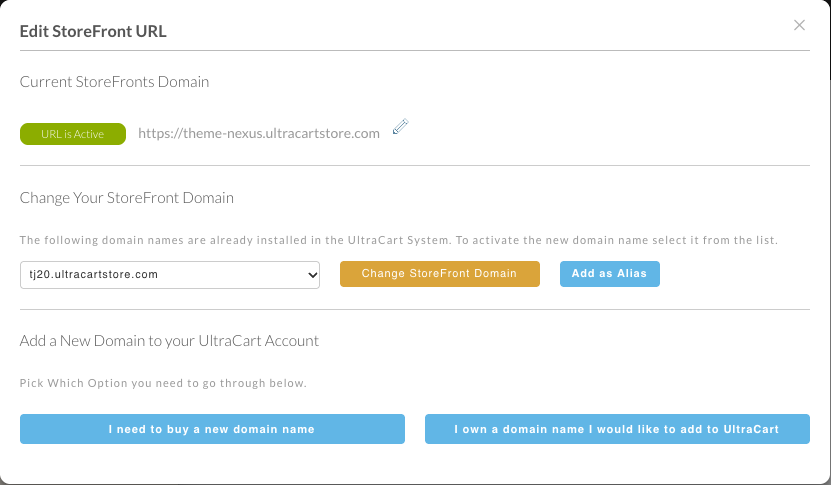
Rename an UltraCart address
Current StoreFronts Domain shows the address in use, marked URL is Active. To change the first part of an UltraCart address:
- Click the pencil (change URL prefix) beside the address.
- Type the new prefix, and choose
ultracartstore.comorultracartdev.comafter it. - Click save, or cancel to leave it as it was.
The prefix must be at least 6 characters, using only A to Z, 0 to 9, and the hyphen.

Switch to a domain already on your account
Change Your StoreFront Domain lists domains that are already installed in UltraCart for your account. Choose one from the list, then:
- click Change StoreFront Domain to make it this StoreFront's address, or
- click Add as Alias to keep the current address and have the chosen domain reach the same StoreFront as well. See Hosts and aliases.
Add a domain you own
-
Under Add a New Domain to your UltraCart Account, click I own a domain name I would like to add to UltraCart.
-
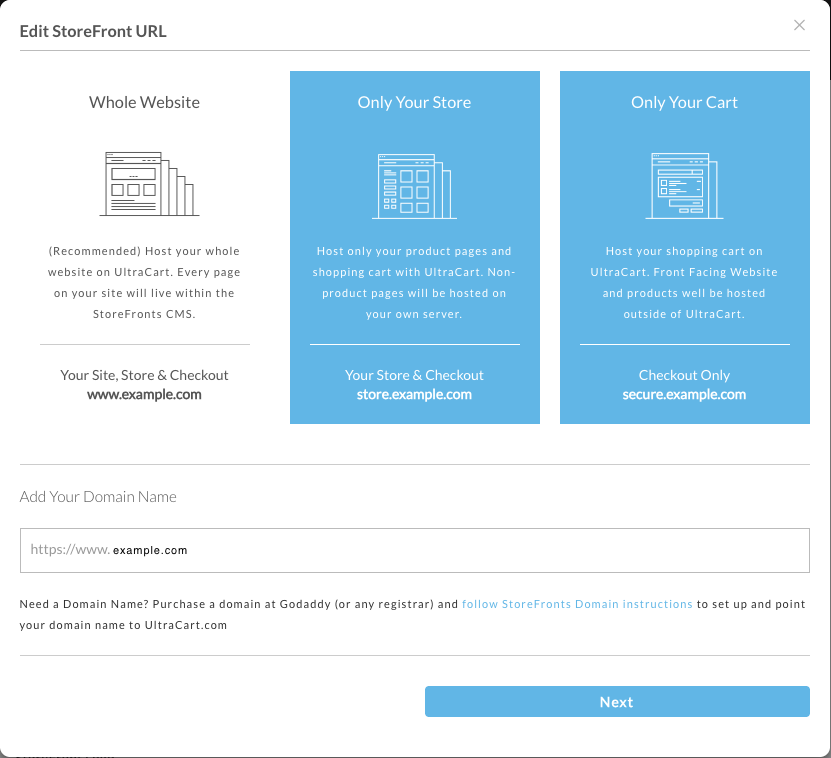
Choose how much of your site UltraCart hosts. Each choice puts the StoreFront on a different address within your domain:
Choice What UltraCart hosts StoreFront address Use when Whole Website (recommended) Your site, store, and checkout. Every page lives in the StoreFronts CMS www.yourdomain.comUltraCart is your whole web presence Only Your Store Product pages and shopping cart. Non-product pages stay on your own server store.yourdomain.comYou already have a site you want to keep Only Your Cart Checkout only. Your site and products are hosted elsewhere secure.yourdomain.comYou want UltraCart for the cart alone -
Type your domain in Add Your Domain Name. The addresses under each choice update to show exactly where your StoreFront would live.
-
Click Next and fill in the details for the SSL certificate.
Before you start, make sure one of these mailboxes exists at your domain and can receive mail:
admin@, administrator@, hostmaster@, postmaster@, or webmaster@. Validation email can
only go to one of those five, and without one the certificate cannot be issued.
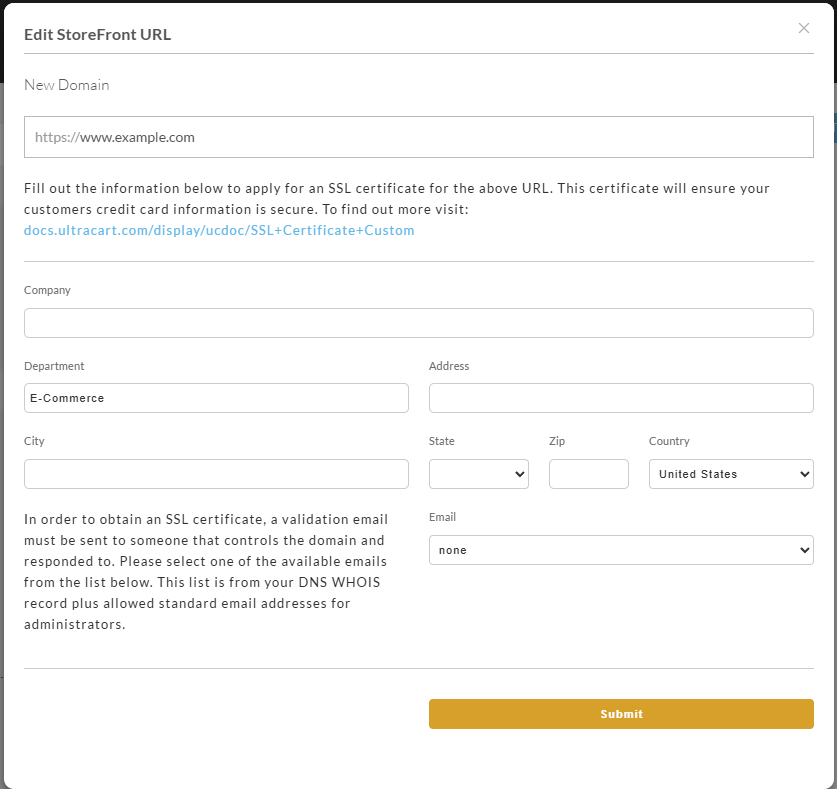
Issuing a certificate requires a validation email to someone who controls the domain. Pick one of the five addresses offered. Addresses drawn from your domain's WHOIS record are no longer accepted by any certificate authority. See Domain control validation.
If you do not own a domain yet
Click I need to buy a new domain name. UltraCart does not sell domains, so this shows a few example registrars. Buy the domain at any registrar you like, then come back and click Continue to set up your hosting and domain settings, which takes you to the same steps as Add a domain you own.
If you already have an SSL certificate
Certificates you bought elsewhere are handled on the SSL Certificates screen rather than in this dialog. See SSL certificates.
After the dialog: point your DNS
The certificate is only the first half. The domain does not reach your StoreFront until you add DNS records at whoever manages DNS for the domain, using the IP address and CNAME target UltraCart emails you.
See DNS at your registrar for the records to create and walkthroughs for several registrars.
UltraCart does not support Cloudflare's DNS proxy. If your domain sits behind Cloudflare, turn the proxy off for these records (the orange cloud) and point the DNS directly at UltraCart. With the proxy on, UltraCart reports the DNS as pointing incorrectly even when Cloudflare's own interface looks right.
If you cannot see your website
A site that will not load after a domain change is almost always a DNS problem, and the StoreFront tells you so.
- Go to Main Menu → StoreFronts → [select your StoreFront] → General.
- Look at the status dot at the right end of the address box. Green means the DNS checks pass. Red means at least one fails.
- Click the dot to open Host Name Check. It runs two checks against the address, and marks
each one Passed or not:
- Does DNS record exist for host name: whether the address has a DNS record at all.
- DNS Pointed at UltraCart: whether that record points at UltraCart.
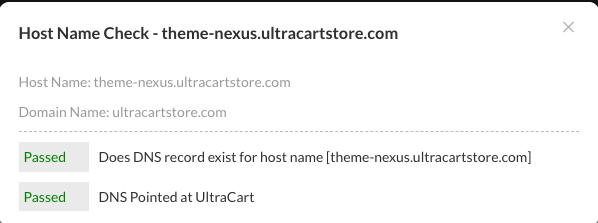
If the first check fails, the record has not been created, or has not propagated yet. If only the second fails, the record exists but points somewhere else, which includes a domain proxied through Cloudflare. See the warning above.
Frequently asked questions
I want several StoreFronts for different product lines, but I only see two hosts. How do I add more?
On UltraCart's own domains you can add as many as you need. Any prefix you like on
ultracartstore.com or ultracartdev.com is yours to claim, such as
spring-sale.ultracartstore.com, and each one can be a separate StoreFront.
StoreFronts on your own domains are limited, and each one needs its own SSL certificate. Buy or import a certificate for each domain, then add it as described in Add a domain you own.
Does UltraCart host my email?
No. UltraCart does not host email with StoreFronts, so keep your email with your current provider. See Hosts and aliases.
Next steps
- DNS at your registrar for the records to create.
- SSL certificates for buying, importing, renewing, and removing one.
- Hosts and aliases for running a second domain against one StoreFront.