SSL Certificate (Custom)
This is where configuration of an SSL certificate occurs. You can access the screen by clicking:
Home → Configuration → (middle menu) Checkout → SSL Certificate (Custom)
The screen will look similar to the screenshot below, if you are a trial user that has not yet placed their billing credit card details on file:

After updating your Service Plan page with the billing credit card details and then returning to the SSL Certificate Custom page, the you'll see:
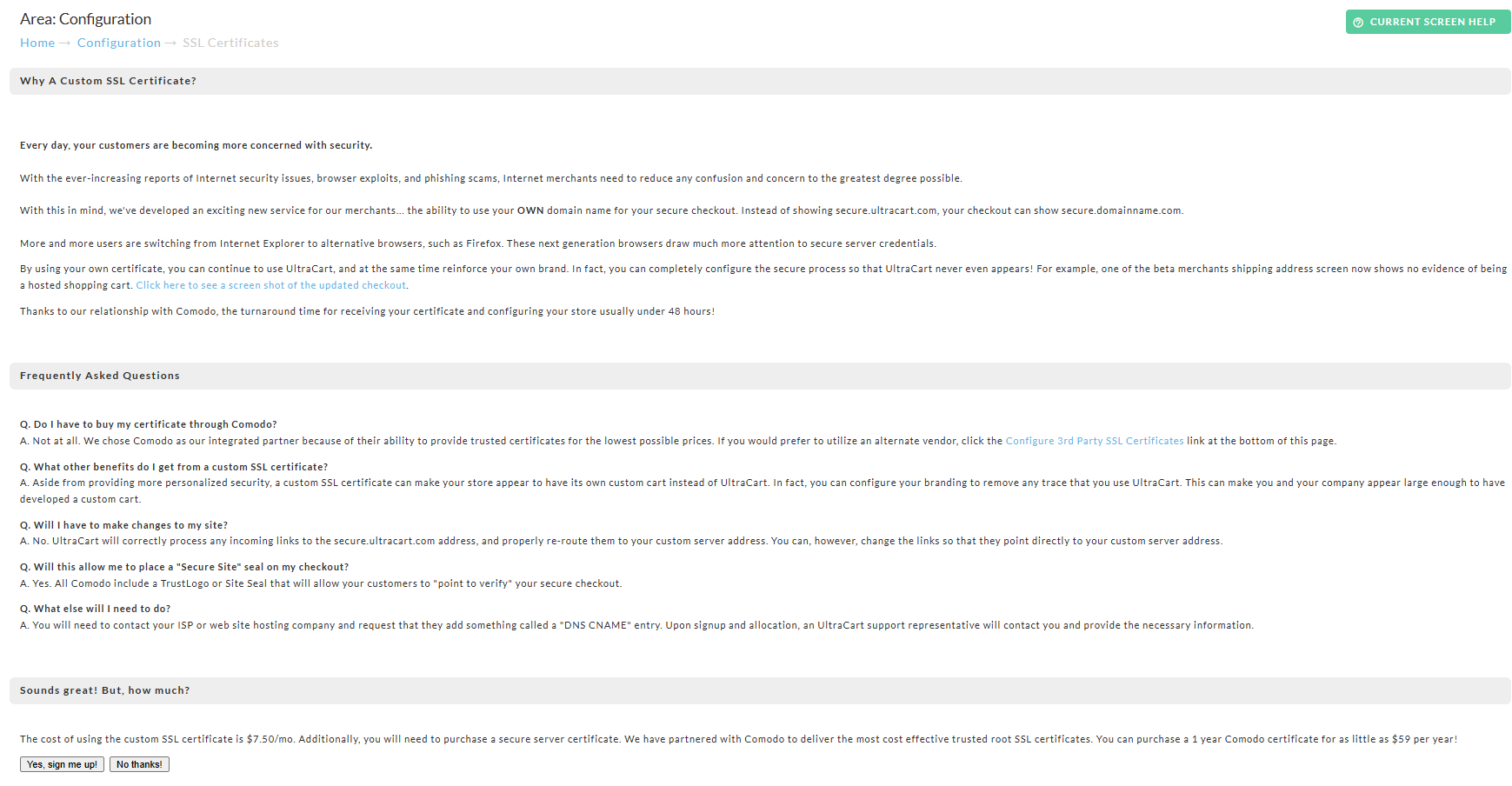
Your three options:
-
Yes, sign me up!
-
No Thanks
-
Configure 3rd Party SSL Certificate
New Certificate through UltraCart from Comodo
If you choose the "Yes, sign me up!" option, you are taken to this purchase page:
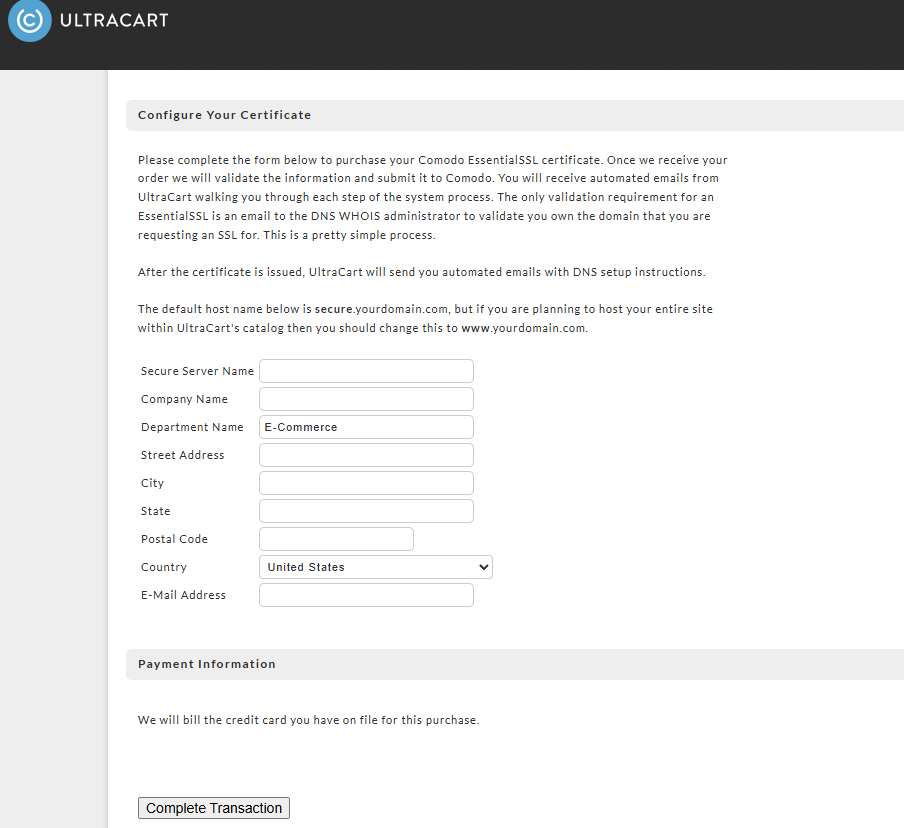
You will need to complete the purchase form with the custom SSL certificate address (Secure Server Name) along with your company name and address details. Also choose the certificate length (number of years). 3 year certificates reduces the renewal duties and offers a savings off the certificate cost.
| Field | Notes |
|---|---|
| Secure Server Name | This is the custom SSL address. we recommend the prefix "secure" (secure.mydomain.com) because it conveys security to the customer. But, you could use other prefixes, such as "store" (store.mydomain.com) or "checkout" (checkout.mydomain.com). :::info You cannot use your default website address www.mydomain.com if you are hosting your website outside of Ultracart. (see FAQ section below) ::: |
| Status | Description | Approximate Time Frame |
|---|---|---|
| Order Received | UltraCart has received your order and will process it shortly. | 1 Business Day |
| Validation Documentation Required | UltraCart has requested validation documents that you need to upload by clicking the upload validation documents button. (*appears only during this step.) :::info ### Importance of matching SSL details to the whois record of domain name It's important that the company details submitted to Comodo match the details as they appear in the whois record for the domain name. Failure to match up exactly can cause the purchase to be delayed or rejected by the certificate issuer. ::: | Waiting on you |
| Button Name | Description |
|---|---|
| Renew with 3rd party | This option allows you to go purchase the renewed SSL from a 3rd party. |
| Do Not Renew | Tells UltraCart not to renew the SSL |
| Re-key | Reissue the SSL to obtain newest certificate |
| Move | Move to another UltraCart Account. |
| Download | Download the Certificate |
| Delete | Delete the configured SSL from the account configuration. |
Advanced Setting
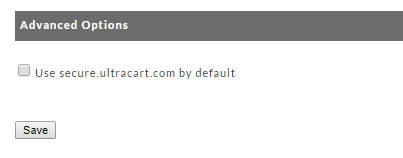
There is an checkbox setting "Use secure.ultracart.com by default" that when checked allows you to use the defaulted secure hostname secure.ultracart.com, so that you can use buy links that do not redirect to the configured SSL. If not checked, a buy link coded with the secure.ultracart.com hostname will auto redirect to the first issued SSL on the account.
If you have multiple SSL's that youwill be using with your items, you will assign the appropriate SSL to the buy link.
Important Note Regarding Cloudflare Configuration
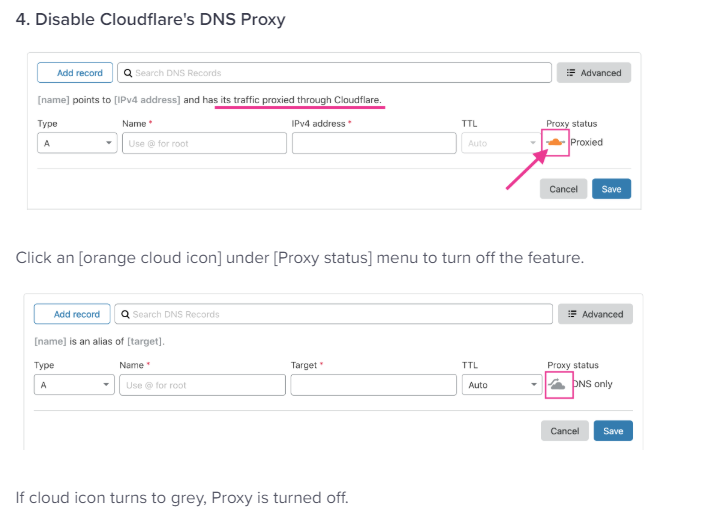
Disable Cloudflare's DNS Proxy
**UltraCart does not support Cloudflare's DNS Proxy configuration. You'll need to turn that off. **
-
**Navigate Login page: **https://dash.cloudflare.com/
-
Click [DNS] menu of your domain name
-
Click [+Add record] button to add new records
About SSL Validation Types
UltraCart purchases the EssentialSSL from Comodo, which is by far the easiest to obtain and easier to manage renewals. EssentialSSL certificates are domain validated certificates which only require an Domain Control verification step.
Turn off Privacy Services
PLEASE NOTE: If you have a privacy service turned on for your domain name, you will need to temporarily turn it off in order to complete the Domain Control Validation step. Once you have received the DCV email and complete the validation step, you can turn the privacy service back on.
Alternatively, if you have "admin@yourdomain.com" configured, the DCV email can be sent to that address.
All other Comodo certificate types are organization validated which will require:
-
DNS Control Email Verification (example DCV email notification)
-
Documentation to validate the address (utility bill, etc.)
-
Public telephone listing (with callback verification)
If your e-commerce organization is new, go the EssentialSSL route. In future years you can upgrade to an organization validated certificate once your documentation, (phone number publications, etc.) are all established.
Optionally, you can purchase one of the organization validated certificates from Comodo directly and import it as a 3rd Party Certificate. Organizational certificates take substantially longer to issue and require validation paperwork from your company along with a verification phone call made to the phone number you have listed on either yp.com or superpages.com. You will need to be able to provide paperwork (such as articles of incorporation, utility bills, etc.) that show an address that matches the address on your certificate request and DNS WHOIS record. If you have any type of domain privacy features active on your DNS WHOIS it will increase the issuance time and paperwork.
For this option, see "3rd Party SSL Integration" below for how to purchase and configure your third party SSL.
3rd Party SSL Integration
Integrating a third party SSL (an SSL you purchased directly, without UltraCart as the point of contact with the SSL issuer during the purchase) can be accomplished via a Certificate Signing Request (CSR).
You'll obtain the CSR by clicking the "Download CSR" button. You will need to provide this document to the certificate authority that you are purchasing from. While purchasing the certificate you may be asked for a server type. Select Apache (Apache/Mod_ssl) for the server type.
CSR
When copying and pasting the CSR from UltraCart, be sure to include the entire block of code including the header and footer sections (those are part of the CSR and it will not work if you strip the header and footer out.
Once you have obtained the SSL Certificate file you'll click on the "upload certificate" button. you'll have two options:
-
Clicking "choose file" button then browsing your computer and uploading the zip file containing your certificate (and all intermediate root certificates)
or -
Paste the certificate (and all intermediate root certificates) into the "Certificates" field.
then clicking the "Upload" button.
Upload Certificate Errors
If the certificate fails the validation uploading it, you recieve an error message.
In this situation, you may need to repeat the process of requesting the CSR and then obtaining the Certificate file again.
Installation
Once the Certificate reaches the installation stage, UltraCart automatically process the installation M-F at the following times: 9AM, 12PM, 3PM (eastern time zone).
Remove An SSL Certificate
SSL configured with a Storefront
If the SSL is currently configured for use with a UltraCart Storefront host, navigate to the Storefront menu for that host then click the "Change Location" button and you'll see the SSL appear in a drop-down list in the middle of the window. Select one of the built in storefront hosts (or another SSL you wish to apply in place of the one you are removing.)
SSL not configured with a Storefront
Navigate: Main Menu > Configuration > (middle menu) Checkout > "SSL Certificate (Custom)"
Here you can click the delete button next the SSL certificate you wsht to remove from your account.
Moving Certificate From One UltraCart Account To Another
Merchant's that have multiple UltraCart accounts may find a need to move an SSL certificate from one account to another.
To accomplish this click the move button next to the SSL Certificate:
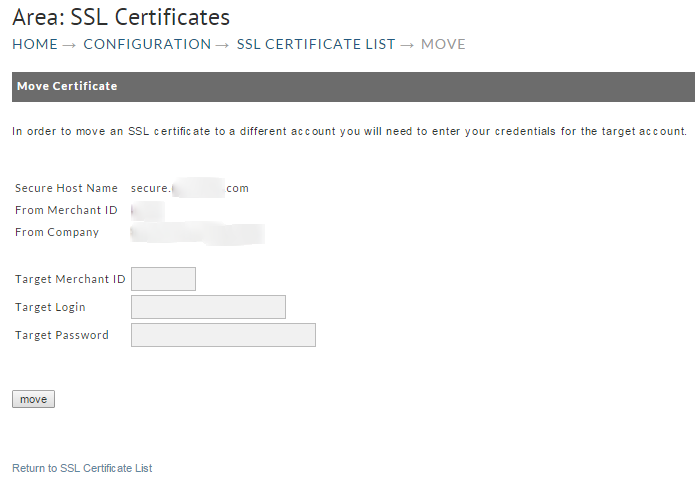
Then sign into the other account using the form you see above.
Frequently Asked Questions
(click a question to view the answer)
Where do I configure the DNS settings to point the SSL to my UltraCart store?
You will typically use the Registration Service Provider from which you purchased your domain name.
If you are unsure from where you originally purchase the domainname, perform a whois lookup:https://whois.icann.org/en
Then, when viewing the whois record for your domain name, scroll down towards the bottom of the record details looking for "Registration Service Provider:" and you'll see the company contact details. Then head over to that service's website and log into your account and navigate to the DNS configuration area.
NOTE: If you are unfamiliar with configuring the DNS settings, you can call the Registration Provider's support line for assistance. Read them the DNS CNAME for your SSL certificate, which you can find within the UltraCart "SSL Certificate (Custom)" configuration page located:
Main Menu > Confguration > (Middle menu) Checkout > (Advanced View Enabled at top right) SSL Certificate (Custom)
Can I use the same SSL certificate on my website and UltraCart?
No. An SSL is associated with a single domain name. A single domain name can only be pointed at one IP address. You will need a certificate for www.mysite.com for your web server and secure.mysite.com for UltraCart.
I'm testing the SSL that just went live and I'm getting an error page that says that there is a certificate mismatch?
Web browsers stores (caches) web pages in order to speed up the loading of pages in the future. Your local computer, likewise performs DNS caching to improve the speed of your internet browsing. In some cases this may create a situation where, even though your website is functioning with the SSL Certificate, you'll see an error page due to checking of the page when the SSL was not active.
Perform the following:
-
Open a command window (in Windows 7: Click the start button then in the "search programs and files" field type: cmd (then click enter key)
-
From the command line prompt, type: ipconfig /flushdns (then click the enter key)
-
Next, close your web browser (all windows of that web browser) then restart.
-
Now, browse to the SSL page address again.
Why does my TrustLogo graphic display the following message on hover/click "IdAuthority Credentials are not available for this site"?
This appears when you have an "Essential SSL", but have the Trust Logo that is valid only with the "Instant SSL"
(The Essential SSL is validated only by the Domain Control Validation (DCV) email, whereas the "Instant SSL" goes through an more extensive validation process in which you provide documentation (such as articles of incorporation, recent utilities statement, etc, showing an exact match to the company details you also have in the whois record for your domain to which the SSL certificate applies, along with a validation of your company phone number in a public listing, such as superpages.com or yp.com)
The Essential SSL does have a "site seal" that is available to be displayed in the checkout ages, it is configurable in the "Conversion and Tracking" tab of the Screen Branding Themes editor.
Can I have multiple custom SSL certificates configured in my account?
Yes. If you have more than one custom SSL certificate applied to the account, then one of them will be the default one, and each additional one is used by manually updating the buy link URL (or mbuy form) to use the custom SSL address that should be applied during the checkout process.
I've already paid $59/year for the SSL what is the monthly $7.50 for?
The monthly cost of using the custom SSL certificate is $7.50/mo. which covers the cost of the IP allocation. Additionally, you will need to purchase a secure server certificate (SSL). We have partnered with Comodo to deliver the most cost effective trusted root SSL certificates. You can purchase a 1 year Comodo certificate for as little as $59 per year!
I've configured my SSL certificate DNS CNAME via Cloudflare. UltraCart is showing me a message that the DNS is pointing incorrectly even though it looks correct in the Cloudflare user interface?
UltraCart does not support proxying through Cloudfare at this time. Instead, you'll need to point the DNS CNAME directly at UltraCart, per the configuration instructions that are sent out to the account admin.