About
This document describes the Wholesale Signup and Wholesale Approval process for storefronts via the Storefront Communications. This replaces the legacy wholesale signup/approval email configuration.
Configuring the Flow
The Wholesale Signup email goes out immediately after the customer successfully submits the wholesale signup form signup, but before the merchant approves them.
This way we will know which tier they are signing up for in order to select an appropriate email.
Instead of using the legacy Configuration located at:
Main Menu → Configuration → Email Notifications → Wholesale Signup/Approval
Navigate:
Main Menu → StoreFronts → (choose StoreFront host) → Flows, then click New Flow.
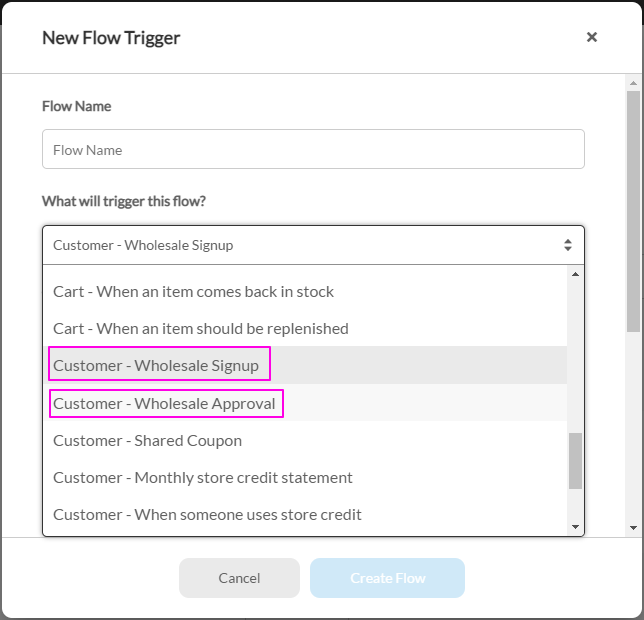
A chooser appears with two cards. Pick New Flow to build from scratch, or From Library to install a predefined flow. New Flow opens the New Flow Trigger dialog, where What will trigger this flow? holds the wholesale triggers.
The StoreFront Communications system has flow triggers for:
-
Customer - Wholesale Signup
-
Customer - Wholesale Approval
Each trigger can be limited to one pricing tier, or set to All. The picker takes a single value, so to give three tiers different messaging you build one flow per tier. For Wholesale Approval a tier is required; for Wholesale Signup it defaults to All.
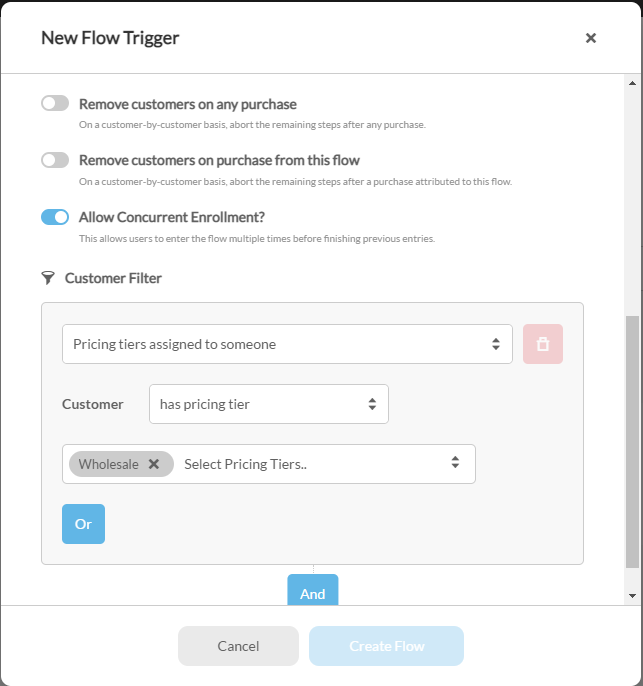
The recommendation would be to have the customer signup for a default pricing tier, and have a single flow trigger that applies to all customer wholesale signups.
Then, once you select their final pricing tier and approve them, you can have separate flows that are pricing tier specific to have pricing tier specific messaging.