A List is required before you can create the form.
About
The Signup Form Builder is used to create a form to allow customer to signup for an email list, this can then be added to an email flow.
NAVIGATE:
Main Menu → StoreFronts → Communication → Lists & Segments → Signup Form Builder
Step 1.
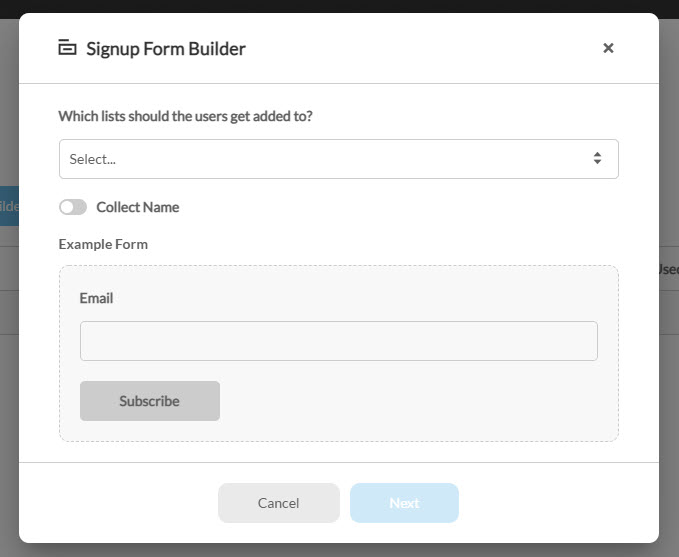
After clicking on the Signup Form Builder button you will be presented with the model shown below. Under Which lists should the users get added to? select one or more lists, then click Next. The field takes several lists, so one form can subscribe a visitor to all of them.
Pick two or more and an extra switch appears, Allow List Selection. Turn it on and the generated form shows a checkbox per list so the visitor chooses which ones to join. Lists are shown by their Public Name where one is set, and by their internal name otherwise.
There is also an option toggle to collect the customers name which will change the form
Step 2.
Here you will be presented with two options the first is the CJSON file to add the form into an existing Storefront and the second will allow you to download the HTML version so that it can be added into an external website.
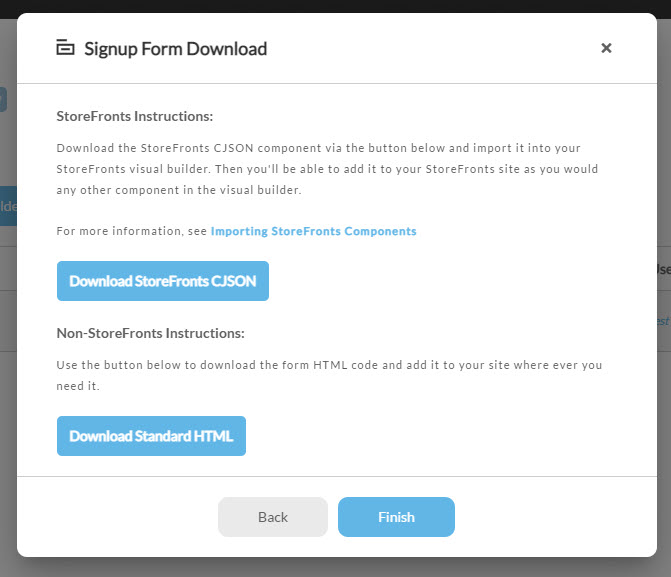
Once you have selected your download you can click Finish to close the model.