Overview
Segments are fully dynamic groupings of customers based the historical actions and properties. Segments support multiple rules with AND/OR logic operations to allow for complex segmentation. Time based filtering can be used to look at historical actions within a specific period.
An example of a populate segment would be “Customers That Have Purchased From You ”.
Building a Segment
Navigation to Lists & Segments under StoreFront Communications and then click the New List or Segment button.
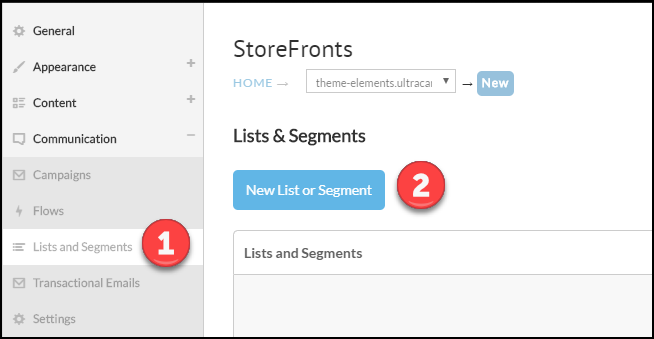
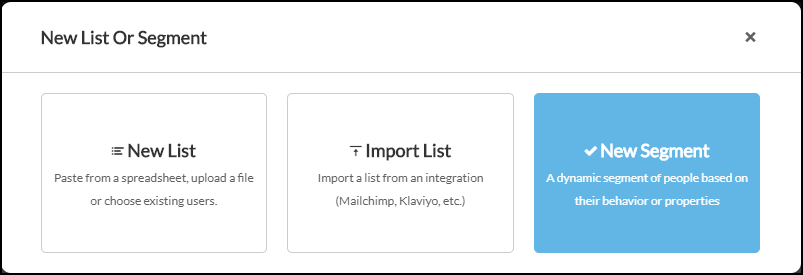
Next click on the new segment button as shown below.
Give the segment a name and then continue on to configure filters. Filters will be discussed in more depth below. Once complete click the Create Segment button.
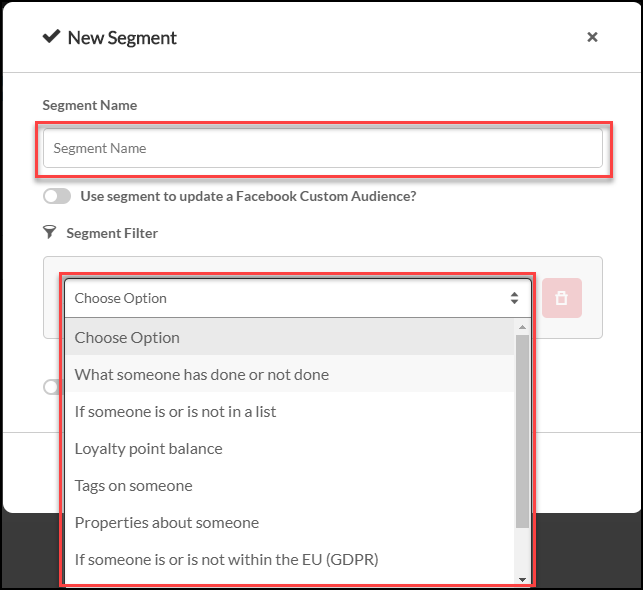
Segment Filters
A segment is defined by one or more filters. The table below lists every filter the segment editor offers, and the options each one gives you.
Some filters appear only inside a flow, where a cart, order, auto order, review, or survey is in context. Those are not listed here, since they are not available when you build a segment.
| Filter | Options | What it does |
|---|---|---|
| What someone has done or not done | 21 behaviour metrics, listed below | The most used filter. Looks at what the customer did within a time period you choose. |
| If someone is or is not in a list | is in <list>, is not in <list> | Checks the customer's list membership. |
| Someone's Auto Orders | is / is not, plus a status of active, inactive, paused, or completed, and optionally specific items | Targets subscribers by the state of their auto orders. |
| Loyalty point balance | is more than <number>, is less than <number>, is between <number> and <number> | Checks loyalty points earned. Useful for reminding a lapsed customer they have points to redeem. |
| Loyalty cashback balance | is more than, is less than, is between | The same comparison against a cashback balance rather than points. |
| Loyalty cashback expiring soon | is more than, is less than, is between | Targets customers whose cashback is about to expire, which is a strong reason to return. |
| Tags on someone | is tagged with <value>, is not tagged with <value> | Checks tags on the customer profile. |
| AtData (formerly TowerData) about someone | Gender: Female, Male, Unknown. Age: 18-20, 21-24, 25-34, 35-44, 45-54, 55-64, 65+, Unknown | Third-party demographic data appended to the profile. |
| Properties about someone | Operators per property type, listed below | Compares properties stored on the customer profile, including any your flows set with an Update Profile step. |
| If someone has opted in to SMS messages | No further options | A yes or no check on SMS opt-in. Pair it with an SMS step so you only text people who agreed to it. |
| If someone is or is not within the EU (GDPR) | is in / is not in, and a region of European Union or United States | Despite the name, this filter also targets United States residents. Both dropdowns must be set. |
| If someone is in BigQuery | A BigQuery Table Id in project.dataset.table_name form, and an Event Ruler JSON expression | Matches customers against a row in your own BigQuery table. |
| Someone's proximity to a location | is within / is not within, a distance, miles or kilometers, and a postal code | Targets customers near a location. Useful for an in-person event. |
| Analytics about someone | Attributes: Average order value, Average days between orders, Historic customer lifetime value, Historic number of orders. Operators: equals, doesn't equal, is at least, is more than, is less than, is at most | Overall analytics about the customer. |
| Pricing tiers assigned to someone | has pricing tier, does not have pricing tier | Targets wholesale and other pricing tiers. |
Behaviour metrics
What someone has done or not done offers these 21 metrics:
| Started checkout | Started checkout value | Return cart |
| Return cart value | Ordered product | Ordered product value |
| Active on site | Active on site time (seconds) | Placed order |
| Placed order value | Fulfilled order | Fulfilled order value |
| Reviewed product | Reviewed product score | Subscribed to list |
| Unsubscribed from list | Clicked email | Delivered email |
| Opened email | Marked email as spam | Blocked email |
Active on site and Active on site time (seconds) are what you need for a browse-abandon segment. Reviewed product and Reviewed product score drive review follow-up.
Property operators
Properties about someone offers different operators depending on the property's type. Pick the type deliberately when you set the property, because a date stored as text will not compare correctly here.
| Type | Operators |
|---|---|
| Text | equals, doesn't equal, contains, doesn't contain, is in, is not in, starts with, doesn't start with, ends with, doesn't end with, is set, is not set |
| Number | equals, doesn't equal, is at least, is more than, is less than, is at most |
| Date | is in the last, is at least, is at most, is between, is in the next, is before, is after, is between dates, is today, is in this month, is in the month of |
| Boolean | is true, is false |
is between compares against a relative range. is between dates is the one to use when you want two absolute calendar dates.
Multiple Filters with Boolean Logic
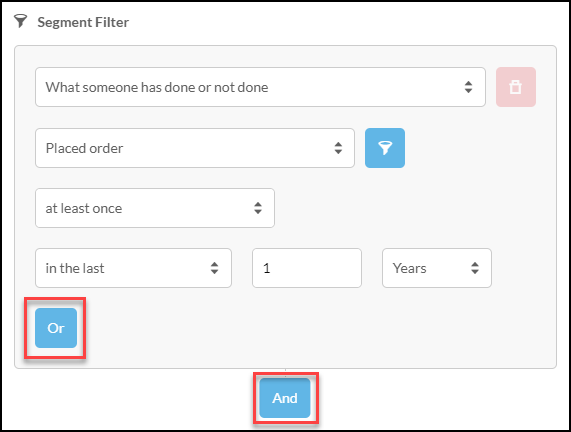
After you have established your first filter, you can add additional filters by clicking either the OR or AND buttons as shown below.
Syncing a segment to another email provider
A segment can keep an external list in step with its own membership. In the segment dialog, turn on Sync this segment to a third-party email marketing provider list?, then pick a Provider and a List.
You can also act on membership changes. When a customer joins this segment and When a customer leaves this segment each let you Add Tags and Remove Tags at the provider, so a customer entering your win-back segment can be tagged there automatically.
The providers offered are the ones already connected to your account.
Integration with Facebook custom audiences
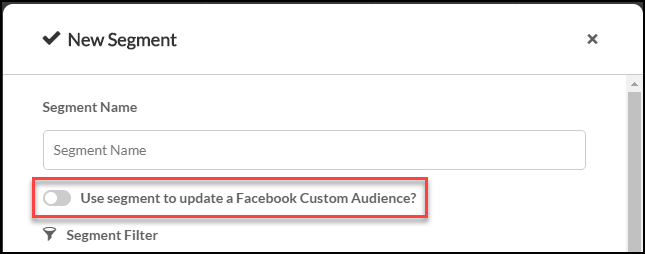
If you have the Facebook Analytics application connected to your StoreFront, a custom audience based upon this segment can be created within Facebook. To connect the Facebook Analytics application, please contact UltraCart Support for an invite to the application and then connect under Privacy & Tracking → Other.

The ability to create a custom audience within Facebook based upon a dynamically changing segment is incredibly power. Telling Facebook what constitutes a great customer allows them to find you “look alike” audiences to attract new customers that have similar characteristics.
Ranking to optimize for top portion of the customers
After you have setup filters to find a segment of customers, you can further refine the membership within the segment by ranking the customers based upon another metric. After you select the “Optimize the resulting segment” option, you can keep a certain number or percentage of the customers based upon a variety of metrics within a particular time period.
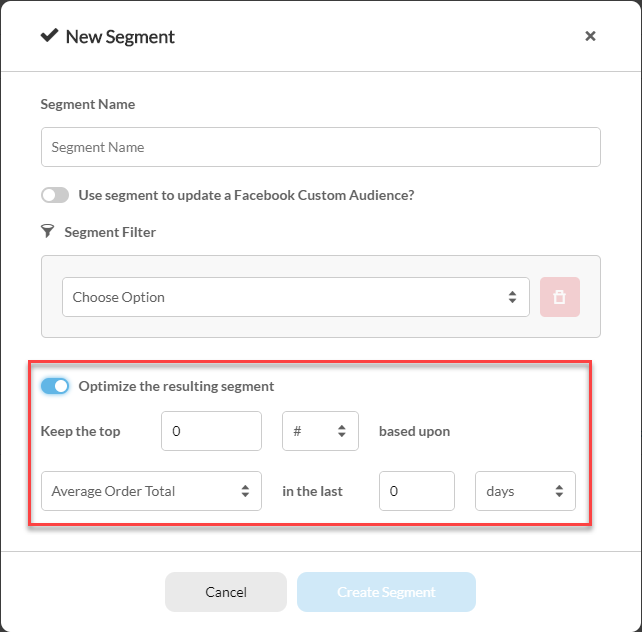
Ranking is especially powerful when creating a segment to populate a Facebook custom audience. You have the ability to select the top 25% of your customers that purchased within the last year based upon their total order value. As Facebook finds you more customers of this quality, your average customer value would increase over time and the segment would dynamically adjust to include only the cream of the crop.