Page Directive Reference
Directives are meta-data that appears in comments within the template code (typically at the top of the template). When present, they generate fields that merchants may fill in, allowing them to customize their web site without having to edit code.
directive declares an attribute → | merchant supplies a value → | value is available within the template |
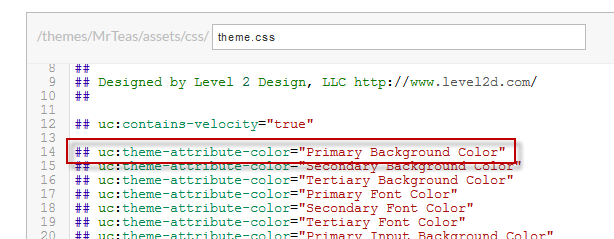 | 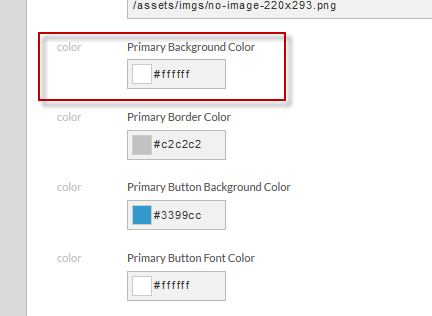 |
|
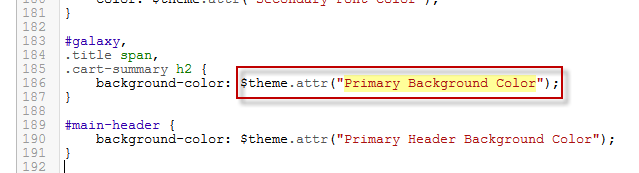
Directives break down into several categories.
The two pound signs (#) in front of each directive example are velocity (our template language) comments. Because the following directives are used by the UltraCart engine and not the velocity template engine, we do not want them read by the velocity engine and rendered as html content. So it's standard practice to list out directives within velocity comments.
The syntax for directives is uc:directive-name="name**|**default-value". The pipe (delimiter) and default value are almost always optional.
Template Capabilities
| Name | Value 1 | Value 2 | Description | Example |
|---|---|---|---|---|
| uc:contains-velocity | Boolean | Indicates that the template contains Velocity code and should be processed through the Velocity rendering engine | ## uc:contains-velocity="true" | |
| uc:display-items | Boolean | Indicates that the template can display items | ## uc:display-items="true" | |
| uc:display-blog-posts | Boolean | When true, additional features are displayed on page editor allowing the merchant to select blog posts, etc. | ## uc:display-blog-posts="true" | |
| uc:display-subgroups | Boolean | Indicates that the template supports displaying child pages. | ## uc:display-subgroups="true" | |
| uc:ignore-missing-directives | Boolean | Useful for instructing the backend editor to not generate input fields for the missing directives used in the template. For example, some of the document tops access lots of different information that is conditional. We don't want input fields generated for conditional data. | ## uc-ignore-missing-directives="true" | |
| uc:page-multimedia-default-used | Boolean | true if the default multimedia image is used somewhere on the page | ||
| uc:pagination | Boolean | Indicates that the template supports paginated display of a large number of items | ## uc:pagination="true" | |
| uc:page-type | String | The type of page. Possible options are: - static - group - item - misc - customer - checkout - affiliate - email | ## uc:page-type="group" |
Attributes (Page, Theme, and Site)
Page, theme, and site attributes all function the same. The only difference is the scope.
- Page attributes are only meant for use on one page.
- Theme attributes within a particular theme.
- Site attributes are expected to be used across the entire site.
| Name | Value 1 | Value 2 | Description | Example |
|---|---|---|---|---|
uc:page-attribute-boolean | Name of the attribute | Default Value | A yes/no attribute that appears as a checkbox in the user interface. | `## uc:page-attribute-boolean="show-comments |
uc:page-attribute-color | Name of the attribute | Default Value | An HTML color that displays as a color picker in the user interface | |
uc:page-attribute-definitionlist | Name of the attribute | A definition list allows terms/definitions or name/value pair lists to be configured | ||
uc:page-attribute-deprecated | Name of the attribute | Marks an attribute as deprecated to allow the merchant warning that it will disappear in future releases | ||
uc:page-attribute-html | Name of the attribute | Default Value | A block of HTML. The editor in the user interface is a syntax highlighting editor. | |
uc:page-attribute-integer | Name of the attribute | Default Value | A number input | |
uc:page-attribute-itemset | Name of the attribute | Default Value | A set of item ids. The input contains a an item search field to make located the items easier. | |
uc:page-attribute-multiline | Name of the attribute | A multi-line text input field. | ||
uc:page-attribute-pagecollection | Name of the attribute | Provides a rich UI widget allowing merchants to select a group of pages for whatever end is desired | ||
uc:page-attribute-rgba | Name of the attribute | Default Value | rgba color picker | |
uc:page-attribute-simplelist | Name of the attribute | A simple list allows for a series of information to be configured within an attribute. | ||
uc:page-attribute-slider | Name of the attribute | Provides a rich UI widget to allow merchants to configure a slider | ||
uc:page-attribute-string | Name of the attribute | Default Value | A single line text input field | |
uc:child-page-multimedia-code | Name of the code | Instructs the editor that this page uses child images by a certain code. Imagine a catalog page that needs to list out many child pages. If the page wishes to show a particular image for each child page, it can specify the code here. When the merchant edits the child page, a placeholder will be created alerting the merchant that they need to supply that image. | ||
uc:child-page-multimedia-code-deprecated | Name of the code | Instructs the editor to display a deprecated warning next to a particular multimedia image, alerting the merchant that the child page's image is no longer in use. | ||
uc:child-page-multimedia-default-used | 'true' | Instructs the editor that this page uses the default image of each child page, most likely to display a thumbnail of the children. | ||
uc:page-description-used | 'true' | Instructs the editor that the page description is used. | ||
uc:page-multimedia-code | Name of the code | Instructs the editor that this page template uses a multimedia image given by a particular code. The editor will display a placeholder for that image to remind the merchant they need to provide an image for proper operation. | ||
uc:page-multimedia-code-deprecated | Name of the code | Instructs the editor to display a deprecated warning next to a particular multimedia image, alerting the merchant that the image is no longer in use. | ||
uc:page-multimedia-default-used | 'true' | Instructs the editor that this page uses the default image, prompting the merchant to supply a default image. | ||
uc:pagecollection-multimedia-code | Name of the code | Instructs the editor that each page in a pagecollection uses images by a certain code. Imagine a catalog page that needs to list out a collection of pages. When the merchant edits any page in the pagecollection, a placeholder will be created alerting the merchant that they need to supply that image. |
| Name | Value 1 | Value 2 | Description | Example |
|---|---|---|---|---|
uc:theme-attribute-boolean | Name of the attribute | Default Value | A yes/no attribute that appears as a checkbox in the user interface. | `## uc:theme-attribute-boolean="show-comments |
uc:theme-attribute-color | Name of the attribute | Default Value | An HTML color that displays as a color picker in the user interface | |
uc:theme-attribute-definitionlist | Name of the attribute | A definition list allows terms/definitions or name/value pair lists to be configured | ||
uc:theme-attribute-deprecated | Name of the attribute | Marks an attribute as deprecated to allow the merchant warning that it will disappear in future releases | ||
uc:theme-attribute-html | Name of the attribute | Default Value | A block of HTML. The editor in the user interface is a syntax highlighting editor. | |
uc:theme-attribute-integer | Name of the attribute | Default Value | A number input | |
uc:theme-attribute-itemset | Name of the attribute | Default Value | A set of item ids. The input contains a an item search field to make located the items easier. | |
uc:theme-attribute-multiline | Name of the attribute | A multi-line text input field. | ||
uc:theme-attribute-pagecollection | Name of the attribute | Provides a rich UI widget allowing merchants to select a group of pages for whatever end is desired | ||
uc:theme-attribute-rgba | Name of the attribute | Default Value | rgba color picker |
| Name | Value 1 | Value 2 | Description | Example |
|---|---|---|---|---|
uc:site-attribute-boolean | Name of the attribute | Default Value | A yes/no attribute that appears as a checkbox in the user interface. | `## uc:site-attribute-boolean="show-comments |
uc:site-attribute-color | Name of the attribute | Default Value | An HTML color that displays as a color picker in the user interface | |
uc:site-attribute-definitionlist | Name of the attribute | A definition list allows terms/definitions or name/value pair lists to be configured | ||
uc:site-attribute-deprecated | Name of the attribute | Marks an attribute as deprecated to allow the merchant warning that it will disappear in future releases | ||
uc:site-attribute-html | Name of the attribute | Default Value | A block of HTML. The editor in the user interface is a syntax highlighting editor. | |
uc:site-attribute-integer | Name of the attribute | Default Value | A number input | |
uc:site-attribute-itemset | Name of the attribute | Default Value | A set of item ids. The input contains a an item search field to make located the items easier. | |
uc:site-attribute-multiline | Name of the attribute | A multi-line text input field. | ||
uc:site-attribute-pagecollection | Name of the attribute | Provides a rich UI widget allowing merchants to select a group of pages for whatever end is desired | ||
uc:site-attribute-rgba | Name of the attribute | Default Value | rgba color picker |
| Name | Value 1 | Value 2 | Description | Example |
|---|---|---|---|---|
uc:item-attribute-boolean | Name of the attribute | Default Value | A yes/no attribute that appears as a checkbox in the user interface. | `## uc:item-attribute-boolean="show-comments |
uc:item-attribute-color | Name of the attribute | Default Value | An HTML color that displays as a color picker in the user interface | |
uc:item-attribute-definitionlist | Name of the attribute | A definition list allows terms/definitions or name/value pair lists to be configured | ||
uc:item-attribute-deprecated | Name of the attribute | Marks an attribute as deprecated to allow the merchant warning that it will disappear in future releases | ||
uc:item-attribute-html | Name of the attribute | Default Value | A block of HTML. The editor in the user interface is a syntax highlighting editor. | |
uc:item-attribute-integer | Name of the attribute | Default Value | A number input | |
uc:item-attribute-itemset | Name of the attribute | Default Value | A set of item ids. The input contains a an item search field to make located the items easier. | |
uc:item-attribute-multiline | Name of the attribute | A multi-line text input field. | ||
uc:item-attribute-pagecollection | Name of the attribute | Provides a rich UI widget allowing merchants to select a group of pages for whatever end is desired | ||
uc:item-attribute-rgba | Name of the attribute | Default Value | rgba color picker | |
uc:item-attribute-simplelist | Name of the attribute | A simple list allows for a series of information to be configured within an attribute. | ||
uc:item-attribute-string | Name of the attribute | Default Value | A single line text input field | |
uc:item-multimedia-code | Name of the code | Instructs the editor that this page template uses an item multimedia image given by a particular code. The editor will display a placeholder for that image to remind the merchant they need to provide an image for proper operation. |
| Name | Value 1 | Value 2 | Description | Example |
|---|---|---|---|---|
uc:blog-attribute-boolean | Name of the attribute | Default Value | A yes/no attribute that appears as a checkbox in the user interface. | `## uc:blog-attribute-boolean="show-comments |
uc:blog-attribute-color | Name of the attribute | Default Value | An HTML color that displays as a color picker in the user interface | |
uc:blog-attribute-definitionlist | Name of the attribute | A definition list allows terms/definitions or name/value pair lists to be configured | ||
uc:blog-attribute-deprecated | Name of the attribute | Marks an attribute as deprecated to allow the merchant warning that it will disappear in future releases | ||
uc:blog-attribute-html | Name of the attribute | Default Value | A block of HTML. The editor in the user interface is a syntax highlighting editor. | |
uc:blog-attribute-integer | Name of the attribute | Default Value | A number input | |
uc:blog-attribute-itemset | Name of the attribute | Default Value | A set of item ids. The input contains a an item search field to make located the items easier. | |
uc:blog-attribute-multiline | Name of the attribute | A multi-line text input field. | ||
uc:blog-attribute-pagecollection | Name of the attribute | Provides a rich UI widget allowing merchants to select a group of pages for whatever end is desired | ||
uc:blog-attribute-rgba | Name of the attribute | Default Value | rgba color picker | |
uc:blog-attribute-simplelist | Name of the attribute | A simple list allows for a series of information to be configured within an attribute. | ||
uc:blog-attribute-string | Name of the attribute | Default Value | A single line text input field |