Item Element Fallbacks and Empty States
Several item elements in the Visual Builder render something instead of nothing when the field they depend on is empty or only partly configured. That output can look like a correct value even though it is not, so a merchant placing the element cannot always tell the difference by looking at the storefront alone. This page lists what each element falls back to.
This page currently covers ITEMMSRP, ITEMSAVINGS, ITEMRELATEDITEMSLIST, and ITEMSTRUCTUREDDATA. ITEMVOLUMEDISCOUNTS, ITEMLISTFACETS, ITEMVARIATIONS, and ITEMATTRIBUTE are not documented here yet, so their absence from this page is not a claim that they have no fallback behavior of their own.
ITEMMSRP
Requires: an MSRP value set on the item's Item tab. When absent: renders the item's Cost instead, and the two look identical on the page. Where the merchant sets it: Item Editor, Item tab.
On an item with a Cost of $49.00 and no MSRP, ITEMMSRP renders "MSRP: $49.00", which reads to a shopper as a manufacturer's suggested price the item does not actually have. Set a real MSRP on the item and the element renders that value instead.
ITEMSAVINGS
Requires: a Cost and a Sale Cost set on the item. When absent: not applicable. The amount is always Cost minus Sale Cost; MSRP never factors into the calculation, even when the item has one set. Where the merchant sets it: Item Editor, Item tab.
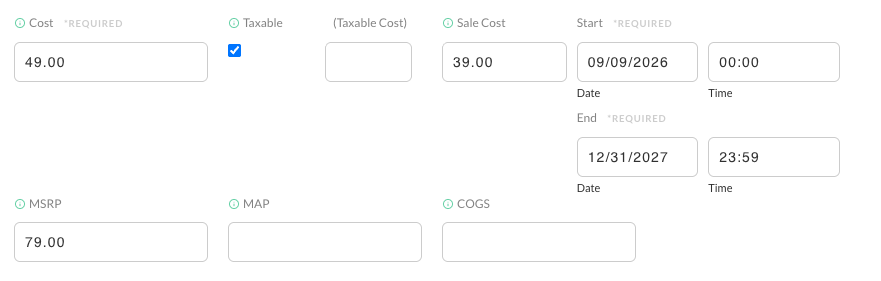
On an item with a Cost of $49.00, a Sale Cost of $39.00, and an MSRP of $79.00, ITEMSAVINGS renders $10.00, the Cost-to-Sale-Cost difference, not $40.00, the MSRP-to-Sale-Cost difference a merchant who has set an MSRP might expect.
ITEMRELATEDITEMSLIST
Requires: a child template placed inside the element for it to clone. When absent: renders nothing at all, the same as an item that genuinely has no related items. Where the merchant sets it: child template added inside ITEMRELATEDITEMSLIST in the Visual Builder; which items it lists is chosen on the item's Related Items tab.
ITEMRELATEDITEMSLIST clones its child template once per related item. With no child template placed inside it, there is nothing to clone, so the element renders nothing at all rather than an empty placeholder.
ITEMSTRUCTUREDDATA
Requires: the storefront's structured data setting enabled, in addition to the element being placed on the page. When absent: not applicable. The element draws nothing on the page whether the setting is enabled or not; check the page source or the Rich Results Test instead of the rendered page. Where the merchant sets it: enable the setting, then add the element, both in the UltraCart interface. See Structured data with schema.org.
ITEMSTRUCTUREDDATA has no visual output by design: it writes a JSON-LD script tag into the page source and draws nothing on the page. See Structured data with schema.org for how to verify its output with Google's Rich Results Test.
Related Documentation
- Item Editor, for where Cost, Sale Cost, and MSRP are set on an item.
- Discounts & Pricing Tiers Tab, for configuring volume discount tiers.
- Related Items Tab, for configuring what ITEMRELATEDITEMSLIST lists.
- Structured data with schema.org, for enabling and verifying ITEMSTRUCTUREDDATA.