Introduction
This tutorial covers the storefront elements and hierarchical structure to implementing PayPal contextual Messaging.
What is PayPal Contextual Messaging?
PayPal Contextual Messaging is a strategic tool designed to promote Pay Later financing options by displaying targeted, lightweight messages at key points in the customer journey. These messages are most effective when placed near product prices on product details, search results, cart, and checkout pages, using the data-pp-layout="text" attribute for a subtle, contextual appearance.
Ultracart Storefront integration
By default, all UltraCart storefront themes have the PayPal Messaging integrated.
The hierarchical structure for the The PayPal Messaging consists of:
-
Container: CONTAINER-PAYPAL-CONTAINER
-
Section: PAYPAL MESSAGING
-
Row: ROW-1
-
Column: Column 1
-
Element: PayPalPayLaterPlan
If you are not locating this container in your storefront, you may have removed it during previous storefront editing/customization. However, you can add it back by adding the container into the storefront hierarchy, quickly and easily. Edit your storefront host, then open the Visual Builder editor and then open the Hierarchy panel, then add the container json (or manually add the detailed elements above):
Here is the container-paypal-banner.json:
PayPal Pay Later Plan Settings
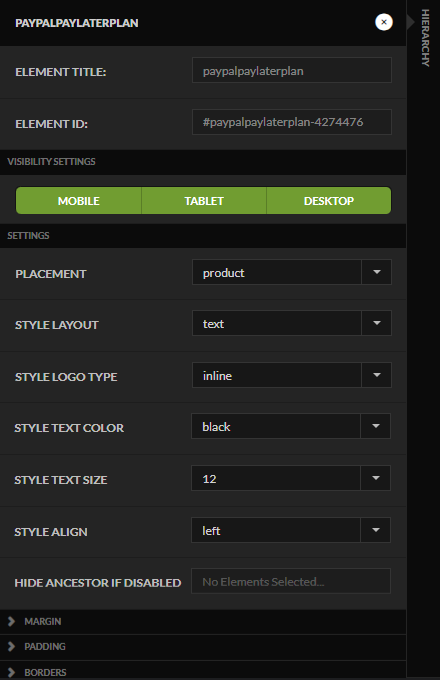
Opening the settings panel for the PAYPALPAYLATERPLAN element, you see the following settings:
| Field | Description/Drop Down List Options |
|---|---|
| Placement | - Home - Category - Product (Default Selection ) - Cart - Payment |
| Style Layout | - Text (Default Selection ) - Flex |
| Style Logo Type | - Primary - Alternative - Inline - None |
| Style Text Color | - Black - White - Monochrome - Grayscale |
| Style Text Size | - 10 - 11 - 12 - 13 - 14 - 15 - 16 |
| Style Align | - Left - Center - Right |
| Hide Ancestor If Disabled |