Advertising Platform Pixels
Advertising platforms need a pixel on your StoreFront to know which ads produced sales. Rather than pasting each platform's snippet into your theme, you enter the ID it gives you and UltraCart injects the script for you. A theme update cannot then wipe out your tracking, which is the usual way conversion data goes quiet without anyone noticing.
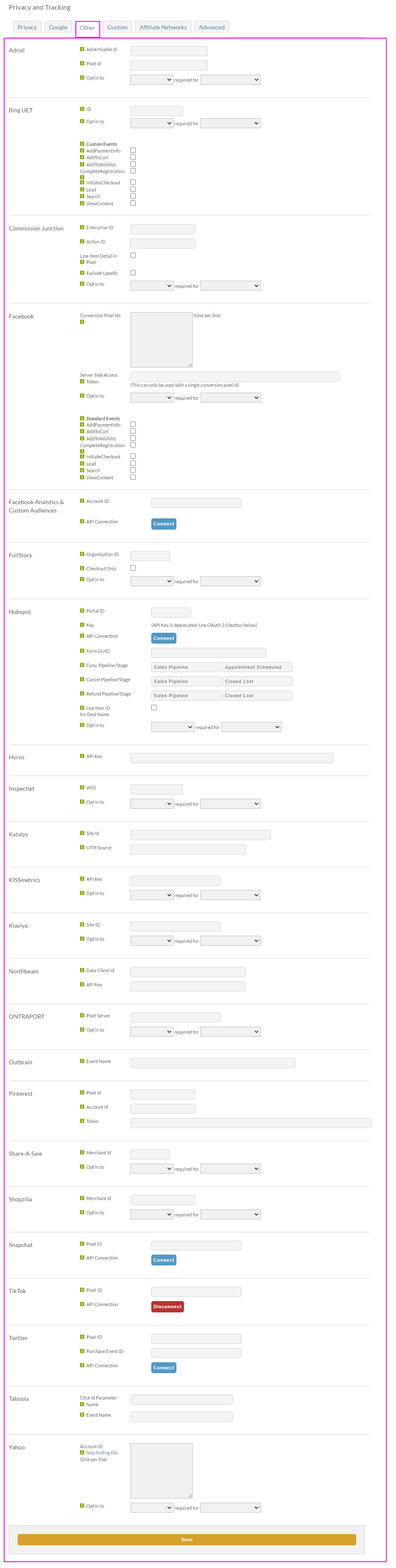
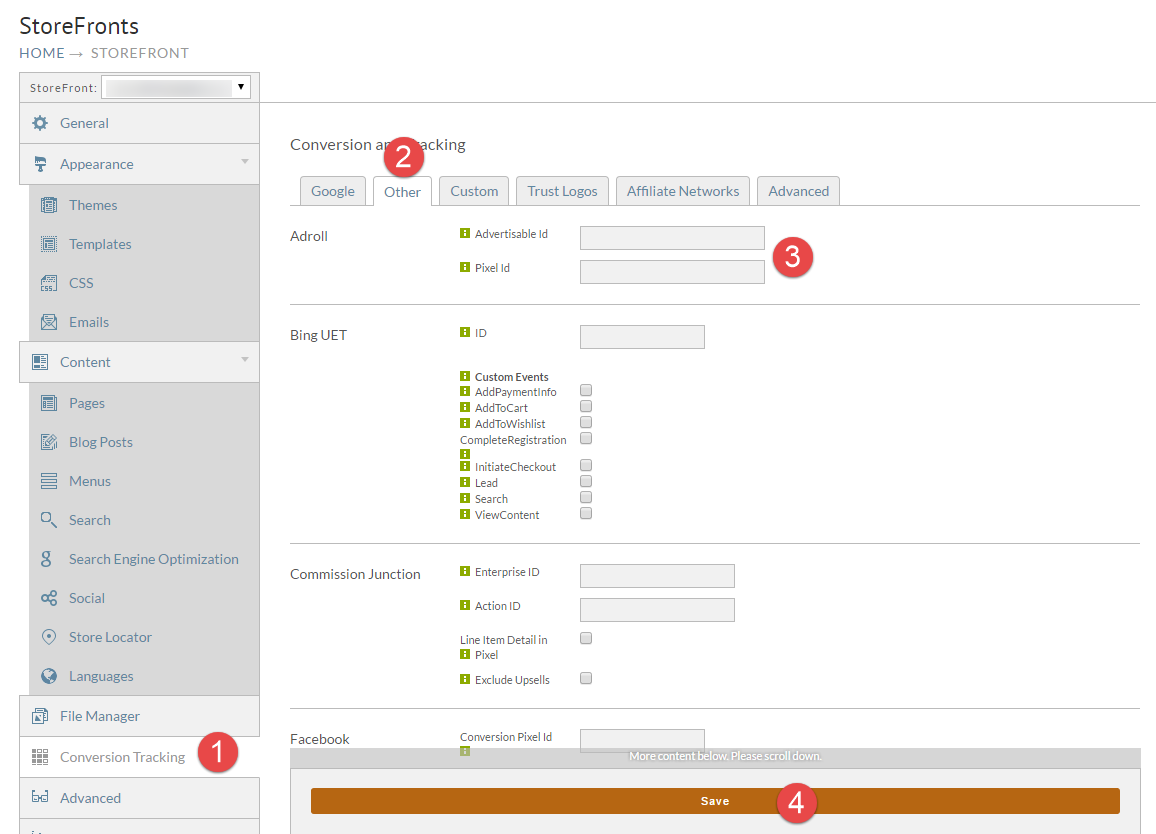
All of these live in one place. Go to Main Menu → StoreFronts, choose your StoreFront host, then open Privacy & Tracking → Other. Fill in the section for your platform and select Save at the bottom of the page.
If you have configured a custom thank you page URL, shoppers bypass the UltraCart receipt screen and nothing configured here fires. Place your tracking code on the custom page instead.
Supported platforms
Every platform below has a section on the Other tab. Most need only an ID or pixel code.
| Platform | What it is for |
|---|---|
| AdRoll | Retargeting and prospecting. Setup steps below |
| Bing UET | Microsoft conversion tracking and remarketing. Setup steps below |
| Facebook, Meta | Pixel, Conversions API, and Open Graph. See the Facebook and Meta integration guide |
| Conversions from Pinterest ad campaigns | |
| Snapchat | Conversion tracking and campaign optimization |
| TikTok | Conversions and user actions from TikTok campaigns |
| Conversion tracking and audience targeting | |
| Outbrain, Taboola | Native advertising and content discovery |
| Yahoo | Yahoo tracking and analytics |
| Shopzilla | Shopping comparison |
| Attentive | SMS marketing. See Attentive Integration |
| Nextdoor | Server-side Conversion API. See Nextdoor Tracking |
Attribution and affiliate platforms are configured on the same tab but documented separately, in Attribution and Affiliate Partners. Google services have their own tab, covered in Google Analytics and Ads.
AdRoll
AdRoll needs two values from its Smart Pixel: an advertisable ID and a pixel ID.
-
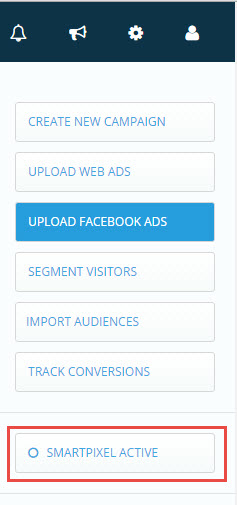
Log in to AdRoll and select Smart Pixel Active on the right of the screen.
-
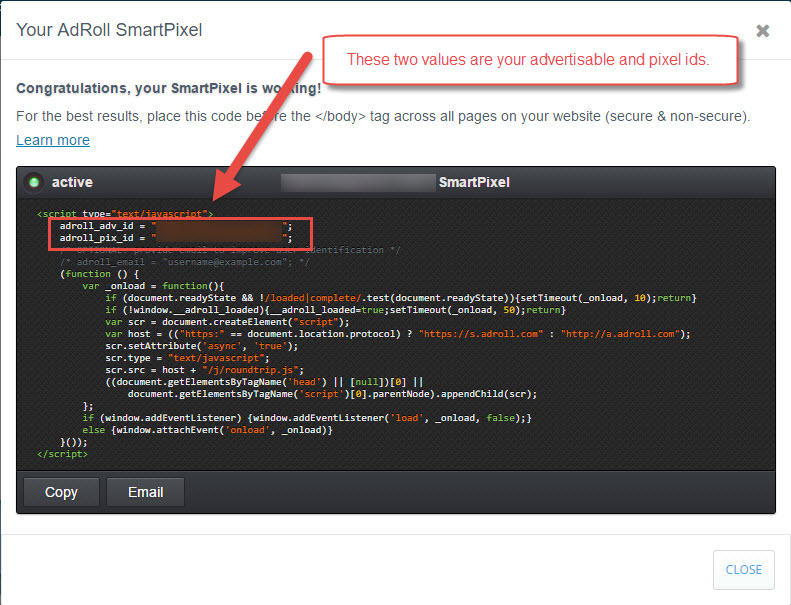
In the dialog that opens, find the two lines of the code snippet containing your Advertisable Id and Pixel Id. Copy the values between the quotes.
-
In UltraCart, go to Privacy & Tracking → Other, fill in the two AdRoll fields, and select Save.
The AdRoll Smart Pixel is then injected into every page of your StoreFront. When a customer buys, the pixel fires with the additional conversion fields populated, so AdRoll records both that a conversion happened and what the order subtotal was.
Bing UET
Bing's Universal Event Tracking tag needs a funded account before it will record anything.
What you need first
- A funded Bing Ads account at secure.bingads.microsoft.com.
- A UET tag. Microsoft documents how to create one.
Configure the tag
-
Go to Privacy & Tracking → Other.
-
Near the top, find the Bing UET section and enter your UET tag ID.

-
Select Save at the bottom of the page.
Set up the conversion goal in Bing
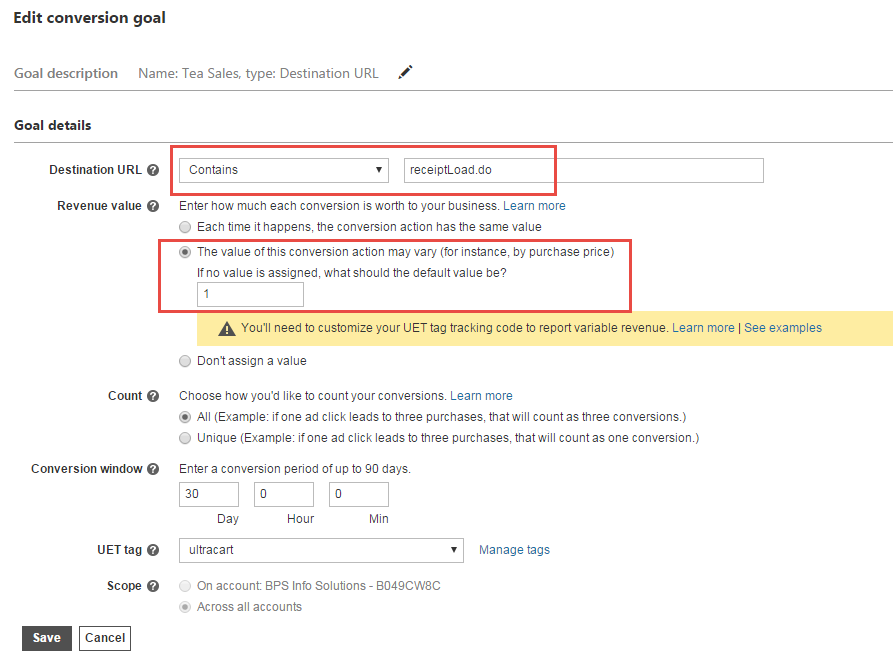
The conversion fires on /checkout/receiptLoad.do. In the
Bing Ads Campaign screen, create a
conversion goal with:
- Destination URL: Contains
receiptLoad.do - Revenue value: the value of this conversion action may vary, for instance by purchase price
Known pitfalls
Bing UET behaves differently from most pixels, and these three catch people out:
- Bing Ads records nothing until your account is funded and a campaign is active. There is no test environment.
- Conversions can take a long time to appear in Campaign Manager. Six hours or more is normal.
- You cannot verify the tag by browsing your own site. You have to create an ad, trigger it, click the ad, and then place a test order.
Checking that a pixel works
Place a test order and view the source of the receipt screen. You should see the platform's snippet near the bottom. If it is there but the platform reports nothing, the platform is usually the place to look next, and an inactive campaign is the common cause.
For Facebook specifically, install the Facebook Pixel Helper Chrome extension and place a test purchase with it active. It reports errors in real time. Note that Facebook only records activity against an active campaign. Merchants testing this usually create a campaign targeting an obscure search term, search for that term themselves so nobody else triggers it, confirm reporting works, and only then activate the real campaign.
Next steps
- Custom Tracking covers platforms with no built-in section, using the Custom tab.
- Privacy and Tracking explains the consent settings that govern when any of these pixels are allowed to fire.