Attribution and Affiliate Partners
Attribution platforms tell you which marketing touchpoint earned a sale. Affiliate networks pay partners for the sales they send you. Both need the same thing from your StoreFront: a reliable signal when an order completes.
You configure all of them in one place. Go to Main Menu → StoreFronts, choose your StoreFront host, then open Privacy & Tracking → Other. Each partner has its own section on that tab. Paste the credentials the partner gave you, then select Save.
Most of these integrations are server-to-server, which means UltraCart calls the partner's API after payment succeeds rather than relying on a browser pixel. Server-to-server tracking keeps reporting accurate when a shopper blocks scripts or closes the tab early.
Every server-to-server call is recorded. When a partner's numbers disagree with yours, open the Integration Log Health Report and look at the actual request and response for the order in question.
Which partner pages live where
| Partner | Where it is documented |
|---|---|
| Awin, Everflow, Hyros, Northbeam, ReferralCandy, Share-A-Sale, RTB House | This page |
| Converge | Converge |
| HubSpot | HubSpot |
| Smart Attribution, UltraCart's own multi-touch model | Smart Attribution |
| Commission Junction, Katalys, KISSmetrics, Klaviyo, ONTRAPORT, FullStory, Inspectlet | Privacy and Tracking, on the Other tab |
Awin
Awin is an affiliate marketing network. When an affiliate sends a shopper to your site, Awin
adds an awc parameter (the Awin click checksum) to the landing page URL. Awin pays the
affiliate only if that value comes back to it with the sale, so the integration's job is to
keep awc with the shopper from the landing page all the way to the completed order.
UltraCart does that in four steps:
- Landing page. UltraCart Analytics records the
awcvalue against the visitor as soon as the page loads. - Checkout. The value travels to your UltraCart checkout, is saved on the cart, and is
written to a first-party
awccookie on the checkout domain. - Receipt. The receipt page fires Awin's conversion tag and its fallback image pixel. The
tag passes the order's stored
awcto Awin directly, so the click is reported even when the shopper came back later without a new Awin link. - After payment. UltraCart reports the sale to Awin's Conversion API server-to-server,
with the stored
awc. Orders that did not come from an Awin click are not sent.
How long awc is kept
A shopper doesn't have to buy on the visit they arrived on:
- UltraCart Analytics keeps visits for at least 365 days. When a returning visitor starts a
checkout, UltraCart looks back through that visitor's earlier visits and recovers
awc, even if the new visit's URL doesn't carry it. This works as long as the browser still has its UltraCart Analytics cookie. Safari limits cookies set by a script to 7 days, so a Safari shopper who returns after more than a week may not be matched. - The cart keeps
awcfor 186 days, and the checkout domain'sawccookie lasts 365 days. UltraCart's server sets that cookie, so Safari's 7-day limit doesn't apply to it. - Awin decides whether a sale still counts under your program's cookie period.
Before you start
Collect these from your Awin account:
- Advertiser ID, also called the MID or Merchant ID. Awin shows it under Account → Overview.
- Conversion API key, used for the server-to-server report.
- Commission group code, only if Awin set up a group for you other than
DEFAULT.
If your storefront pages live on another site, such as WordPress, and only the checkout is on
UltraCart, install the UltraCart Analytics script on that site with your checkout domain in its
crosslink list. The script then adds awc to links that lead to your checkout. See
Cross-Domain Identity Stitching (Crosslink).
Configure Awin
- Go to Privacy & Tracking → Other → Awin.
- Enter your Advertiser ID.
- Enter your Conversion API Key.
- Enter a Commission Group if Awin gave you one. Leave it empty to use
DEFAULT. - Select Save.
There is no on/off switch. Each field turns on part of the integration, and clearing it turns that part off:
| What you fill in | What it turns on |
|---|---|
| Advertiser ID | The Awin conversion tag and fallback pixel on the receipt page |
| Advertiser ID and Conversion API Key | Also the server-to-server report through Awin's Conversion API |
What UltraCart sends to Awin
| Awin field | Value |
|---|---|
| Order reference | The UltraCart order ID |
| Amount | The order subtotal after discounts, before tax and shipping |
| Currency | Your account's base currency |
| Commission group | Your Commission Group, or DEFAULT |
| Voucher | The first coupon code on the order, if any |
Click checksum (awc) | The value captured from the Awin landing page, in both the conversion tag and the server-to-server report |
| Channel | The last-click source, or aw when none was recorded. See Deduplication. |
Each order is reported to the Conversion API once. If an order moves back to Accounts Receivable and is approved again, it is not sent a second time.
Every Conversion API call appears in the Integration Log Health Report under Awin Conversion API, with the request and Awin's response. The API key is masked in the log.
Deduplication with other channels
If you also pay other channels for sales, such as Google Ads, email or another affiliate
network, Awin can deduplicate: it pays its affiliate only when Awin was the last click. To
support that, UltraCart reports the last-click channel with every sale, using Awin's source
method:
- Add a
sourceparameter to the links each channel sends shoppers to, such as?source=googleon your Google Ads URLs and?source=emailon your email links. Ask Awin to appendsource=awto your Awin links. Values can be up to 20 letters and digits. - UltraCart records the most recent
sourceon the cart for 30 days. A visit with nosourceleaves the recorded value unchanged. A new Awin click (anawcwithout asource) counts asaw. - The recorded source is sent as the channel in the conversion tag, the fallback pixel and
the Conversion API report. When nothing was recorded, the channel is
aw, Awin's own default.
UltraCart reads source only on storefronts with an Awin Advertiser ID. On a separate site
such as WordPress, the UltraCart Analytics script carries source to your checkout only
while the shopper has an Awin click in that browsing session. A shopper who returns later
from another channel and goes straight to checkout from your site keeps the earlier channel.
Talk to your Awin contact before changing your channel setup: an incorrect channel value can stop Awin from tracking sales.
Everflow
Everflow is a partner marketing platform. The integration tracks inbound clicks and reports conversions back after payment.
- Go to Privacy & Tracking → Other → Everflow.
- Enter your Everflow domain and any parameter overrides you need.
- Select Save.
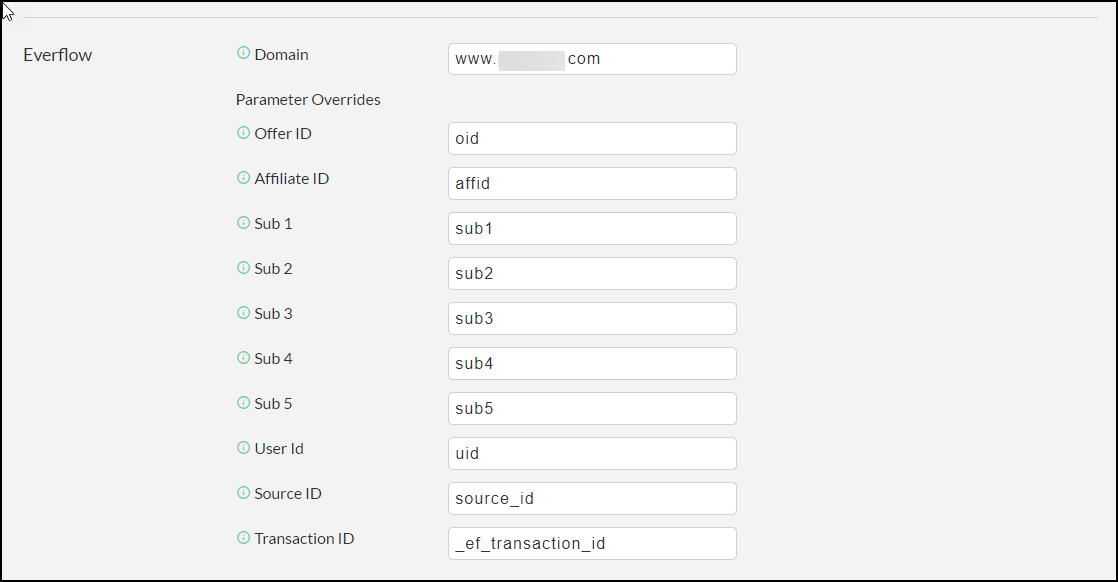
Your StoreFront watches inbound traffic for Everflow's parameters, typically
_ef_transaction_id, and stores the associated information against the session. Once payment
processes, UltraCart makes a server-to-server call to Everflow with the order details.
Attributing an upsell to Everflow
Each upsell can carry its own Everflow advertiser event ID, set in the upsell's advanced settings. When a customer takes that upsell, UltraCart records the advertiser event ID as an item property on the order and includes it in the transmission to Everflow.

Hyros
Hyros is a tracking and attribution tool for digital businesses.
- Get your API key from Hyros.
- Go to Privacy & Tracking → Other → Hyros.
- Paste the API key into the configuration field, then select Save.

Hyros publishes its own API documentation if you need to understand what the platform does with the data it receives.
Northbeam
Northbeam is an attribution platform built on first-party data.
- Go to Privacy & Tracking → Other → Northbeam.
- Enter your Data Client Id and API Key.
- Select Save.

The Northbeam integration uses the server-to-server Orders API for both initial orders and rebill orders, alongside a tracking pixel injected into the checkout. Rebills are included, so subscription revenue is attributed rather than counted only at the first purchase.
ReferralCandy
ReferralCandy runs referral and affiliate programs, tracking sales through referral links and coupon codes.
Before you start, collect two values from your ReferralCandy account:
- Access Id
- Secret Key
Then go to Privacy & Tracking → Other → ReferralCandy, enter both values, and select Save.

UltraCart then sends server-to-server conversion information to ReferralCandy. Every call to the ReferralCandy Conversion API appears in the Integration Log Health Report.
Share-A-Sale
Share-A-Sale is an affiliate marketing network.
- Go to Privacy & Tracking → Other.
- Scroll to Share-A-Sale Merchant Id.
- Enter your merchant ID, then select Save at the bottom of the page.
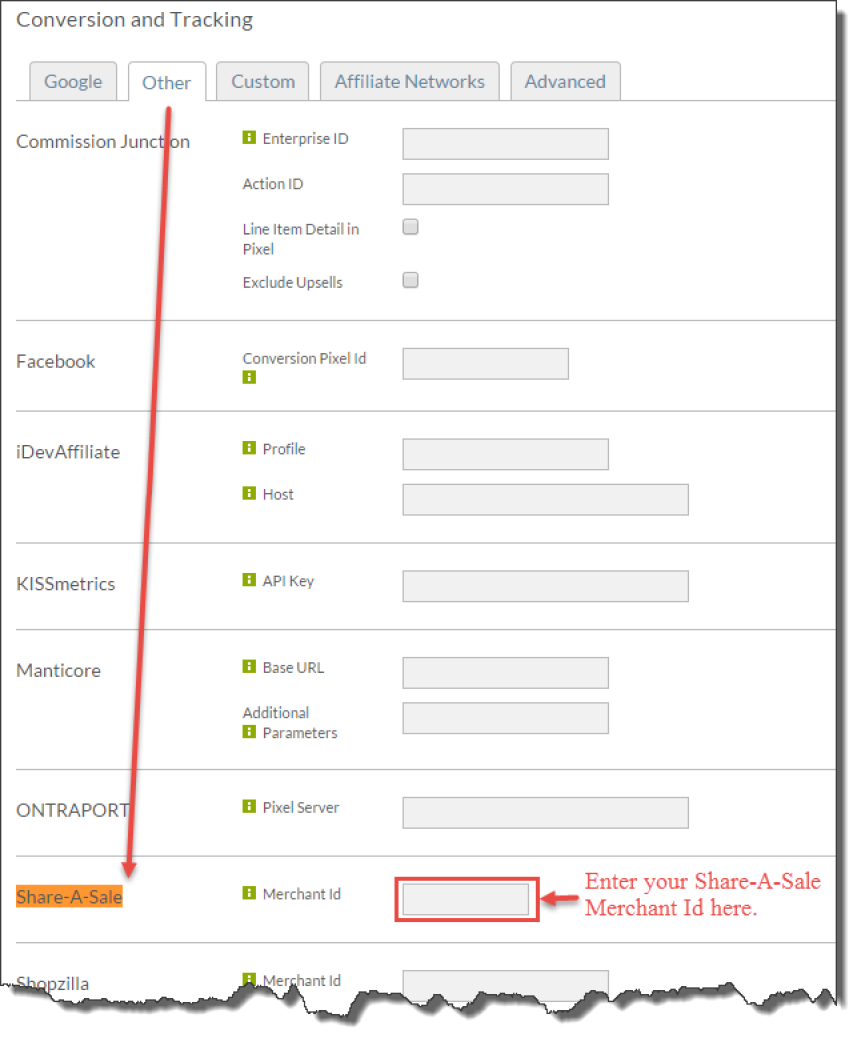
Configuring Share-A-Sale here rather than pasting a snippet into your receipt footer means a theme update cannot overwrite it.
If you are not using StoreFronts, configure Share-A-Sale through the legacy checkout instructions instead.
RTB House
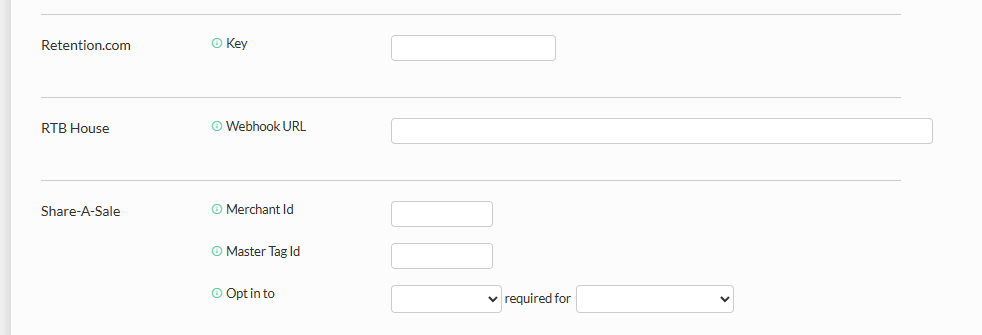
RTB House receives order information through a webhook rather than a pixel. Provide a webhook URL in Privacy & Tracking → Other, in the RTB House section. UltraCart calls it once per order, after payment succeeds.
The webhook receives a JSON payload in this shape:
{
  "date": "2024-09-08T14:30:15.123Z",
  "order_id": "DEMO-12345",
  "order_value": 149.99,
  "device": "Desktop",
  "browser": "Chrome 118.0.5993.70",
  "host": "shop.example.com",
  "custom_field_4": "some tracking information here",
  "items": [
    {
      "item_id": "PROD-001",
      "description": "Wireless Bluetooth Headphones",
      "quantity": 1
    },
    {
      "item_id": "PROD-002",
      "description": "USB-C Charging Cable",
      "quantity": 2
    }
  ]
}
Next steps
- Privacy and Tracking explains the tab these settings live on, and the privacy controls that govern when tracking fires at all.
- Smart Attribution distributes credit across the whole customer journey instead of giving it all to the last click.
- Offline Conversions feeds upsell and rebill revenue back to Google and Bing after the original order.